Fabric Data Days starts November 4th!
Advance your Data & AI career with 50 days of live learning, dataviz contests, hands-on challenges, study groups & certifications and more!
Get registered- Power BI forums
- Get Help with Power BI
- Desktop
- Service
- Report Server
- Power Query
- Mobile Apps
- Developer
- DAX Commands and Tips
- Custom Visuals Development Discussion
- Health and Life Sciences
- Power BI Spanish forums
- Translated Spanish Desktop
- Training and Consulting
- Instructor Led Training
- Dashboard in a Day for Women, by Women
- Galleries
- Data Stories Gallery
- Themes Gallery
- Contests Gallery
- QuickViz Gallery
- Quick Measures Gallery
- Visual Calculations Gallery
- Notebook Gallery
- Translytical Task Flow Gallery
- TMDL Gallery
- R Script Showcase
- Webinars and Video Gallery
- Ideas
- Custom Visuals Ideas (read-only)
- Issues
- Issues
- Events
- Upcoming Events
Get Fabric Certified for FREE during Fabric Data Days. Don't miss your chance! Request now
- Power BI forums
- Forums
- Get Help with Power BI
- Desktop
- Using minimum function after aggregation
- Subscribe to RSS Feed
- Mark Topic as New
- Mark Topic as Read
- Float this Topic for Current User
- Bookmark
- Subscribe
- Printer Friendly Page

- Mark as New
- Bookmark
- Subscribe
- Mute
- Subscribe to RSS Feed
- Permalink
- Report Inappropriate Content
Using minimum function after aggregation
Hi all.
I am trying to apply a minimum function after aggregation. Meaning that PBI should not look in raw data for the minimum, but instead it should find the minimum after aggregation.
My minimum function is conditional. It is about finding the "point 0" for a time series (paybacktime).
It would seem that this is a relative frequent occuring task, so wondering if someone have a nice recipe for this? 🙂
Best Regards,
Torben
Solved! Go to Solution.


- Mark as New
- Bookmark
- Subscribe
- Mute
- Subscribe to RSS Feed
- Permalink
- Report Inappropriate Content
@Anonymous , Does that mean you want to group data till a level and take min
minx(summarize(Table, Table[Group], "_1",sum(Table[Value])),[_1])
You can more than one group like Table[Group], Table[Group1] etc
Another way
https://community.powerbi.com/t5/Desktop/SUM-of-AVERAGE/td-p/197013
- Mark as New
- Bookmark
- Subscribe
- Mute
- Subscribe to RSS Feed
- Permalink
- Report Inappropriate Content
@Anonymous , Does that mean you want to group data till a level and take min
minx(summarize(Table, Table[Group], "_1",sum(Table[Value])),[_1])
You can more than one group like Table[Group], Table[Group1] etc
Another way
https://community.powerbi.com/t5/Desktop/SUM-of-AVERAGE/td-p/197013
- Mark as New
- Bookmark
- Subscribe
- Mute
- Subscribe to RSS Feed
- Permalink
- Report Inappropriate Content
Exactly! Except that the "summarize" part should be dynamic. We have lot's of users on an Excel-connection that will aggregate data in all kind of ways.
Btw: i haven't examined how these kind of functions works in an Excel-connection.


- Mark as New
- Bookmark
- Subscribe
- Mute
- Subscribe to RSS Feed
- Permalink
- Report Inappropriate Content
Hi @Anonymous ,
First go to query editor>select column 000,001,002,003>choose "unpivot columns";
Then create 2 measures as below:
_total = SUMX(FILTER(ALL('Table (2)'),'Table (2)'[Attribute]=MAX('Table (2)'[Attribute])&&'Table (2)'[Country]=MAX('Table'[Country])),'Table (2)'[Value])payback periods =
var a=MINX(FILTER(ALL('Table (2)'),'Table (2)'[_total]>0),'Table (2)'[_total])
Return
CALCULATE(MAX('Table (2)'[Attribute]),FILTER('Table (2)','Table (2)'[_total]=a))
Finally you will see:
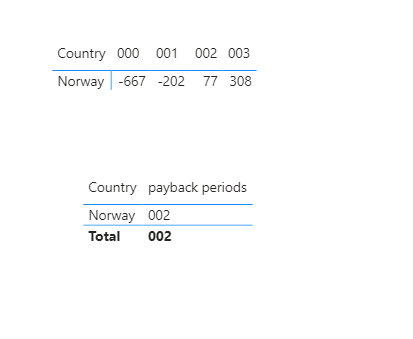
For the related .pbix file, pls click here.
Best Regards,
Kelly
- Mark as New
- Bookmark
- Subscribe
- Mute
- Subscribe to RSS Feed
- Permalink
- Report Inappropriate Content
Im getting an error message when opening the pbix file:

Im using may-2020 version of PBI.
Anyhow, I will try out your formulas provided 🙂


- Mark as New
- Bookmark
- Subscribe
- Mute
- Subscribe to RSS Feed
- Permalink
- Report Inappropriate Content
Hi @Anonymous
Try installing power bi again.
Mariusz
If this post helps, then please consider Accepting it as the solution.
Please feel free to connect with me.
- Mark as New
- Bookmark
- Subscribe
- Mute
- Subscribe to RSS Feed
- Permalink
- Report Inappropriate Content
Hi @Anonymous
Not sure if understand the requirement, it would be a lot easier if you would provide a data sample, explain your scenario and provide an expected outcome.
but you can try to use MAXX aggregating over an attribute, like for example.
max sales by color = MAXX( VALUES( table[color] ), CALCULATE( SUM( table[sales amt] ) ) )
Mariusz
If this post helps, then please consider Accepting it as the solution.
Please feel free to connect with me.
- Mark as New
- Bookmark
- Subscribe
- Mute
- Subscribe to RSS Feed
- Permalink
- Report Inappropriate Content
Thanks for your input.
Here is a visualization of my problem, hope it's helpful.
Top table: here is my raw data, split by country and device. The columns "000", "001", .. represent the accumulated customer value.
Middle table: a PBI user have aggregated the values on country, perhaps in a excel connection.
Bottom table: this is the output im looking for (it does not need to show the relative month, just the break-even month).
I tried the following: payback_month = CALCULATE(MIN(table[relative_month]),cashflow[value_acc] > 0).
This returns the minimum value, but for the raw/non-aggregated data!

Helpful resources

Fabric Data Days
Advance your Data & AI career with 50 days of live learning, contests, hands-on challenges, study groups & certifications and more!

Power BI Monthly Update - October 2025
Check out the October 2025 Power BI update to learn about new features.

FabCon Atlanta 2026
Join us at FabCon Atlanta, March 16-20, for the ultimate Fabric, Power BI, AI and SQL community-led event. Save $200 with code FABCOMM.


