Get certified for free when you join Fabric Data Days 2026 and dive into Fabric, Power BI, SQL, AI, and other essential data skills.
Join nowJuly 7 - July 17 | Round 2 of the Power BI Dataviz World Championships. Don't miss your chance! Learn more
I am trying to calcuate something within the same column. I want to take the data from different years and calculate the percentage difference.
Maybe I am close?
Calculate(sum(Data Table [column] = 2015 - Calculate(sum(Date Table [column] = 2014
Do this from 2014 until current. Then calculate the percentage difference from there by: Calculate(sum(Data Table [column] = 2015 - Calculate(sum(Date Table [column] = 2014) /(Sum(Data Table [column] = 2015) *(100)
This does not work but I am thinking I may be close?
Hello @Anonymous,
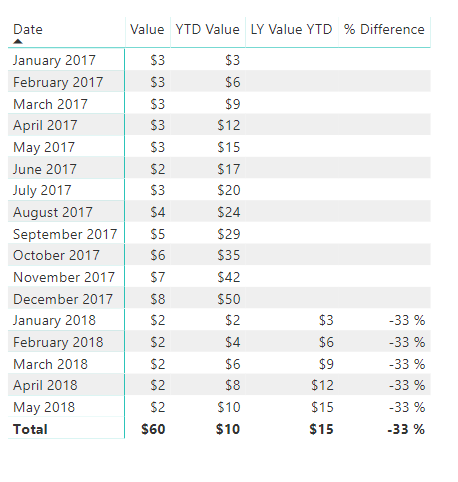
Try something like: *this should get you closer even though it is calculating Year to Date*
Total = SUM(Table1[Value])
YTD Value =
TOTALYTD(
[Total],Table1[Date]
) [ LY Value YTD] =
CALCULATE(
TOTALYTD([Total],Table1[Date]),
SAMEPERIODLASTYEAR(Table1[Date])
) % Difference = DIVIDE([YTD Value]-[ LY Value YTD],[ LY Value YTD])
Proud to be a Super User!
Thank you for that information! I created the equations and added the Percent equation with a date field of year to divide it up by year but it is just saying Cant display the visual. Even just having the Percent equation is also saying the same thing. I am sure I needt adjust something but I am stuck at this point.
Join us in Barcelona for FabCon and SQLCon, the Fabric, Power BI, SQL, and AI community event. Save €200 with code FABCMTY200.
Join Fabric Data Days 2026: 60 days of free live/on-demand sessions, challenges, study groups, and certification opportunities.
| User | Count |
|---|---|
| 23 | |
| 19 | |
| 18 | |
| 17 | |
| 13 |
| User | Count |
|---|---|
| 60 | |
| 52 | |
| 47 | |
| 40 | |
| 38 |