cancel
Showing results for 
Search instead for 
Did you mean: 

The Power BI Data Visualization World Championships is back! Get ahead of the game and start preparing now! Learn more

Reply
Anonymous
Not applicable

Using column header as values for calculation

Hi Experts,


I have a table as below in my Power BI: 


2022        2023       2024           Next_Order_Year 

0              1             2                 2025

0              1             0                 2024

2               0            1                 2023   


I want a to write a DAX that will return a column "Total_Prior_Next_Order_Year" that will count all the values before the year in the Next_Order_Year. 


Example, For the first row, it will add all the values as the year 2022, 2023 and 2024 are prior to 2025 and the result will be 3.


For the second row, it will add all the values for the column  2022 and  2023 as these are  prior to 2024 and the result will be 1.

For the third  row, it will take only the value under column 2022 as it is the only year  prior to 2023 and the result will be 2.


Thank you.

2 REPLIES 2
ryan_mayu
Super User
Super User

@Anonymous 

here is a workaround for you.

1. create a reference table , user hearder as first row , transpose table and remove text value.

2. create a column in original table


Column = CALCULATE(COUNTROWS('Table (2)'),FILTER('Table (2)','Table (2)'[Column1]<'Table'[nextorderyear]))

1.PNG

pls see the attachment below


Did I answer your question? Mark my post as a solution!

Proud to be a Super User!


bolfri
Solution Sage
Solution Sage

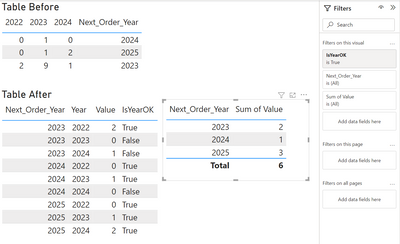
Hi, I think you should consider unpivoting your data.

Step 1. Unpivot your data

Simply select Next_Order_Year (and other columns if you have) and from Ribbon > Transform > Unpivot Columns > Unpivot Other Columns

= Table.UnpivotOtherColumns(Source, {"Next_Order_Year"}, "Year", "Value")


Step 2. Add condition for Next_Order_Year

= Table.AddColumn(#"Unpivoted Other Columns", "IsYearOK", each [Year] < [Next_Order_Year])


Step 3. Keep only rows with IsYearOK = True or you can leave it here (if you need that data) and filter it with a measure or on the visual


Power Query M:

let
    Source = Table.FromRows(Json.Document(Binary.Decompress(Binary.FromText("i45WMlDSUTIEYiMQNjAyVYrVQQgaQARNwIJGUAFDiKCxUmwsAA==", BinaryEncoding.Base64), Compression.Deflate)), let _t = ((type nullable text) meta [Serialized.Text = true]) in type table [#"2022" = _t, #"2023" = _t, #"2024" = _t, Next_Order_Year = _t]),
    #"Unpivoted Other Columns" = Table.UnpivotOtherColumns(Source, {"Next_Order_Year"}, "Year", "Value"),
    #"Added Custom" = Table.AddColumn(#"Unpivoted Other Columns", "IsYearOK", each [Year] < [Next_Order_Year]),
    #"Changed Type" = Table.TransformColumnTypes(#"Added Custom",{{"Next_Order_Year", Int64.Type}, {"Year", Int64.Type}, {"Value", Int64.Type}, {"IsYearOK", type logical}})
in
    #"Changed Type"
 

bolfri_0-1673483425060.png


Did I answer your question? Mark my post as a solution!

Proud to be a Super User!


Helpful resources

Announcements
Power BI DataViz World Championships

Power BI Dataviz World Championships

The Power BI Data Visualization World Championships is back! Get ahead of the game and start preparing now!

December 2025 Power BI Update Carousel

Power BI Monthly Update - December 2025

Check out the December 2025 Power BI Holiday Recap!

FabCon Atlanta 2026 carousel

FabCon Atlanta 2026

Join us at FabCon Atlanta, March 16-20, for the ultimate Fabric, Power BI, AI and SQL community-led event. Save $200 with code FABCOMM.