

cancel
Showing results for 
Search instead for 
Did you mean: 

Next up in the FabCon + SQLCon recap series: The roadmap for Microsoft SQL and Maximizing Developer experiences in Fabric. All sessions are available on-demand after the live show. Register now

Reply
Axel_hnk
Frequent Visitor

Using Tables in Posts - Error Message

Hi there,
when I write a post I often use tables to illustrate things.


When I use the table feature and do some formatting (e.g. formatting the headline bold) I receive an error message "

Correct the highlighted errors and try again.

Your post has been changed because invalid HTML was found in the message body. The invalid HTML has been removed. Please review the message and submit the message when you are satisfied."

After that (coming back from preview) my table looks like 💩:

Col1Col2Col3
TextTextText


What's wrong with using tables? Just try formatting the 1st row bold and set the width of the table to say 80%.

Thx.

1 ACCEPTED SOLUTION
v-luwang-msft
Community Support
Community Support

Hi @Axel_hnk ,

Try to copy  your text from the reply box and pasting into a text editor.  Reloaded the page, copied text from text editor and pasted into the new reply box. 

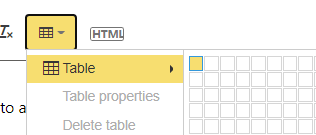
And you also could test the below:

vluwangmsft_3-1655098830881.png


A B C
1 2 3

vluwangmsft_1-1655098764089.pngvluwangmsft_2-1655098777658.png


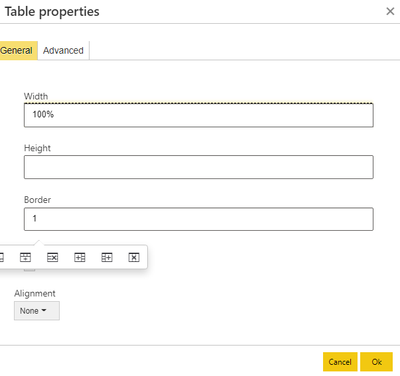
After edit the reply ,it also return me:

vluwangmsft_4-1655098884181.png


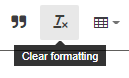
Then selected all,click the below:

vluwangmsft_5-1655098907343.png


I also encounter this problem frequently and it is usually solved by the above method.


Did I answer your question? Mark my post as a solution!


Best Regards

Lucien

View solution in original post

1 REPLY 1
v-luwang-msft
Community Support
Community Support

Hi @Axel_hnk ,

Try to copy  your text from the reply box and pasting into a text editor.  Reloaded the page, copied text from text editor and pasted into the new reply box. 

And you also could test the below:

vluwangmsft_3-1655098830881.png


A B C
1 2 3

vluwangmsft_1-1655098764089.pngvluwangmsft_2-1655098777658.png


After edit the reply ,it also return me:

vluwangmsft_4-1655098884181.png


Then selected all,click the below:

vluwangmsft_5-1655098907343.png


I also encounter this problem frequently and it is usually solved by the above method.


Did I answer your question? Mark my post as a solution!


Best Regards

Lucien

Helpful resources

Announcements
New to Fabric survey Carousel

New to Fabric Survey

If you have recently started exploring Fabric, we'd love to hear how it's going. Your feedback can help with product improvements.

Power BI DataViz World Championships carousel

Power BI DataViz World Championships - June 2026

A new Power BI DataViz World Championship is coming this June! Don't miss out on submitting your entry.

Join our Fabric User Panel

Join our Fabric User Panel

Share feedback directly with Fabric product managers, participate in targeted research studies and influence the Fabric roadmap.

March Power BI Update Carousel

Power BI Community Update - March 2026

Check out the March 2026 Power BI update to learn about new features.