hi, @Anonymous
You can try to this code in Power Query
let
    Source = #table(type table[Enum = text],{{"TomJones"},{"ChiAuYeung"},{"JoeBloggs"},{"PeterKay"}            }),
    Splitted = Table.TransformColumns(Source, {{"Enum", each Splitter.SplitTextByPositions(Text.PositionOfAny(_,{"A".."Z"},Occurrence.All))(_)}}),
    Tabled = Table.TransformColumns(Splitted,{{"Enum", each Table.FromColumns(List.Zip({_}))}}),
    ColumnNames = Table.ColumnNames(Table.Combine(Tabled[Enum])),
    NewColumnNames = List.Transform(ColumnNames, each "Enum."&Text.Middle(_,6)),
    ExpandedEnum = Table.ExpandTableColumn(Tabled, "Enum", ColumnNames, NewColumnNames),
    TransformList = List.Transform(NewColumnNames, each {_,type text}),
    Typed = Table.TransformColumnTypes(ExpandedEnum, TransformList)
in
    Typed
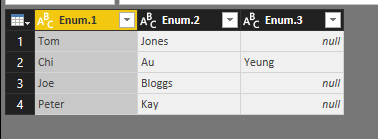
Result:
Best Regards,
Lin
Community Support Team _ Lin
If this post helps, then please consider Accept it as the solution to help the other members find it more quickly.


