cancel
Showing results for 
Search instead for 
Did you mean: 

The FabCon + SQLCon recap series starts April 14th at 8am Pacific. If you’re tracking where AI is going inside Fabric, this first session is a can't miss. Register now

Reply
LeanneShapro
Advocate I
Advocate I

Calculate NPS Score with DAX

Hello Power BI Users - 


I use the following excel formula to calculate my NPS score and I'd like to create the DAX equivalent. It should take the percentage of promoters (scores of 9 and 10) minus the percentage of detractors (scores of 0 to 6) What do you suggest? 


NPS Excel formula -
=ROUNDUP((100*((COUNTIF(A:A,">8")-COUNTIF(A:A,"<7"))/COUNT(A:A))),0)


5 REPLIES 5
Anonymous
Not applicable

My NPS formula:

NPS Score =
  VAR ResponseCount = COUNTA(SurveyResponse[Answer])
  VAR PromoterCount = COUNTAX(FILTER(SurveyResponse, [Answer] >= 9), [Answer])
  VAR DetractorCount = COUNTAX(FILTER(SurveyResponse, [Answer] <= 6), [Answer])

  VAR Score = 0 + (PromoterCount - DetractorCount) / ResponseCount * 100

  RETURN IF(NOT(ISBLANK(ResponseCount)), Score)

Hello


Thanks for the NPS formula. In my table I have different course names [module] which is text. How do I add in a filter so the NPI score is filtered by course names? 


Thanks!

Ray

v-juanli-msft
Community Support
Community Support

Hi @LeanneShapro

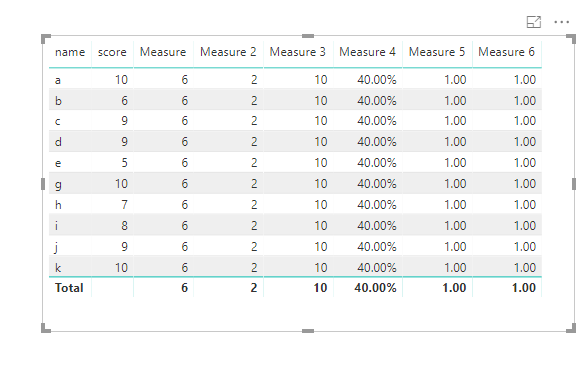
You could create measures

Measure = CALCULATE(COUNT(Table1[name]),FILTER(ALL(Table1),[score]>8))

Measure 2 = CALCULATE(COUNT(Table1[name]),FILTER(ALL(Table1),[score]<7))

Measure 3 = CALCULATE(COUNT(Table1[name]),ALL(Table1))

Measure 4 = ([Measure]-[Measure 2])/[Measure 3]

Measure 5 = ROUNDUP([Measure 4],0)

Or a nested measure

Measure 6 =
VAR low =
    CALCULATE ( COUNT ( Table1[name] ), FILTER ( ALL ( Table1 ), [score] < 7 ) )
VAR high =
    CALCULATE ( COUNT ( Table1[name] ), FILTER ( ALL ( Table1 ), [score] > 8 ) )
VAR alname =
    CALCULATE ( COUNT ( Table1[name] ), ALL ( Table1 ) )
VAR percentage = ( high - low )
    / alname
RETURN
    ROUNDUP ( percentage, 0 )

3.png


Best Regards

Maggie

Hi @v-juanli-msft - 


I appreciate you sharing your recommendation. 


I entered the following formula per your suggestion: 


NPS = VAR low =
CALCULATE ( COUNT ( 'GetFeedback Result'[Likely to Recommend - RNPS] ), FILTER ( ALL ( 'GetFeedback Result' ), [Likely to Recommend - RNPS] < 7 ) )
VAR high =
CALCULATE ( COUNT ( 'GetFeedback Result'[Likely to Recommend - RNPS] ), FILTER ( ALL ( 'GetFeedback Result' ), [Likely to Recommend - RNPS] > 8 ) )
VAR alname =
CALCULATE ( COUNT ( 'GetFeedback Result'[Likely to Recommend - RNPS] ), ALL ( 'GetFeedback Result' ) )
VAR percentage = ( high - low )
/ alname
RETURN
ROUNDUP ( percentage, 0 )


When I added the measure as a Card on my dashboard, it came out as a -1. When I used my excel formula, it resulted the value -33, which is accurate. 


Do you have further recommendations for me? 


Thanks in advance, 


Leanne

Johanno
Continued Contributor

Hi, I would have created a calculated column using SWITCH so that each row get either promoter, detractor or blank. Then use a measure to count and divide. How does that sound?

Helpful resources

Announcements
New to Fabric survey Carousel

New to Fabric Survey

If you have recently started exploring Fabric, we'd love to hear how it's going. Your feedback can help with product improvements.

Power BI DataViz World Championships carousel

Power BI DataViz World Championships - June 2026

A new Power BI DataViz World Championship is coming this June! Don't miss out on submitting your entry.

Join our Fabric User Panel

Join our Fabric User Panel

Share feedback directly with Fabric product managers, participate in targeted research studies and influence the Fabric roadmap.

March Power BI Update Carousel

Power BI Community Update - March 2026

Check out the March 2026 Power BI update to learn about new features.