cancel
Showing results for 
Search instead for 
Did you mean: 

Vote for your favorite vizzies from the Power BI Dataviz World Championship submissions. Vote now!

Reply
Anonymous
Not applicable

User customizable Pivot Table

Hi,


I have a requirement in my Power BI report that I'm struggling with for days now.


My datamodel is quite large with > 20 tables. I would like a matrix where I can count the distinct amount of customers and let the user of the report in his browser dynamically add and remove dimensions as rows and/or columns in where the distinct amount of customers is grouped by the values of these dimensions.


In short: I’m searching for a way to create the Excel Pivot Table functionality J. The goal is that the user of the report can create their own custom made reports in his browser in which the value is always the distinct amount of customers, but the rows and columns in which those amount of customers are grouped can manually be selected.


Simple Example (with only one table)

ID

Office

Active

Color

1

GR

Yes

Red

2

GR

Yes

Blue

3

GR

No

Blue

4

NO

No

Blue

5

NO

No

Red

6

NO

No

Red

7

ZW

No

Red

8

ZW

No

Blue

9

ZW

Yes

Blue

10

ZW

Yes

Blue


The User can choose the report rows and columns. For example he wishes to see the amount of customers by Color and Office as Rows and Active as a Column. The result should something like this:


Rows

Yes

No

Total

Blue

3

3

6

GR

1

1

2

NO


1

1

ZW

2

1

3

Red

1

3

4

GR

1


1

NO


2

2

ZW


1

1

Total

4

6

10


Thanks & Regards,

Tiemen

1 ACCEPTED SOLUTION
Anonymous
Not applicable

@v-yingjl @amitchandak 


The new preview feature 'personalize visual experience' is the solution for me. Thank you for your help. 


Regards,


Tiemen

View solution in original post

5 REPLIES 5
Anonymous
Not applicable

@v-yingjl @amitchandak 


The new preview feature 'personalize visual experience' is the solution for me. Thank you for your help. 


Regards,


Tiemen

Hi @Anonymous ,

Glad to hear the issue is solved. You can accept your reply as solution, that way, other community members could easily find the answer when they get same issues.


Best Regards,
Yingjie Li

v-yingjl
Community Support
Community Support

Hi @Anonymous ,

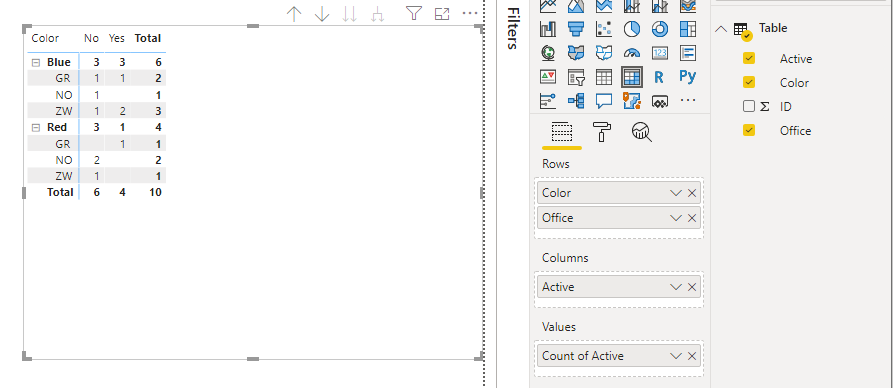
Based on your expected output, you can use Matrix visual to achieve it directly:

Matrix.png


Best Regards,
Yingjie Li

If this post helps then please consider Accept it as the solution to help the other members find it more quickly.

amitchandak
Super User
Super User

@Anonymous , use all expect

https://www.sqlbi.com/articles/using-allexcept-versus-all-and-values/


This should give you the required data

Share with Power BI Enthusiasts: Full Power BI Video (20 Hours) YouTube
Microsoft Fabric Series 60+ Videos YouTube
Microsoft Fabric Hindi End to End YouTube
Anonymous
Not applicable

Hi @amitchandak ,


Thanks for your reply. Personally I do not the relation between creating a customizable pivot table in Power BI for browser based users and using ALLEXCEPT in DAX. Can you explain how ALLEXCEPT can help me in creating the customizable pivot table?


Regards,

Tiemen

Helpful resources

Announcements
Power BI DataViz World Championships

Power BI Dataviz World Championships

Vote for your favorite vizzies from the Power BI World Championship submissions!

Sticker Challenge 2026 Carousel

Join our Community Sticker Challenge 2026

If you love stickers, then you will definitely want to check out our Community Sticker Challenge!

January Power BI Update Carousel

Power BI Monthly Update - January 2026

Check out the January 2026 Power BI update to learn about new features.

FabCon Atlanta 2026 carousel

FabCon Atlanta 2026

Join us at FabCon Atlanta, March 16-20, for the ultimate Fabric, Power BI, AI and SQL community-led event. Save $200 with code FABCOMM.