Join us at FabCon Atlanta from March 16 - 20, 2026, for the ultimate Fabric, Power BI, AI and SQL community-led event. Save $200 with code FABCOMM.
Register now!The Power BI Data Visualization World Championships is back! Get ahead of the game and start preparing now! Learn more
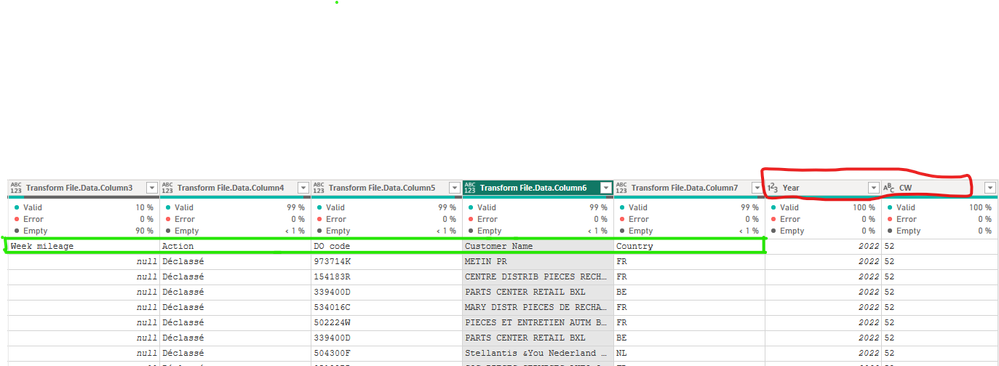
Hi, After merging some tables from different sources, I want to use the first row as headers, but only for specific columns, not all of them. Is there a way to do this? As you can see in the image, the last two columns' headers are already set.
Solved! Go to Solution.
Hello @Anonymous ,
So if the fields you want to do make first row as header for them are the fields before the merge, the at the right side of the power query there's a section named applied steps, so you go to the step before the merge and apply the make first row as header there before the merge step.
Proud to be a Super User! | |
Hi, @Anonymous
Here's what I add to Idrissshatila's approach.
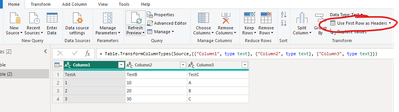
As Idrissshatila said, before your merge Table, you can hit Use first Row as Heads in PowerQuery
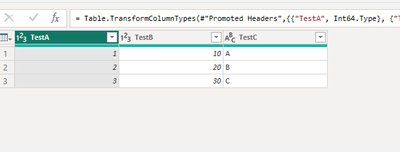
You can see the preview
How to Get Your Question Answered Quickly
Best Regards
Yongkang Hua
If this post helps, then please consider Accept it as the solution to help the other members find it more quickly.
Hello @Anonymous ,
So if the fields you want to do make first row as header for them are the fields before the merge, the at the right side of the power query there's a section named applied steps, so you go to the step before the merge and apply the make first row as header there before the merge step.
Proud to be a Super User! | |
The Power BI Data Visualization World Championships is back! Get ahead of the game and start preparing now!
Check out the November 2025 Power BI update to learn about new features.
| User | Count |
|---|---|
| 65 | |
| 46 | |
| 43 | |
| 26 | |
| 19 |
| User | Count |
|---|---|
| 198 | |
| 126 | |
| 102 | |
| 69 | |
| 53 |