Join us at FabCon Atlanta from March 16 - 20, 2026, for the ultimate Fabric, Power BI, AI and SQL community-led event. Save $200 with code FABCOMM.
Register now!The Power BI Data Visualization World Championships is back! Get ahead of the game and start preparing now! Learn more
Is it possible to essentially use a table/ list to filter a another table in dax?
Right now I have a table that has material and a pegged material. Each material in the table can have multiple pegged materials, so first I store a calculated table that's got the pegged materials related to the material in the given row
Var list = summarize(filter(table, material = earlier(material), pegged material)
Then I want to return a table where the material is only the pegged material list above... Something like...
Var peggedtable = summarize (filter(table, only material in list), material)
Is this possible? I can't seem to get it to work. Tried naturalinnerjoin, crossjoin with no luck.
Solved! Go to Solution.
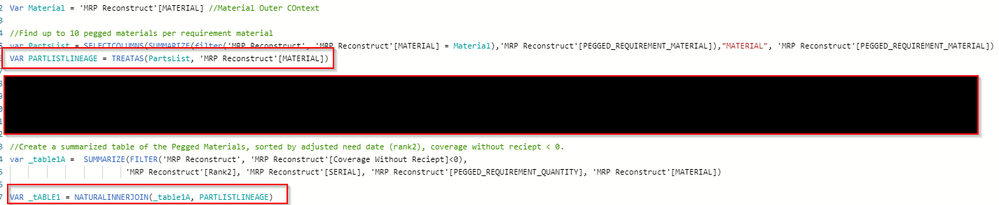
Well I solved it. For anyone curious. Natural InnerJoin was the solution after all, just needed to fix the data lineage. Worked great after that.
Also, to simplify this further, I moved the naturalinnerjoin to the filter in table 1.
This is a one man thread but I could not find a solution to pass a list as a filter in dax anywhere. Everything directed you to power query or discretely listing out the filters. Hopefully someone can find some use here besides me.
I discovered an even easier solution is to use the in Operator. If you have a list defined as a signle column variable, you can use the in operator to filter the table using the desired column list you have, whether is it explicit or gererated from a dax expression. Super handy.
Well I solved it. For anyone curious. Natural InnerJoin was the solution after all, just needed to fix the data lineage. Worked great after that.
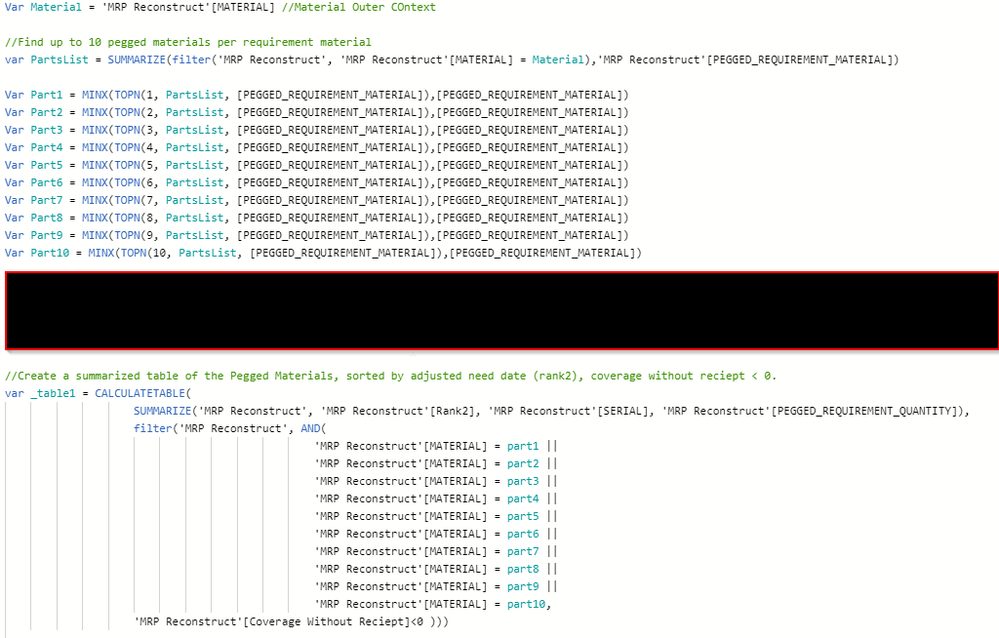
To be Clearer, Right now I am explicity calling out up to 10 variables to filter the Table. This seems clunky and it could miss a value if the pegged materials exceed 10 per material.
Check out the November 2025 Power BI update to learn about new features.
Advance your Data & AI career with 50 days of live learning, contests, hands-on challenges, study groups & certifications and more!