FabCon is coming to Atlanta
Join us at FabCon Atlanta from March 16 - 20, 2026, for the ultimate Fabric, Power BI, AI and SQL community-led event. Save $200 with code FABCOMM.
Register now!- Power BI forums
- Get Help with Power BI
- Desktop
- Service
- Report Server
- Power Query
- Mobile Apps
- Developer
- DAX Commands and Tips
- Custom Visuals Development Discussion
- Health and Life Sciences
- Power BI Spanish forums
- Translated Spanish Desktop
- Training and Consulting
- Instructor Led Training
- Dashboard in a Day for Women, by Women
- Galleries
- Data Stories Gallery
- Themes Gallery
- Contests Gallery
- QuickViz Gallery
- Quick Measures Gallery
- Visual Calculations Gallery
- Notebook Gallery
- Translytical Task Flow Gallery
- TMDL Gallery
- R Script Showcase
- Webinars and Video Gallery
- Ideas
- Custom Visuals Ideas (read-only)
- Issues
- Issues
- Events
- Upcoming Events
The Power BI Data Visualization World Championships is back! Get ahead of the game and start preparing now! Learn more
- Power BI forums
- Forums
- Get Help with Power BI
- Desktop
- Use Filters in Measure DAX
- Subscribe to RSS Feed
- Mark Topic as New
- Mark Topic as Read
- Float this Topic for Current User
- Bookmark
- Subscribe
- Printer Friendly Page


- Mark as New
- Bookmark
- Subscribe
- Mute
- Subscribe to RSS Feed
- Permalink
- Report Inappropriate Content
Use Filters in Measure DAX
I have a list a set of data which I've used this DAX to calculate percentages of the total records;
DIVIDE(COUNT(ACTIVITY[PERSON_CODE]),CALCULATE(COUNT(ACTIVITY[PERSON_CODE]),ALL(ACTIVITY)))
In one of my report pages the data is filtered to one particular year and 'active' users only so I'd like to create a new measure which takes this into account so that all 'active' users in 2019=100%. At the moment it's giving me 60% because it's taking into account 2020 and other user states. This is my first attempt at the new DAX but it doesn't work;
Solved! Go to Solution.


- Mark as New
- Bookmark
- Subscribe
- Mute
- Subscribe to RSS Feed
- Permalink
- Report Inappropriate Content
I would first try your original measure with ALLSELECTED() instead of ALL().
If this works for you, please mark it as solution. Kudos are appreciated too. Please let me know if not.
Regards,
Pat
Did I answer your question? Mark my post as a solution! Kudos are also appreciated!
To learn more about Power BI, follow me on Twitter or subscribe on YouTube.
@mahoneypa HoosierBI on YouTube

- Mark as New
- Bookmark
- Subscribe
- Mute
- Subscribe to RSS Feed
- Permalink
- Report Inappropriate Content
Hi @DHB ,
You may try to use the below measure:
DIVIDE(COUNT(ACTIVITY[PERSON_CODE]),CALCULATE(COUNT(ACTIVITY[PERSON_CODE]),ALLSELECTED(ACTIVITY)))Please try.
Aiolos Zhao
- Mark as New
- Bookmark
- Subscribe
- Mute
- Subscribe to RSS Feed
- Permalink
- Report Inappropriate Content
Hi @DHB ,
You may try to use the below measure:
DIVIDE(COUNT(ACTIVITY[PERSON_CODE]),CALCULATE(COUNT(ACTIVITY[PERSON_CODE]),ALLSELECTED(ACTIVITY)))Please try.
Aiolos Zhao
- Mark as New
- Bookmark
- Subscribe
- Mute
- Subscribe to RSS Feed
- Permalink
- Report Inappropriate Content
I would first try your original measure with ALLSELECTED() instead of ALL().
If this works for you, please mark it as solution. Kudos are appreciated too. Please let me know if not.
Regards,
Pat
Did I answer your question? Mark my post as a solution! Kudos are also appreciated!
To learn more about Power BI, follow me on Twitter or subscribe on YouTube.
@mahoneypa HoosierBI on YouTube
- Mark as New
- Bookmark
- Subscribe
- Mute
- Subscribe to RSS Feed
- Permalink
- Report Inappropriate Content
Thanks Pat, that works but I have another issue now. I'm representing that measure in a gauge visual and when I apply filters in the report the value stays at 100%. With the DAX I used before it only showed 60% but when I used filters this would go up and down between 0-60. Can I use the ALLSELECTED version and still have the gauge correspond to the filters I use somehow?


- Mark as New
- Bookmark
- Subscribe
- Mute
- Subscribe to RSS Feed
- Permalink
- Report Inappropriate Content
@DHB , try like
DIVIDE(calculate([COUNT(ACTIVITY[PERSON_CODE]),FILTER(ACTIVITY,ACTIVITY[YEAR]=2019&(ACTIVITY[ENROL_WF]="active"))),CALCULATE(COUNT(ACTIVITY[PERSON_CODE]),ALL(ACTIVITY)))
- Mark as New
- Bookmark
- Subscribe
- Mute
- Subscribe to RSS Feed
- Permalink
- Report Inappropriate Content
Hi @DHB ,
You need to tell us what's your expected result finally. Because the allselected function is to calculate % by person code.
Please show us the sample data(what you want) and show us what you want(screenshot or image).
It's better to give some examples for different scenarios.
Aiolos Zhao
- Mark as New
- Bookmark
- Subscribe
- Mute
- Subscribe to RSS Feed
- Permalink
- Report Inappropriate Content
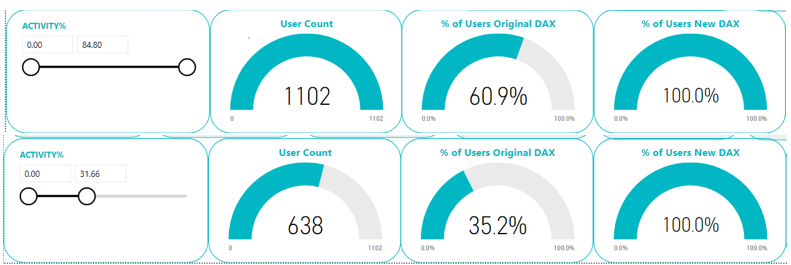
This page in my report is filtered to 2019 and active users (1102 in total). My original DAX didn't filter out other years or user states so gave me a % of 60.9 in the gauge. the new DAX gives me the right % but it doesn't change when I move the slider on the left.
- Mark as New
- Bookmark
- Subscribe
- Mute
- Subscribe to RSS Feed
- Permalink
- Report Inappropriate Content
Sorry - picture wouldn't upload
- Mark as New
- Bookmark
- Subscribe
- Mute
- Subscribe to RSS Feed
- Permalink
- Report Inappropriate Content
Helpful resources

Power BI Dataviz World Championships
The Power BI Data Visualization World Championships is back! Get ahead of the game and start preparing now!

Power BI Monthly Update - December 2025
Check out the December 2025 Power BI Holiday Recap!

FabCon Atlanta 2026
Join us at FabCon Atlanta, March 16-20, for the ultimate Fabric, Power BI, AI and SQL community-led event. Save $200 with code FABCOMM.

| User | Count |
|---|---|
| 39 | |
| 37 | |
| 33 | |
| 33 | |
| 29 |


| User | Count |
|---|---|
| 132 | |
| 90 | |
| 78 | |
| 66 | |
| 65 |


