cancel
Showing results for 
Search instead for 
Did you mean: 

Get Fabric Certified for FREE during Fabric Data Days. Don't miss your chance! Request now

Reply
interactive_va
Frequent Visitor

Usage Metrics not showing 90 days of data for all reports

Hi,

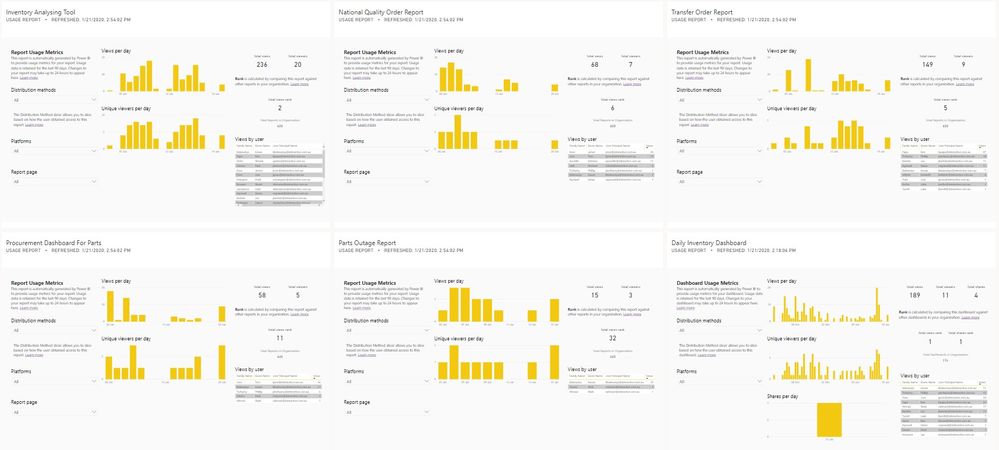
I am trying to see the usage metrics of all my reports. Power BI is showing 90 days for some reports and less for others.

How to resolve?


Usage Metrics.jpg

Thanks,

VA

1 ACCEPTED SOLUTION

Hi @interactive_va


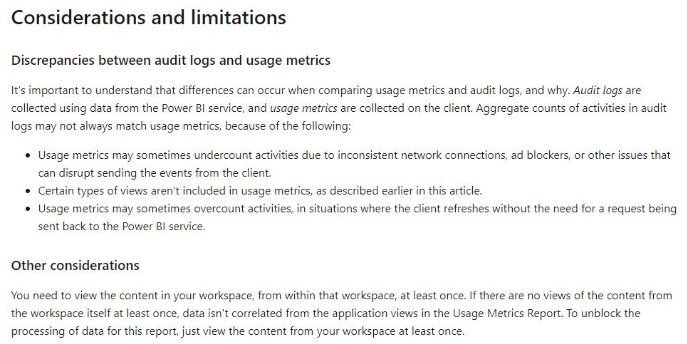
Here are the limitations about metrics,pls see below:


Annotation 2020-02-03 093150.png


Best Regards,
Kelly

View solution in original post

3 REPLIES 3
v-kelly-msft
Community Support
Community Support

Hi @interactive_va


Could you pls check the created date of the reports which is showing less than 90 days?If it is less than 90 days, of course it wont appear in metrics for 90days.

References pls click here.


Best Regards,
Kelly

Thanks for the reply @v-kelly-msft .


The reports were created almost a year ago. Some time ago, 90 days were coming.


I also tried uploading the report again to see if it shows metrics from the date of upload/update. But, still no success.


Please let me know in case you can think of any other solution.


Regards,

Varun

Hi @interactive_va


Here are the limitations about metrics,pls see below:


Annotation 2020-02-03 093150.png


Best Regards,
Kelly

Helpful resources

Announcements
November Power BI Update Carousel

Power BI Monthly Update - November 2025

Check out the November 2025 Power BI update to learn about new features.

Fabric Data Days Carousel

Fabric Data Days

Advance your Data & AI career with 50 days of live learning, contests, hands-on challenges, study groups & certifications and more!

FabCon Atlanta 2026 carousel

FabCon Atlanta 2026

Join us at FabCon Atlanta, March 16-20, for the ultimate Fabric, Power BI, AI and SQL community-led event. Save $200 with code FABCOMM.

Top Solution Authors
Top Kudoed Authors