Hi team,
I have a difficulty to solve related to building a pie chart which comes from the calculation of % weighted average of 4 products. Details as belows:
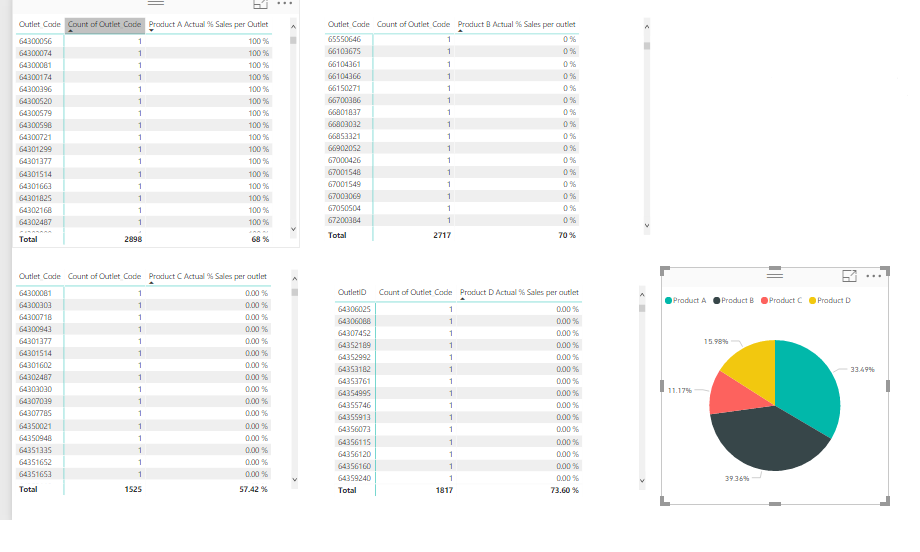
- I have total 2,898 outlets and 4 products A, B, C, D which come from 4 different product tables . Only product A are sold in all 2,898 outlets, other products are sold in some outlets. It also mean some outlets sell all 4 products, some only sell 3 or even 2.
- The column "Product A Actual % Sales per outlet" means the percentage of sales performance in one outlet, min =0% and max = 100%
- I need to create a pie chart to compare the sales percentage of 4 products to know which have more contribution to the total sales. And because those 2,898 outlets allocated into different regions (I do have region column but dont show it here) so I need to create a calculation that will works when filtering any region.
However, I dont know how to do it with weighted average formula. The true fomula should be presented the same result as:
Pie chart:
Percentage of product A: 68%*2,898/(68%*2,898 + 70%*2,717 + 57.42%*1,525 + 73.6%*1,817) = 32.4%
Similarly for Product B, C, D.
Thank you for your help
Regards,
Vu