cancel
Showing results for 
Search instead for 
Did you mean: 

Get Fabric Certified for FREE during Fabric Data Days. Don't miss your chance! Request now

Reply
Anonymous
Not applicable

Upload PBIX file to Power BI Server - part of the changes are not reflected

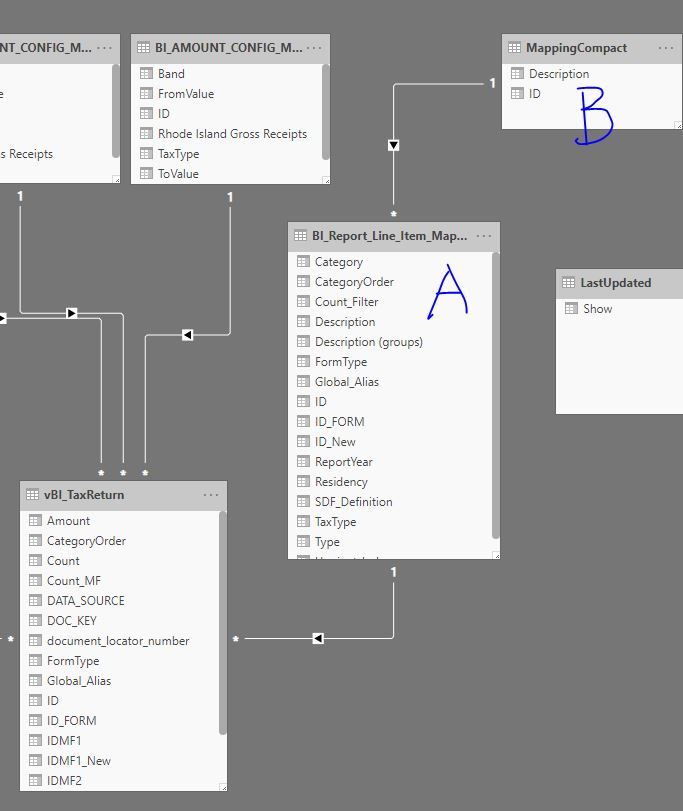
I have a report on PBI server, and I made changes to the local copy. The data relationship is as follows:


For some reason, I had to add B as ref table pointing to A in the new PBIX file, which points to the transaction table. In old PBIX file, B doesn't exist. After I loaded on to the server, and I opened it up there, I found B was not used.

I tried to overwrite/delete the original file, and reuploaded the new one, but this problem is still there. 


What did I do wrong or is this a PBI bug?


Capture.JPG


4 REPLIES 4
v-easonf-msft
Community Support
Community Support

Hi , @Anonymous 

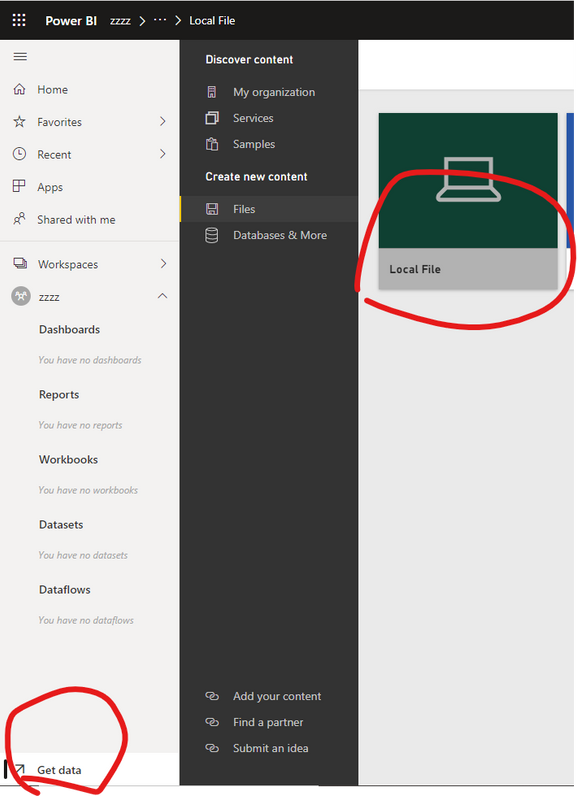
You   can take a  try to create a new workspace  and using "get  data "  to get local pbix  file,then reconfigure your gateway  and data refresh.

85.png

Best Regards,
Community Support Team _ Eason
If this post helps, then please consider Accept it as the solution to help the other members find it more quickly.


venkatasuresh_g
Helper III
Helper III

Hi are you saying  you don't see B in the PBIX after you upload? I would try deleting Data set and report both and re publish as a cleanup , you should see chnages as you have in desktop at this point 


Suresh 


Anonymous
Not applicable

yes, after I opened it in the browser, and check the data, I found a column that was supposed to have data is empty (this column does have data when opened in Power BI). If I loaded it on the server and opened it before I refreshed the report, everything looked great. 


Only AFTER the refresh happened, the problem shows up. So I think there is something going on when the report is refreshed. 


Did you suggest me that I delete the file on the server and upload a new one? I did that but it didn't work.

Thanks!


Hi , @Anonymous 


Could you please tell me whether your problem has been solved?
If it is,  please mark the helpful replies or add your reply as Answered to close this thread?

Best Regards,
Community Support Team _ Eason

Helpful resources

Announcements
November Power BI Update Carousel

Power BI Monthly Update - November 2025

Check out the November 2025 Power BI update to learn about new features.

Fabric Data Days Carousel

Fabric Data Days

Advance your Data & AI career with 50 days of live learning, contests, hands-on challenges, study groups & certifications and more!

FabCon Atlanta 2026 carousel

FabCon Atlanta 2026

Join us at FabCon Atlanta, March 16-20, for the ultimate Fabric, Power BI, AI and SQL community-led event. Save $200 with code FABCOMM.

Top Solution Authors
Top Kudoed Authors