Don't miss your chance to take the Fabric Data Engineer (DP-600) exam for FREE! Find out how by watching the DP-600 session on-demand now through April 28th.
Learn moreJoin the FabCon + SQLCon recap series. Up next: Power BI, Real-Time Intelligence, IQ and AI, and Data Factory take center stage. All sessions are available on-demand after the live show. Register now
I get data from multiple files in the same folder, but when I change the path and refresh data, I have a error message. For example
File Path File Name
D:\OneDrive\2018\ A.xls
B.xls
C.xls
And the file get data with the path D:\OneDrive\Total.xls
When I changed File of the Path to
D:\OneDrive\2018\Data\ A.xls
B.xls
C.xls
And the file get data with the path D:\OneDrive\2018\Total.xls
When I refresh data have an error
[Datasource.error] Could not find file 😧 \ OneDrive \ 2018 \ A.xls ...
Now, I want to automatically update the Path file when I refresh the data
Currently I use fomular excel: Cell ("file name") to get the path to update change part of the path
Thanks!!!!
Hi @nmhung49
As searched and tested, it is impossible to refresh the dataset and chane the data source path at the same time in Power BI currentlly.
When you click on "refresh" button, it will refresh the data from the exsiting data source file via data connection.
To select different data source files for the report,
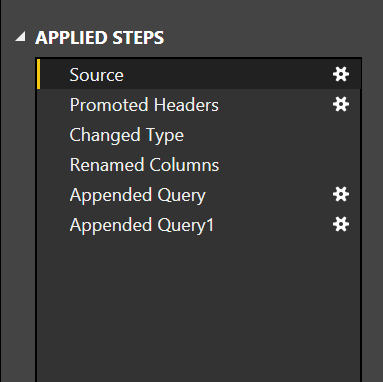
You could go to query editor, select your table and on the right hand side under Applied Steps click settings icon.
You can also go to File -> Options and settings -> Data source settings >Right click data sources and change source.
Best Regards
Maggie
Check out the April 2026 Power BI update to learn about new features.
If you have recently started exploring Fabric, we'd love to hear how it's going. Your feedback can help with product improvements.
A new Power BI DataViz World Championship is coming this June! Don't miss out on submitting your entry.
| User | Count |
|---|---|
| 43 | |
| 38 | |
| 34 | |
| 20 | |
| 16 |
| User | Count |
|---|---|
| 66 | |
| 65 | |
| 30 | |
| 26 | |
| 25 |