FabCon is coming to Atlanta
Join us at FabCon Atlanta from March 16 - 20, 2026, for the ultimate Fabric, Power BI, AI and SQL community-led event. Save $200 with code FABCOMM.
Register now!- Power BI forums
- Get Help with Power BI
- Desktop
- Service
- Report Server
- Power Query
- Mobile Apps
- Developer
- DAX Commands and Tips
- Custom Visuals Development Discussion
- Health and Life Sciences
- Power BI Spanish forums
- Translated Spanish Desktop
- Training and Consulting
- Instructor Led Training
- Dashboard in a Day for Women, by Women
- Galleries
- Data Stories Gallery
- Themes Gallery
- Contests Gallery
- QuickViz Gallery
- Quick Measures Gallery
- Visual Calculations Gallery
- Notebook Gallery
- Translytical Task Flow Gallery
- TMDL Gallery
- R Script Showcase
- Webinars and Video Gallery
- Ideas
- Custom Visuals Ideas (read-only)
- Issues
- Issues
- Events
- Upcoming Events
The Power BI Data Visualization World Championships is back! Get ahead of the game and start preparing now! Learn more
- Subscribe to RSS Feed
- Mark Topic as New
- Mark Topic as Read
- Float this Topic for Current User
- Bookmark
- Subscribe
- Printer Friendly Page

- Mark as New
- Bookmark
- Subscribe
- Mute
- Subscribe to RSS Feed
- Permalink
- Report Inappropriate Content
Unpivot
Hello all...
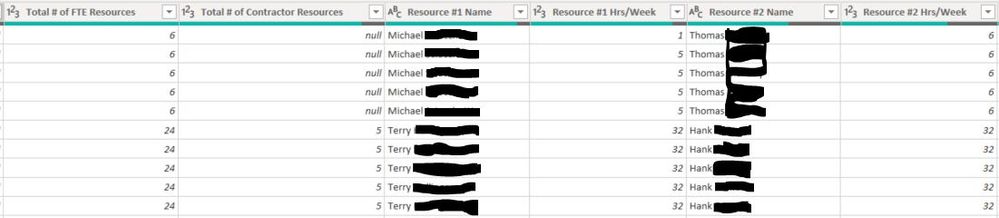
I would like to have Resource #, Resource Name, and Resource Hrs/Week columns instead of how the data is organized in the first table below.
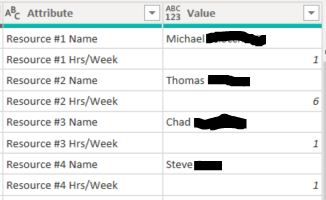
I selected the other columns (Total # of FTE Resources and Total # of Contractor resources) and then unpivoted other columns and arrived at the second table below. Is anyone able to guide me on the next steps?
Solved! Go to Solution.


- Mark as New
- Bookmark
- Subscribe
- Mute
- Subscribe to RSS Feed
- Permalink
- Report Inappropriate Content
@Anonymous
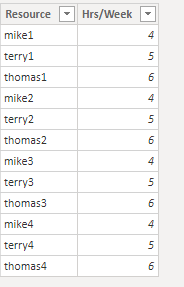
I am not sure how to create the table for dynamic number of Resource # Name and Hrs/Week columns. Maybe someone out here could help with M query.
If we know the columns are fixed, i could use DAX to create a new table and generate some kind of index as key.
Dax:

- Mark as New
- Bookmark
- Subscribe
- Mute
- Subscribe to RSS Feed
- Permalink
- Report Inappropriate Content
@Anonymous
Where is the Resource # column? Are you refering to # of FTE or # of Contractor columns?
Do you only have 4 sets of Resource # Name and Resource Hrs/Week columns?
- Mark as New
- Bookmark
- Subscribe
- Mute
- Subscribe to RSS Feed
- Permalink
- Report Inappropriate Content
That's the issue I'm having with this data. There are no separate Resource # columns. The FTE, Contractor, and all other columns are organized how we would hope they would be. The Resource columns are not.
I want to be able to add a Project name page level filter, for example, and then have a table that lists all of the resources and number of hours they're working on that project instead of having to create a table with the Resource #1 Name, Resource #1 Hrs/Week, Resource #2 Name, Resource #2 Hrs/Week, etc., fields pulled in.
- Mark as New
- Bookmark
- Subscribe
- Mute
- Subscribe to RSS Feed
- Permalink
- Report Inappropriate Content
@Anonymous
I am not sure how to create the table for dynamic number of Resource # Name and Hrs/Week columns. Maybe someone out here could help with M query.
If we know the columns are fixed, i could use DAX to create a new table and generate some kind of index as key.
Dax:
- Mark as New
- Bookmark
- Subscribe
- Mute
- Subscribe to RSS Feed
- Permalink
- Report Inappropriate Content
I appreciate your time and effort here. If I understand you correctly; what's critical to this approach is creating a key so it can relate to the original table that contains the project information. That creates a whole other challenge.
When all is said and done, the approach may be to ask the data owner to restructure their data.


- Mark as New
- Bookmark
- Subscribe
- Mute
- Subscribe to RSS Feed
- Permalink
- Report Inappropriate Content
What is the analysis you want to perform will decide the step?
You have to rename the column. And then use it as per need.
Refer
- Mark as New
- Bookmark
- Subscribe
- Mute
- Subscribe to RSS Feed
- Permalink
- Report Inappropriate Content
I thought I was clear regarding what I'm trying to accomplish, but to add more context, I'd like to be able to pull a "Resource" field in to a table instead of the "Resource #1, Resource #2, etc. fields.
The link you sent just shows how to perform the steps that I already took.
Helpful resources

Power BI Dataviz World Championships
The Power BI Data Visualization World Championships is back! Get ahead of the game and start preparing now!

Power BI Monthly Update - November 2025
Check out the November 2025 Power BI update to learn about new features.

FabCon Atlanta 2026
Join us at FabCon Atlanta, March 16-20, for the ultimate Fabric, Power BI, AI and SQL community-led event. Save $200 with code FABCOMM.

| User | Count |
|---|---|
| 59 | |
| 46 | |
| 42 | |
| 23 | |
| 18 |


| User | Count |
|---|---|
| 193 | |
| 124 | |
| 101 | |
| 67 | |
| 49 |


