Join us at FabCon Atlanta from March 16 - 20, 2026, for the ultimate Fabric, Power BI, AI and SQL community-led event. Save $200 with code FABCOMM.
Register now!The Power BI Data Visualization World Championships is back! Get ahead of the game and start preparing now! Learn more
Hi,
Being a total noob in Power BI, unable to solve this issue on my own.
I uploaded 2 CSV file Customer and Product from the folder, updated in the query editor and loaded in Power BI desktop.
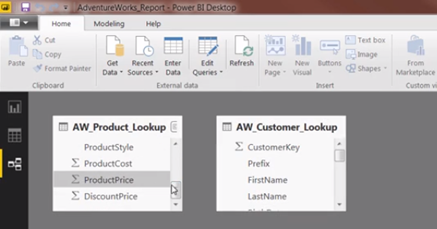
I can view the small icon (SIGMA Icon) next to column names in Data but not in Model View.
Please find the attached image.
Data View in Power BI
Model View in Power BI
Awaiting help.
Thanks.
Solved! Go to Solution.
Hi @Anonymous
Sigma icon will not appear in the model view. It will appear in data view as it is required to know which is a number column while projecting it in a chart, measure or column.
Hi @Anonymous
Sigma icon will not appear in the model view. It will appear in data view as it is required to know which is a number column while projecting it in a chart, measure or column.
Yess.. I have checked on other platforms.
The new version of Power BI does not have icons.
You saved my day.
Thanks,
Veena
Hi,
First, thanks for replying.
But this seems strange. Because I am taking one online class and their Model view is totally different. The sigma icon is visible next to numerical columns.
Thnks again.
Check out the November 2025 Power BI update to learn about new features.
Advance your Data & AI career with 50 days of live learning, contests, hands-on challenges, study groups & certifications and more!
| User | Count |
|---|---|
| 58 | |
| 45 | |
| 42 | |
| 21 | |
| 18 |