cancel
Showing results for 
Search instead for 
Did you mean: 

The Power BI Data Visualization World Championships is back! It's time to submit your entry. Live now!

Reply
terry_levan
Regular Visitor

Unable to save .PBIX file containing SQL Server Direct Query and a Calendar Table

Hi!

I am new to the forum so I apologize up front.

I have created a report with a Direct Query to a SQL Server database. I created a couple visuals and save the file. As soon as I added a calendar table to add time intellignece and  attempted to save the file I get "Cannot open package because FileMode or FileAccess value is not valid for the stream." I am using 2.68.5432.761 64-bit. Is there a workaround for this? Thanks

3 REPLIES 3
Onkareshwar
New Member

Hi @v-juanli-msft ,


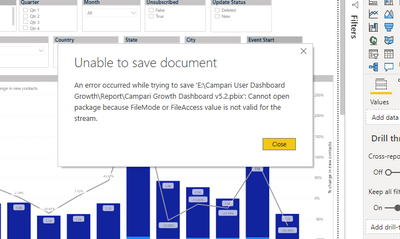
I am also facing the same error when i do any changes in report and tried to save that then i got the message like below, can you please tell me any resolution for this. I unable to figure out the root cause becuase i am facing this first time.

Onkareshwar_1-1619454386288.png

v-juanli-msft
Community Support
Community Support

Hi @terry_levan 

You use Power BI Desktop and happen to this error, right?

If so, first, please note that time intellignece function is not supported for use in DirectQuery mode. For more information about limitations in DirectQuery models, seehttps://go.microsoft.com/fwlink/?LinkId=219172.


We just published the latest 4/21/2019 release (2.68.5432.841), can you try updating to the latest to see if that resolves your issue:

https://www.microsoft.com/en-us/download/details.aspx?id=45331


In addition, if you use Power bi report server and see this error, please have a look at this article.

https://blog.devoworx.net/2019/01/19/missing-save-as-power-bi-report-server-in-power-bi-desktop/


Best Regards
Maggie


Community Support Team _ Maggie Li
If this post helps, then please consider Accept it as the solution to help the other members find it more quickly.

Thanks @terry_levan for your response, however your shared document is much helpful for me in my case.
I found the workaround for this issue. I opned the new Power BI template file and In that i imported the previous saved template usinf File>Import option, then i did the transformation whaterver i need then i am able to save the Template.

Helpful resources

Announcements
Power BI DataViz World Championships

Power BI Dataviz World Championships

The Power BI Data Visualization World Championships is back! It's time to submit your entry.

January Power BI Update Carousel

Power BI Monthly Update - January 2026

Check out the January 2026 Power BI update to learn about new features.

FabCon Atlanta 2026 carousel

FabCon Atlanta 2026

Join us at FabCon Atlanta, March 16-20, for the ultimate Fabric, Power BI, AI and SQL community-led event. Save $200 with code FABCOMM.