Don't miss your chance to take the Fabric Data Engineer (DP-700) exam on us!
Learn moreThe FabCon + SQLCon recap series starts April 14th at 8am Pacific. If you’re tracking where AI is going inside Fabric, this first session is a can't miss. Register now
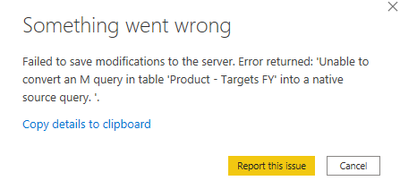
I removed a dataset from the Service and need to republish it, however Desktop can't open the PBIX due to the following eror.
I've tried turning off options inside Desktop Options but with no success. Is there any way to get past this kind of error?
@Anonymous
A change or a modification has happened in your source that is feeds the query 'Product - Targets FY'. Please open a blank PBIX file connect to the same source and check.
⭕ Subscribe and learn Power BI from these videos
⚪ Website ⚪ LinkedIn ⚪ PBI User Group
Thanks for replying, @Fowmy
I actually don't know what the source is - I need to look at the PBIX to find out. Is there a way to do that?
Hi @Anonymous
I find similar posts might helpful, please check
https://community.powerbi.com/t5/Desktop/Error-Unable-to-convert-an-M-query/td-p/1401998
Hope it helps!
Best Regards,
Community Support Team _ Tang
If this post helps, please consider Accept it as the solution✔️ to help the other members find it more quickly.
If you have recently started exploring Fabric, we'd love to hear how it's going. Your feedback can help with product improvements.
A new Power BI DataViz World Championship is coming this June! Don't miss out on submitting your entry.
Share feedback directly with Fabric product managers, participate in targeted research studies and influence the Fabric roadmap.
| User | Count |
|---|---|
| 53 | |
| 40 | |
| 37 | |
| 19 | |
| 18 |
| User | Count |
|---|---|
| 69 | |
| 67 | |
| 34 | |
| 33 | |
| 30 |