Join us at FabCon Atlanta from March 16 - 20, 2026, for the ultimate Fabric, Power BI, AI and SQL community-led event. Save $200 with code FABCOMM.
Register now!Get Fabric Certified for FREE during Fabric Data Days. Don't miss your chance! Request now
Hi Folks,
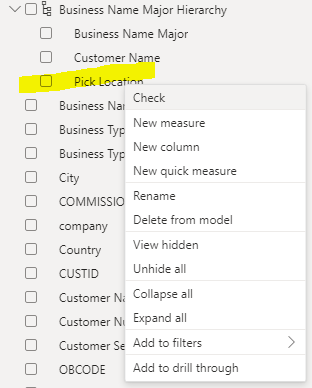
So its been a month since i have used Power BI and i think there must have been a change since then? I am unable to click and drag elements (like Pick Location) upward in a my custom hierarchy. I would like "Pick Location" at the top of my hierarchy. I cant even move it by right clicking on it. Any ideas? Thanks.
Solved! Go to Solution.
Hi @airwolf39
You can do it in the model view, select the hierarchy and in the Settings Tab you will be able to put the fields in the right order .
Did it work ? Mark it as a solution to help spreading knowledge.
A kudos would be appreciated
Hi @airwolf39
You can do it in the model view, select the hierarchy and in the Settings Tab you will be able to put the fields in the right order .
Did it work ? Mark it as a solution to help spreading knowledge.
A kudos would be appreciated
Why did Power BI change this? I have to go to a completely different screen now?
Check out the November 2025 Power BI update to learn about new features.
Advance your Data & AI career with 50 days of live learning, contests, hands-on challenges, study groups & certifications and more!