Join us at FabCon Atlanta from March 16 - 20, 2026, for the ultimate Fabric, Power BI, AI and SQL community-led event. Save $200 with code FABCOMM.
Register now!The Power BI Data Visualization World Championships is back! Get ahead of the game and start preparing now! Learn more
I am trying to connect to a Sharpeoint List that I have access to but not able to get through.
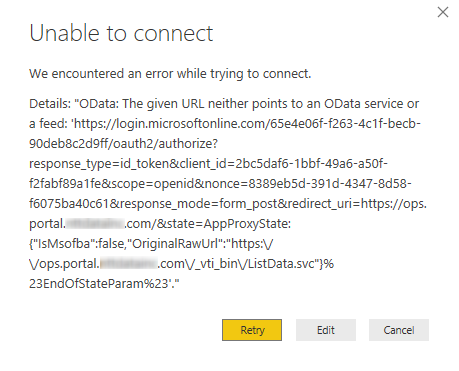
As suggested in a few posts I'm using the URL of the base site e.g. https://ops.portal.companyname.com. The site uses Azure single sign-on. However, I'm always getting the error below.
Hi @vickyd,
Were you using the OData connector or the SharePoint Online List connector?
What authentication type did you use, anonymous, Windows or Microsoft account?
Such an connection error ("neither OData service or feed") can be caused by incorrect credentails. Please check whether you provided valid login account.
If you weren't prompted for a username/password it's possible you already had credentials stored. You could try deleting your credentials and connecting again.
Best regards,
Yuliana Gu
@v-yulgu-msft wrote:Hi @vickyd,
Were you using the OData connector or the SharePoint Online List connector?
What authentication type did you use, anonymous, Windows or Microsoft account?
Such an connection error ("neither OData service or feed") can be caused by incorrect credentails. Please check whether you provided valid login account.
If you weren't prompted for a username/password it's possible you already had credentials stored. You could try deleting your credentials and connecting again.
Best regards,
Yuliana Gu
Sharepoint List is what I am using.
Our Sharepoint site uses Azure AD authentication so typically we enter our login credentials in the browser. I used Windows Authentication i.e. "Use my current credentials" as well as "Use alternate credentials" in Power BI. Both are giving same error.
I deleted Windows credentials from Credential Manager and also deleted any stored connections in the Data Source settings in Power BI. No luck.
Note: I don't have access to the base sharepoint site. I only ahve access to a sub-site under the base company sharepoint portal. However, I did try entering base site URL as well as the sub-site URL. Same error for both.
Hi @vickyd,
Currently, Power BI desktop doesn't support Azure AD authentication.
You could upvote this idea or add your own comments under the idea.
Best regards,
Yuliana Gu
problem sharepoint lists 2010 with power bi desktop, we are stopped and we can not move forward, I have many customers with sharepoint 2010 and I can not attend them, who can help me please
The Power BI Data Visualization World Championships is back! Get ahead of the game and start preparing now!
Check out the November 2025 Power BI update to learn about new features.
| User | Count |
|---|---|
| 59 | |
| 43 | |
| 42 | |
| 23 | |
| 17 |
| User | Count |
|---|---|
| 190 | |
| 122 | |
| 96 | |
| 66 | |
| 47 |