Forum Discussion

 Post Prodigy
UTC to AEST
- 9 years ago
You can use the table and function from my post as illustrated in this video:

 Microsoft Employee
We can switch time zone when add a custom column. I have tested it on my local environment.
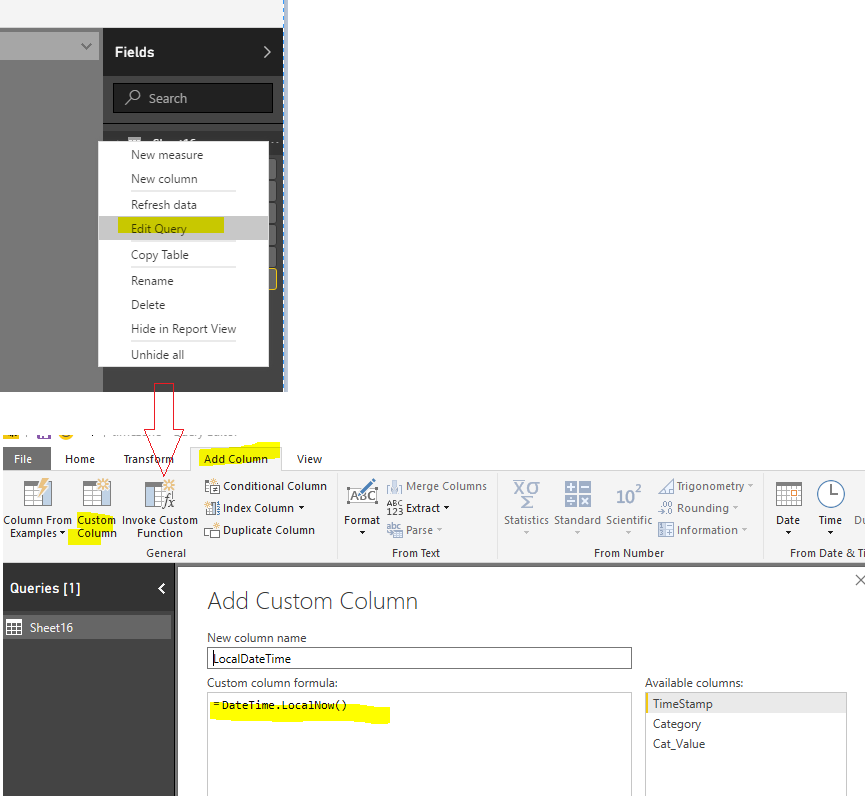

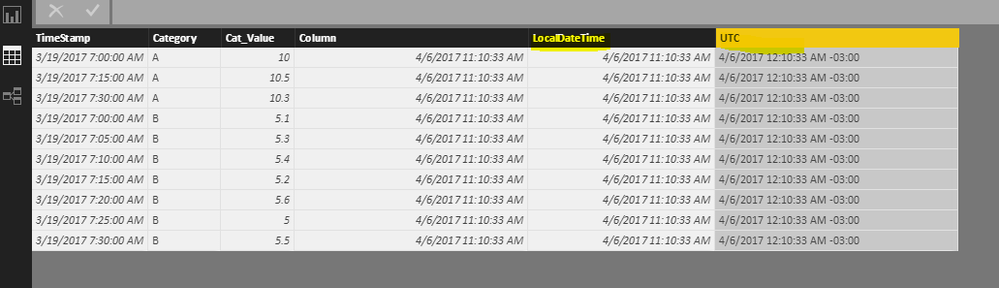
Regards,
Charlie Liao

 Community Champion
v-caliao-msft your solution won't work in this case as it doesn't take into account Daylight Saving Time (DST) switches.
 ElliotP9 years ago
This is the issue we are working to solve.
I've seen a complicated potential solution on radacad (I can find the link if you haven't seen it before); but it relies upon working with an external API which seems a tad overkill.
- MarcelBeug9 years ago
If I strip down my solution in the other post to the bare minimum required for this specific timezone: you need a table with the clock switches and a function for the conversion.
Query UTCtoAET returns a table with UTC-datetime-stamps between 1/1/2010 and 1/1/2030 in witch the clocks are adjusted in Australia, together with the offset after the switch:
let
    Source = Table.FromRows(Json.Document(Binary.Decompress(Binary.FromText("dZJLDsMgEEOvUrGOxHwITXqVKPe/RlsCEhiz9ZOFxo/rCho1mqi85CMStqAa7u0KKfoTa665lFwlGoBWKLmSggJ4Ch69ACONDKA9UXInhR1AK5Q8kUIC0Aol30nBAQxX59XVeS6U/I2FM7oAGGc6VjMdi5nO1Uwnv9qYawfQfw5jrg1AP5Mx1Qqgn8km1XUmI6r/RxtTvQPo/4Yx1QnAsBJT7QCGlSbVbaVJdT16Mt2OnkzXv2FMdQbwa9xf", BinaryEncoding.Base64), Compression.Deflate)), let _t = ((type text) meta [Serialized.Text = true]) in type table [UTC = _t, UTCOffset = _t]),
    #"Changed Type" = Table.TransformColumnTypes(Source,{{"UTC", type datetime}, {"UTCOffset", Int64.Type}})
in
    #"Changed Type"
This was created via "Enter Data". You can make adjustments if you press the gear button right from the step Source in the query editor:
Function fnUTCtoAET converts UTC datetimes to AEDT/AEST:
(DateTimeUTC as datetime) as datetime => DateTimeUTC + #duration(0,Table.Last(Table.SelectRows(UTCtoAET, each [UTC] <= DateTimeUTC))[UTCOffset],0,0)
Example query that converts some UTC datetimes to AEDT/AEST:
let
    Source = Table.FromColumns({List.DateTimes(#datetime(2017,6,1,0,0,0),10,#duration(60,0,0,0))},type table[UTC = datetime]),
    #"Invoked Custom Function" = Table.AddColumn(Source, "AEST/AEDT", each fnUTCtoAET([UTC]), type datetime)
in
    #"Invoked Custom Function"
Result:
- ElliotP9 years ago
This is incredible and definitly should be stickied as this is probably the first publically available solution to this major problem.
So:
1: I create a table using enter data for the past few years back and forward as I need for the days when daylight savings change.
2: Create a function in my data table using the Custom Function and link my date table with my Custom Function generated AEST column?