Forum Discussion

 Post Prodigy
UTC to AEST
- 9 years ago
You can use the table and function from my post as illustrated in this video:

 Community Champion
And what happened with my answer to your same question???? :smileysad:
- MarcelBeug9 years ago
It is always posssible to converrt between local time and UTC time, but then you are dependent on the time zone setting of your computer (which might as well be a server running on UTC).
Example query:
let Source = Table.FromColumns({List.DateTimes(#datetime(2017,1,1,1,0,0),10,#duration(25,1,0,0))},type table[UTC = datetime]), #"Added Custom" = Table.AddColumn(Source, "Local", each DateTime.From(DateTime.AddZone([UTC],0,0)), type datetime) in #"Added Custom"  ElliotP9 years ago
Evening,
For some reason I didn't see the post pop up a while ago, I'm so sorry. :smileysad:
I've had a look, I'm not sure how to create that original TimeTable? As well, the pbix will have a locale of United States as so I'm able to convert the string which my datetime is identified and stored as, into a DateTime data type.
 v-caliao-msft9 years ago
Microsoft Employee
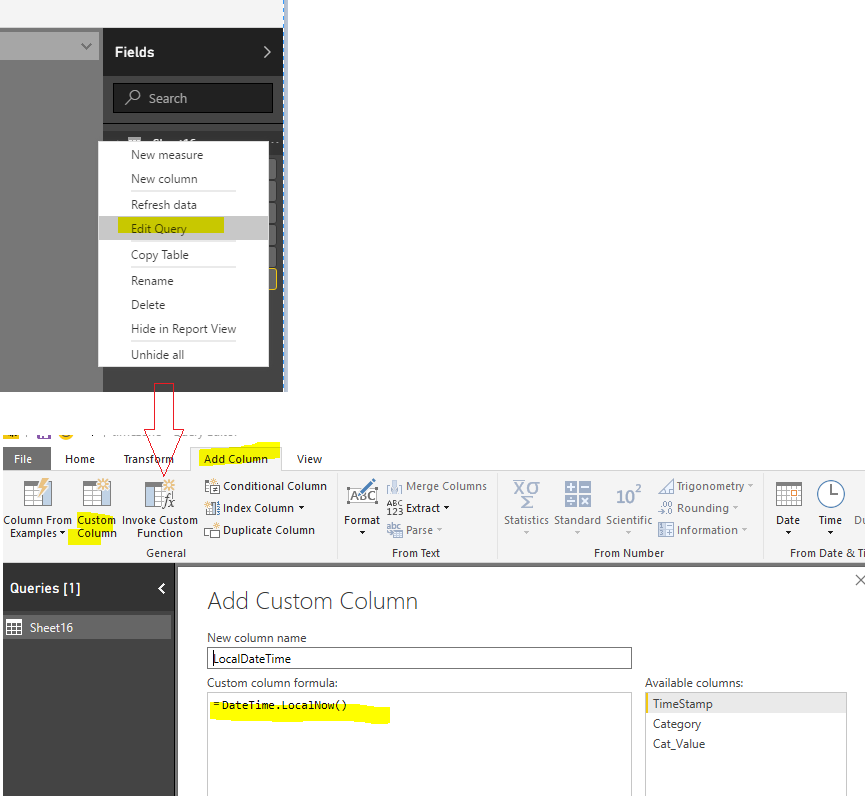
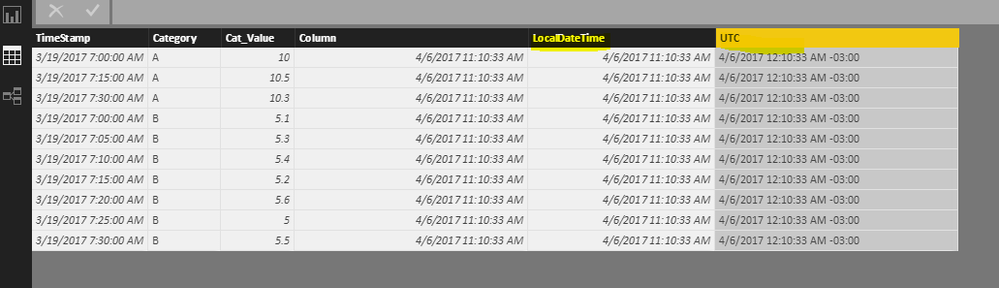
We can switch time zone when add a custom column. I have tested it on my local environment.
Regards,
Charlie Liao
- MarcelBeug9 years ago
v-caliao-msft your solution won't work in this case as it doesn't take into account Daylight Saving Time (DST) switches.