cancel
Showing results for 
Search instead for 
Did you mean: 

Next up in the FabCon + SQLCon recap series: The roadmap for Microsoft SQL and Maximizing Developer experiences in Fabric. All sessions are available on-demand after the live show. Register now

Reply
Matt22365
Resolver III
Resolver III

USERELATIONSHIP not working on many to 1

Hi all

I hope someone can help

I have 2 inactive relationships between:

  • Table1 - Start Date & Table2 - Date
  • Table1 - End Date & Table2 - Date

The purpose of this is to plot values from Table1 overtime on a line chart against the start and end dates. 

Table1 has multiple dates vs Table2 being a date table so these need to be a many : 1 relationship


The additional challenge is that I need the values from table 1 to accumulate as the dates go on. This is the bit which does not work with the many : 1 relationship (the formula works if I make a simpiliar version with a 1:1 relationship)


These are the formula:

Running Total End = CALCULATE(SUM('Table1'[Value]),USERELATIONSHIP(Table2[Date],'Table1'[EndDate]), FILTER(ALLSELECTED('Table1'),'Table1'[EndDate] <=MAX('Table1'[EndDate])))
 
Running Total Start = CALCULATE(SUM('Table1'[Value]),USERELATIONSHIP(Table2[Date],'Table1'[StartDate]), FILTER(ALLSELECTED('Table1'),'Table1'[StartDate] <=MAX('Table1'[StartDate])
 
I do not get an error with this formula, the issue is that the accumulation aspects stop working and I just get a normal values line chart
 
Any help would be greatly appreciated
 
Thanks
 
MAtt 
2 ACCEPTED SOLUTIONS
v-yingjl
Community Support
Community Support

Hi @Matt22365 ,

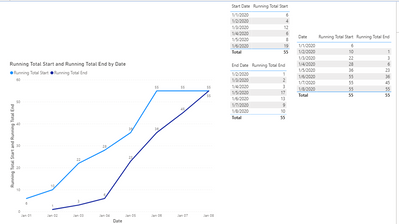
To calculate the accumulated value, the table in the filter should be table2 not table1:

Running Total Start = 
CALCULATE (
    SUM ( 'Table1'[Value] ),
    USERELATIONSHIP ( Table2[Date], 'Table1'[Start Date] ),
    FILTER (
        ALL ( 'Table2'),
        'Table2'[Date] <= MAX('Table2'[Date])
    )
)

Running Total End = 
CALCULATE (
    SUM ( 'Table1'[Value] ),
    USERELATIONSHIP ( Table2[Date], 'Table1'[End Date] ),
    FILTER(
        ALL(Table2),
        'Table2'[Date] <= MAX('Table2'[Date])
    )
)

table.png

Attached the sample file that hopes to help you: USERELATIONSHIP not working on many to 1.pbix


Best Regards,
Yingjie Li

If this post helps then please consider Accept it as the solution to help the other members find it more quickly.

View solution in original post

Hi


Thank you very much that worked great. I could not open your example file but the formula update worked.


I has made it so the measure doesnt accumulate in a table visualisation but I can live with that, the trend line was my main priority


Matt 

View solution in original post

3 REPLIES 3
v-yingjl
Community Support
Community Support

Hi @Matt22365 ,

To calculate the accumulated value, the table in the filter should be table2 not table1:

Running Total Start = 
CALCULATE (
    SUM ( 'Table1'[Value] ),
    USERELATIONSHIP ( Table2[Date], 'Table1'[Start Date] ),
    FILTER (
        ALL ( 'Table2'),
        'Table2'[Date] <= MAX('Table2'[Date])
    )
)

Running Total End = 
CALCULATE (
    SUM ( 'Table1'[Value] ),
    USERELATIONSHIP ( Table2[Date], 'Table1'[End Date] ),
    FILTER(
        ALL(Table2),
        'Table2'[Date] <= MAX('Table2'[Date])
    )
)

table.png

Attached the sample file that hopes to help you: USERELATIONSHIP not working on many to 1.pbix


Best Regards,
Yingjie Li

If this post helps then please consider Accept it as the solution to help the other members find it more quickly.

Hi


Thank you very much that worked great. I could not open your example file but the formula update worked.


I has made it so the measure doesnt accumulate in a table visualisation but I can live with that, the trend line was my main priority


Matt 

amitchandak
Super User
Super User

@Matt22365 , should have worked


try like

CALCULATE(SUM('Table1'[Value]),USERELATIONSHIP(Table2[Date],'Table1'[StartDate]), FILTER(ALLSELECTED('Date'),'Date'[Date] <=MAX('Date'[Date])))


CALCULATE(SUM('Table1'[Value]),USERELATIONSHIP(Table2[Date],'Table1'[StartDate]), FILTER(ALLSELECTED('Table1'),'Table1'[StartDate] <=MAX('Table1'[StartDate])))


Share with Power BI Enthusiasts: Full Power BI Video (20 Hours) YouTube
Microsoft Fabric Series 60+ Videos YouTube
Microsoft Fabric Hindi End to End YouTube

Helpful resources

Announcements
New to Fabric survey Carousel

New to Fabric Survey

If you have recently started exploring Fabric, we'd love to hear how it's going. Your feedback can help with product improvements.

Power BI DataViz World Championships carousel

Power BI DataViz World Championships - June 2026

A new Power BI DataViz World Championship is coming this June! Don't miss out on submitting your entry.

Join our Fabric User Panel

Join our Fabric User Panel

Share feedback directly with Fabric product managers, participate in targeted research studies and influence the Fabric roadmap.

March Power BI Update Carousel

Power BI Community Update - March 2026

Check out the March 2026 Power BI update to learn about new features.