Join us at FabCon Atlanta from March 16 - 20, 2026, for the ultimate Fabric, Power BI, AI and SQL community-led event. Save $200 with code FABCOMM.
Register now!Get Fabric Certified for FREE during Fabric Data Days. Don't miss your chance! Request now
Hi, I need help with this problem:
In a bar chart, I need to display two fields.
But not both together, but to show one or another, depending on the value selected in a slicer
One of the fields represents percentages, and the other represents absolute numeric values.
I use a stacked bar chart and it works fine.
But the problem is that for small values it does not show the data labels.
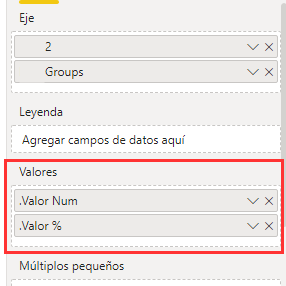
If I place only one of the fields in the chart, the data labels are shown, but if I place both, even if both are never shown together, it does not show the data labels.
How can I do to show one or the other field in the same chart, keeping each one its format (percentage or number), and always showing the data labels?
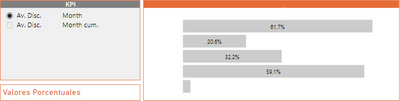
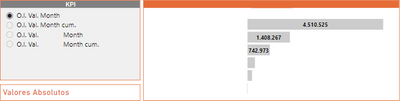
I attach screenshots to help understanding.
Thank you very much!
Solved! Go to Solution.
Hi @pmaurizi ,
You can achieve this with bookmarks creating two visualizations
https://docs.microsoft.com/en-us/power-bi/create-reports/desktop-bookmarks
Or this can also be done using the calcuted groups with external tools.
However be aware that if you use this option you won't be abble to use implicit measures on your model anymore, meanig you cannot drag as column to a chart and make a sum or a count you will need to star using measures for all calculations.
Regards
Miguel Félix
Proud to be a Super User!
Check out my blog: Power BI em PortuguêsHi @pmaurizi ,
You can achieve this with bookmarks creating two visualizations
https://docs.microsoft.com/en-us/power-bi/create-reports/desktop-bookmarks
Or this can also be done using the calcuted groups with external tools.
However be aware that if you use this option you won't be abble to use implicit measures on your model anymore, meanig you cannot drag as column to a chart and make a sum or a count you will need to star using measures for all calculations.
Regards
Miguel Félix
Proud to be a Super User!
Check out my blog: Power BI em PortuguêsCheck out the November 2025 Power BI update to learn about new features.
Advance your Data & AI career with 50 days of live learning, contests, hands-on challenges, study groups & certifications and more!