FabCon is coming to Atlanta
Join us at FabCon Atlanta from March 16 - 20, 2026, for the ultimate Fabric, Power BI, AI and SQL community-led event. Save $200 with code FABCOMM.
Register now!- Power BI forums
- Get Help with Power BI
- Desktop
- Service
- Report Server
- Power Query
- Mobile Apps
- Developer
- DAX Commands and Tips
- Custom Visuals Development Discussion
- Health and Life Sciences
- Power BI Spanish forums
- Translated Spanish Desktop
- Training and Consulting
- Instructor Led Training
- Dashboard in a Day for Women, by Women
- Galleries
- Data Stories Gallery
- Themes Gallery
- Contests Gallery
- QuickViz Gallery
- Quick Measures Gallery
- Visual Calculations Gallery
- Notebook Gallery
- Translytical Task Flow Gallery
- TMDL Gallery
- R Script Showcase
- Webinars and Video Gallery
- Ideas
- Custom Visuals Ideas (read-only)
- Issues
- Issues
- Events
- Upcoming Events
The Power BI Data Visualization World Championships is back! Get ahead of the game and start preparing now! Learn more
- Power BI forums
- Forums
- Get Help with Power BI
- Desktop
- Two dates from the same database
- Subscribe to RSS Feed
- Mark Topic as New
- Mark Topic as Read
- Float this Topic for Current User
- Bookmark
- Subscribe
- Printer Friendly Page


- Mark as New
- Bookmark
- Subscribe
- Mute
- Subscribe to RSS Feed
- Permalink
- Report Inappropriate Content
Two dates from the same database
Hello, good afternoon!!
I have the following drawback:
In a DB I have guide creation dates and a guide entry date, in a table I need to reflect how many guides created and how many guides entered, not all enter the same day of their creation, for example:
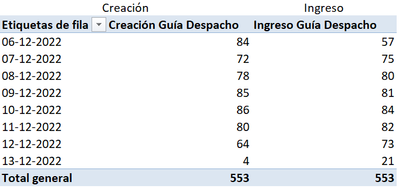
In power BI the same information is visualized to me like this:
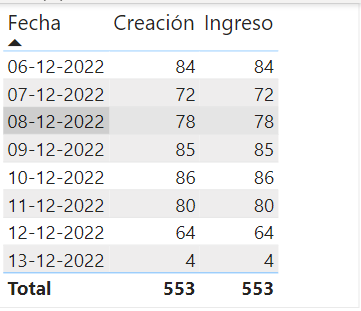

Please help them.
Thank you
Solved! Go to Solution.

- Mark as New
- Bookmark
- Subscribe
- Mute
- Subscribe to RSS Feed
- Permalink
- Report Inappropriate Content
Hi @jmatamal ,
If I understand correctly, you would like to get the count of guides created and guides entered. But you can't get the correct count of guide entered. Can I know how did you set your table visual in Power BI? Please try to follow the steps below to do it and check if you can get the expected result...
1. Delete the relationship between the calendar table and fact table
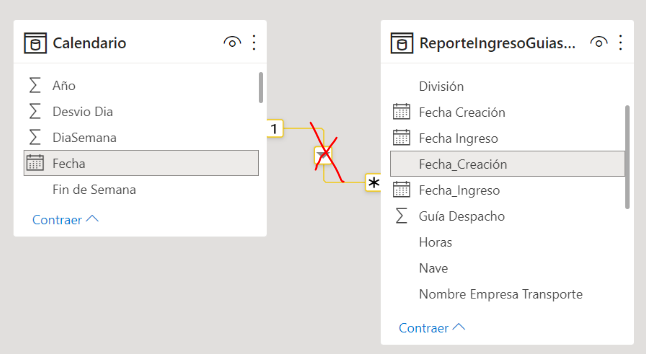
2. Create a table visual: put the field [Fecha] of calendar table and the following two measures onto the table visual
Count of guides creation =
VAR _seldate =
    SELECTEDVALUE ( 'Calendario'[Fecha] )
RETURN
    CALCULATE (
        COUNT ( 'ReporteIngresoGuiasxx'[Fecha_Creacion] ),
        FILTER (
            'ReporteIngresoGuiasxx',
            'ReporteIngresoGuiasxx'[Fecha_Creacion] = _seldate
        )
    )
Count of guides entered =
VAR _seldate =
SELECTEDVALUE ( 'Calendario'[Fecha] )
RETURN
CALCULATE (
COUNT ( 'ReporteIngresoGuiasxx'[Fecha_Ingreso] ),
FILTER (
'ReporteIngresoGuiasxx',
'ReporteIngresoGuiasxx'[Fecha_Ingreso] = _seldate
)
)Best Regards


- Mark as New
- Bookmark
- Subscribe
- Mute
- Subscribe to RSS Feed
- Permalink
- Report Inappropriate Content
try the below, May be this would help.
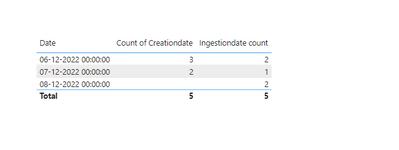
Step 1: You need to create the inactive relationship between calendar table Date column and fact table ingestion date column. Please refe the attached image.
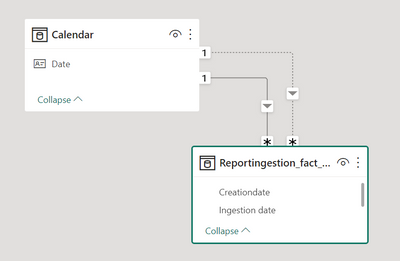
Step 2: You have to write a measure to get the correct ingestion date count by making the inactive relationship into active through USERELATIONSHIP dax function.
Ingestiondate count =
CALCULATE (
    COUNT ( Reportingestion_fact_table[Ingestion date] ),
    USERELATIONSHIP ( 'Calendar'[Date], Reportingestion_fact_table[Ingestion date] )
)
Step 3: Use the newly created measure in your report.
Thanks,
- Mark as New
- Bookmark
- Subscribe
- Mute
- Subscribe to RSS Feed
- Permalink
- Report Inappropriate Content
Hello, good morning!!!
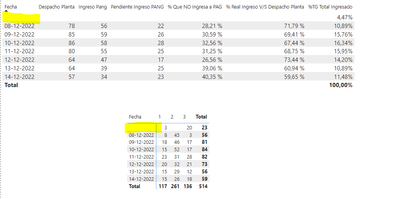
I only have a small inconvenience when entering the measurement, it does not show the date of the last registration


- Mark as New
- Bookmark
- Subscribe
- Mute
- Subscribe to RSS Feed
- Permalink
- Report Inappropriate Content
Hi @jmatamal ,
What's the meaning of "the date of the last registration"? What's your final expected result? Could you please provide some raw data in your fact tables and special examples to explain it in order to get better unerstanding on your requirment and give you a suitable solution? Thank you.
Best Regards
- Mark as New
- Bookmark
- Subscribe
- Mute
- Subscribe to RSS Feed
- Permalink
- Report Inappropriate Content
Hi @jmatamal ,
If I understand correctly, you would like to get the count of guides created and guides entered. But you can't get the correct count of guide entered. Can I know how did you set your table visual in Power BI? Please try to follow the steps below to do it and check if you can get the expected result...
1. Delete the relationship between the calendar table and fact table
2. Create a table visual: put the field [Fecha] of calendar table and the following two measures onto the table visual
Count of guides creation =
VAR _seldate =
    SELECTEDVALUE ( 'Calendario'[Fecha] )
RETURN
    CALCULATE (
        COUNT ( 'ReporteIngresoGuiasxx'[Fecha_Creacion] ),
        FILTER (
            'ReporteIngresoGuiasxx',
            'ReporteIngresoGuiasxx'[Fecha_Creacion] = _seldate
        )
    )
Count of guides entered =
VAR _seldate =
SELECTEDVALUE ( 'Calendario'[Fecha] )
RETURN
CALCULATE (
COUNT ( 'ReporteIngresoGuiasxx'[Fecha_Ingreso] ),
FILTER (
'ReporteIngresoGuiasxx',
'ReporteIngresoGuiasxx'[Fecha_Ingreso] = _seldate
)
)Best Regards
- Mark as New
- Bookmark
- Subscribe
- Mute
- Subscribe to RSS Feed
- Permalink
- Report Inappropriate Content
Thank you very much for your help, I have solved it in an excellent way.
A hug
- Mark as New
- Bookmark
- Subscribe
- Mute
- Subscribe to RSS Feed
- Permalink
- Report Inappropriate Content
Hi @jmatamal ,
Thanks for your feedback. Could you please mark the helpful post as Answered since the problem has been resolved? It will help the others in the community find the solution easily if they face the same problem as yours. Thank you.

Best Regards
Helpful resources

Power BI Dataviz World Championships
The Power BI Data Visualization World Championships is back! Get ahead of the game and start preparing now!

Power BI Monthly Update - December 2025
Check out the December 2025 Power BI Holiday Recap!

FabCon Atlanta 2026
Join us at FabCon Atlanta, March 16-20, for the ultimate Fabric, Power BI, AI and SQL community-led event. Save $200 with code FABCOMM.

| User | Count |
|---|---|
| 40 | |
| 35 | |
| 34 | |
| 31 | |
| 28 |


| User | Count |
|---|---|
| 137 | |
| 102 | |
| 71 | |
| 67 | |
| 65 |


