cancel
Showing results for 
Search instead for 
Did you mean: 

Get Fabric Certified for FREE during Fabric Data Days. Don't miss your chance! Request now

Reply
jschwab
Frequent Visitor

Trend Line Disappears When Expanding Down the Hierarchy on Clustered Column Chart

When setting a date with a hierarchy on the X-Axis to a Clustered Column Chart, I can add a Trend Line at the Year level. But when I expand the hierarchy down to Months, it disappears.


I saw another post with the explanation that Trend Lines only work on numerical values (ie fails when expanding to Months, which is Text). But if that is the case, why do Trend Lines continue to work on Line Charts and Area Charts when expanding down to the Month level ?


Just as a note, this issue occurs on the Line and Clustered Column Chart as well.

2 REPLIES 2
v-chuncz-msft
Community Support
Community Support

@jschwab ,


You may take a look at the post below.

https://community.powerbi.com/t5/Desktop/How-to-draw-find-a-Trendline-in-PowerBI-August-2017-Preview...

Community Support Team _ Sam Zha
If this post helps, then please consider Accept it as the solution to help the other members find it more quickly.

Thanks for your response @v-chuncz-msft  !

That post advises that only Continuous Charts can have a trendline.

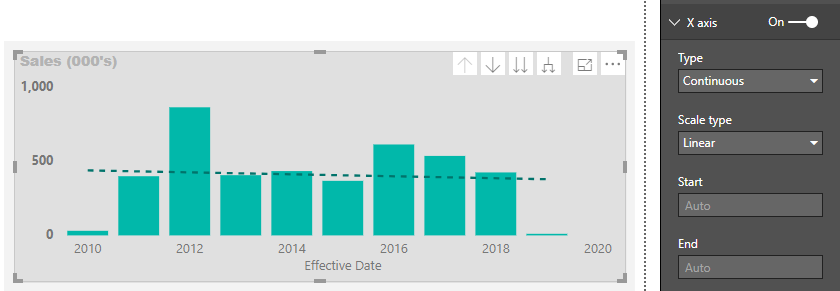
My Clustered Column has a Continuous X-Axis at the Year Level:

image.png

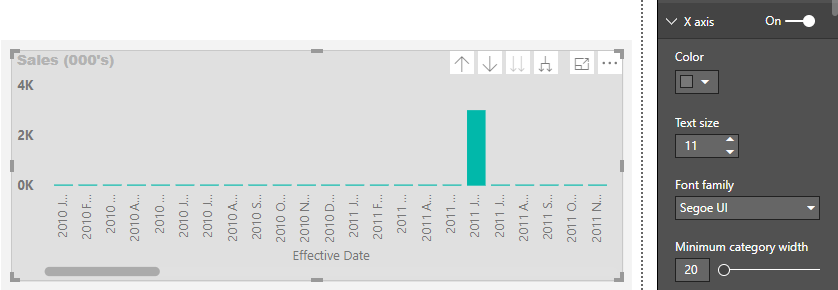
But Categorical at the Month Hierarchy, so the Trendline disappears:

Categorical.png

Or rather I should say the "Type" section disappears entirely, I'm assuming it switched back to Category because of the way the X-Axis looks.

Is this a bug ?

Helpful resources

Announcements
November Power BI Update Carousel

Power BI Monthly Update - November 2025

Check out the November 2025 Power BI update to learn about new features.

Fabric Data Days Carousel

Fabric Data Days

Advance your Data & AI career with 50 days of live learning, contests, hands-on challenges, study groups & certifications and more!

FabCon Atlanta 2026 carousel

FabCon Atlanta 2026

Join us at FabCon Atlanta, March 16-20, for the ultimate Fabric, Power BI, AI and SQL community-led event. Save $200 with code FABCOMM.

Top Solution Authors
Top Kudoed Authors