Join us at FabCon Atlanta from March 16 - 20, 2026, for the ultimate Fabric, Power BI, AI and SQL community-led event. Save $200 with code FABCOMM.
Register now!The Power BI Data Visualization World Championships is back! It's time to submit your entry. Live now!
Given this data:
Project Score1 Score2 Score3
a 1 0 1
b 0 1 0
c 0 0 1
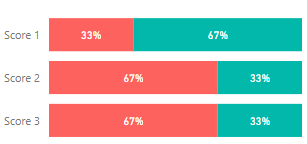
I'd like to transpose the scores to get their pass/fail rate as the following:
Do I need to create an intermediate table/view or how could I do the grouping?
Thanks!
Solved! Go to Solution.
Hi @Anonymous ,
Do you want to calculate the percentage of the o and 1 for the Score1, Score2, Score3?
If it is, you could unpivot your Score X columns in Query editor firstly and then create the measure below?
0 =
CALCULATE (
COUNTROWS ( 'Table2' ),
FILTER (
'Table2',
'Table2'[Value] = 0
&& 'Table2'[Score] = MAX ( 'Table2'[Score] )
)
)
/ COUNTROWS ( 'Table2' )
1 =
CALCULATE (
COUNTROWS ( 'Table2' ),
FILTER (
'Table2',
'Table2'[Value] = 1
&& 'Table2'[Score] = MAX ( 'Table2'[Score] )
)
)
/ COUNTROWS ( 'Table2' )
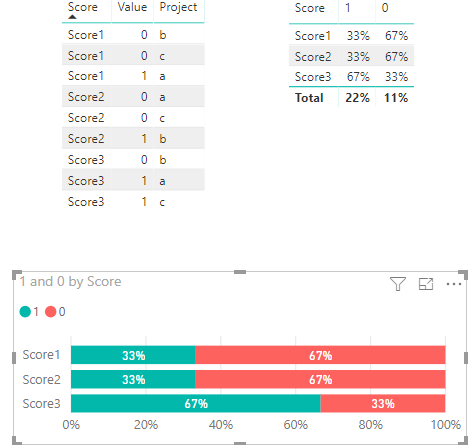
Here is the output.
You also could have a reference of my attachement.
If I misunderstood your logic, please decribe your logic in more details.
Best Regards,
Cherry
Hi @Anonymous ,
Have you solved your problem?
If you have solved, please always accept the replies making sense as solution to your question so that people who may have the same question can get the solution directly.
If you still need help, please feel free to ask.
Best Regards,
Cherry
Hi @Anonymous ,
Do you want to calculate the percentage of the o and 1 for the Score1, Score2, Score3?
If it is, you could unpivot your Score X columns in Query editor firstly and then create the measure below?
0 =
CALCULATE (
COUNTROWS ( 'Table2' ),
FILTER (
'Table2',
'Table2'[Value] = 0
&& 'Table2'[Score] = MAX ( 'Table2'[Score] )
)
)
/ COUNTROWS ( 'Table2' )
1 =
CALCULATE (
COUNTROWS ( 'Table2' ),
FILTER (
'Table2',
'Table2'[Value] = 1
&& 'Table2'[Score] = MAX ( 'Table2'[Score] )
)
)
/ COUNTROWS ( 'Table2' )
Here is the output.
You also could have a reference of my attachement.
If I misunderstood your logic, please decribe your logic in more details.
Best Regards,
Cherry
The Power BI Data Visualization World Championships is back! It's time to submit your entry.
Check out the January 2026 Power BI update to learn about new features.
| User | Count |
|---|---|
| 60 | |
| 49 | |
| 30 | |
| 25 | |
| 23 |
| User | Count |
|---|---|
| 128 | |
| 102 | |
| 57 | |
| 39 | |
| 31 |