cancel
Showing results for 
Search instead for 
Did you mean: 

The Power BI Data Visualization World Championships is back! Get ahead of the game and start preparing now! Learn more

Reply
skasper
Responsive Resident
Responsive Resident

Transform Data from SharePoint List

Hi,


I am using PowerBI to query data from a SharePoint List with 50+ columns/fields. The list is used to evaluate team members in projects. The fields consist of some attributes to identify the evaluation (ID Evaluation, Evaluator, Evaluee, Project, Role, Date) and 52 critera, each of which gets rated with a value from 1 to 6.


Each record in the list represents one evaluation of a person. This is displayed in query editor as a flat list. What I need to do is to transform this flat list into an actual data model, allowing me to run reports on it.


Please refer to the pbix at this link (http://sascha-kasper.com/sample.pbix) for details including sample data. The relationship diagram below should give you an idea.

  • eval_results: this is the list as it comes from SharePoint
  • attributes: this is a table with each criterion for the evaluation. Each criterion belongs to one area.
  • areas: this is a table defining a criterion's related area (e.g. 'communication')
  • rating_scale: list of valid ratings and their titles (e.g. '1 - Needs Improvement')
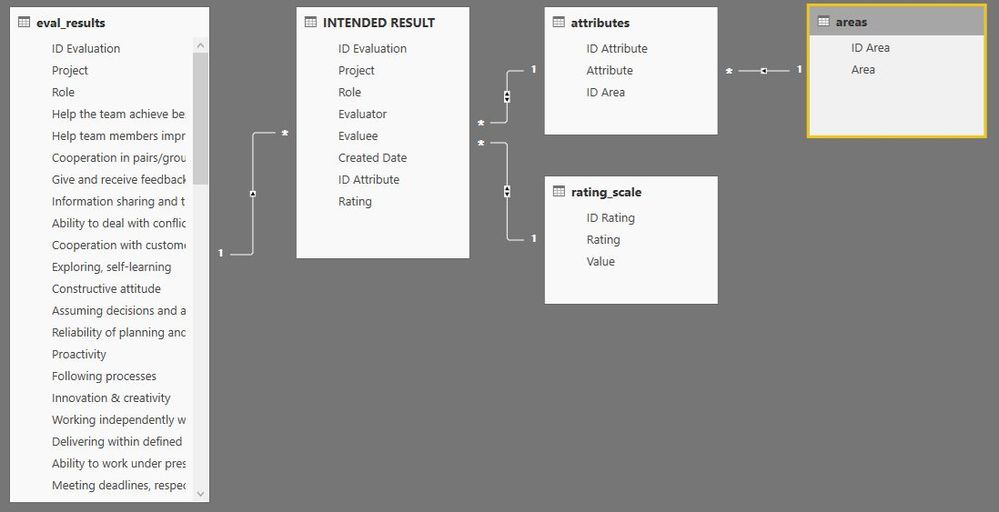
Relationship DiagramRelationship Diagram

I fail to find a way to get there and would appreciate any help you can provide. Thank you.


Best - Sascha
Please always mark accepted solutions. It helps others with similar questions or problems. Thank you.
1 ACCEPTED SOLUTION
skasper
Responsive Resident
Responsive Resident

Turns out, there is an easy built-in solution. All I had to do was to


  • go to the flat table of evaluation results in Query Editor
  • select the columns which are the 'metadata' for each result (i.e. ID, Evaluator, Evaluee, Title, Created)
  • unpivot all other columns (either right-click in the selected area or choose the option from the menu ribbon)

And voila, I have a table exactly as I need it.


Thought I would share this with you, hoping it might be useful for others, too.

Best - Sascha
Please always mark accepted solutions. It helps others with similar questions or problems. Thank you.

View solution in original post

3 REPLIES 3
skasper
Responsive Resident
Responsive Resident

Turns out, there is an easy built-in solution. All I had to do was to


  • go to the flat table of evaluation results in Query Editor
  • select the columns which are the 'metadata' for each result (i.e. ID, Evaluator, Evaluee, Title, Created)
  • unpivot all other columns (either right-click in the selected area or choose the option from the menu ribbon)

And voila, I have a table exactly as I need it.


Thought I would share this with you, hoping it might be useful for others, too.

Best - Sascha
Please always mark accepted solutions. It helps others with similar questions or problems. Thank you.
Anonymous
Not applicable

HI @skasper,


For your requirement, I don't think it is simple to achieve. These data may from different tables or need to lookup multiple table to summary records.


In my opinion, you can load tables which contains needed column, summary them with related column, then remove not related column and records.(you will get related entity table)


After these steps, you can use dax functions to create tables based on above entries.


Reference link:

Introduction to Columns


Notice: if your data contains any privacy data, please do mask sensitive data before sharing.


Regards,

Xiaoxin Sheng

skasper
Responsive Resident
Responsive Resident

Yes, I also think it's not very simple. That's probably why I did not manage to do it on my own, yet. I will try your suggestion though I am not entirely clear how to do it. Thank you for your effort.

Best - Sascha
Please always mark accepted solutions. It helps others with similar questions or problems. Thank you.

Helpful resources

Announcements
Power BI DataViz World Championships

Power BI Dataviz World Championships

The Power BI Data Visualization World Championships is back! Get ahead of the game and start preparing now!

December 2025 Power BI Update Carousel

Power BI Monthly Update - December 2025

Check out the December 2025 Power BI Holiday Recap!

FabCon Atlanta 2026 carousel

FabCon Atlanta 2026

Join us at FabCon Atlanta, March 16-20, for the ultimate Fabric, Power BI, AI and SQL community-led event. Save $200 with code FABCOMM.