Join us at FabCon Atlanta from March 16 - 20, 2026, for the ultimate Fabric, Power BI, AI and SQL community-led event. Save $200 with code FABCOMM.
Register now!The Power BI Data Visualization World Championships is back! Get ahead of the game and start preparing now! Learn more
Hi,
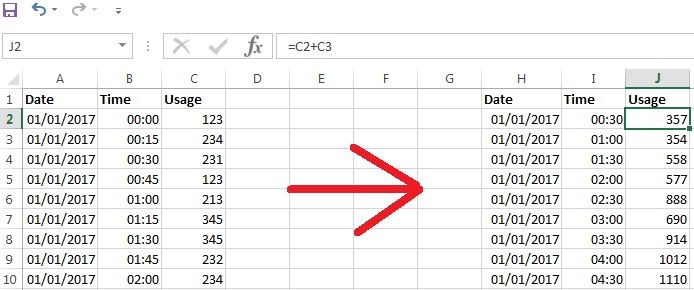
I want to convert the 15 mins interval data into 30 mins interval data. Can anyone guide me in doing this in PowerBI?
I have the screenshot which is required.
Solved! Go to Solution.
A Power Query solution:
let
Source = Data15Mins,
#"Changed Type" = Table.TransformColumnTypes(Source,{{"Time", type number}}),
#"Divided Column" = Table.TransformColumns(#"Changed Type", {{"Time", each Number.RoundDown(_ * 48, 0) / 48, type number}}),
#"Changed Type1" = Table.TransformColumnTypes(#"Divided Column",{{"Time", type time}}),
#"Inserted Merged Date and Time" = Table.AddColumn(#"Changed Type1", "Merged", each [Date] & [Time], type datetime),
#"Grouped Rows" = Table.Group(#"Inserted Merged Date and Time", {"Merged"}, {{"Usage", each List.Sum([Usage]), type number}}),
#"Inserted Time" = Table.AddColumn(#"Grouped Rows", "Time", each DateTime.Time([Merged]), type time),
#"Extracted Date" = Table.TransformColumns(#"Inserted Time",{{"Merged", DateTime.Date}}),
#"Reordered Columns" = Table.ReorderColumns(#"Extracted Date",{"Merged", "Time", "Usage"})
in
#"Reordered Columns"
Hi @MarcelBeug
I appreciated this is an old thread, I am trying to apply your methodology in rounding time values to the nearest 8 hour interval. I am somewhat struggling to understand the functions within the below and how to amend this to achieve it. For example, It would be ideal if times between 00:00:00 - 07:59:59 were assigned to the 00:00:00 band, those between 08:00:00 - 15:59:59 in the 08:00:00 band and those 16:00:00 - 23:59:59 to the 16:00:00 band.
For a different purpose, it would also be good for you to explain the calculation given within the first solution, so it could be modified to for example rounding to 1 hour, or 10 minute timeframes.
Your response is appreciated.
Regards,
A Power Query solution:
let
Source = Data15Mins,
#"Changed Type" = Table.TransformColumnTypes(Source,{{"Time", type number}}),
#"Divided Column" = Table.TransformColumns(#"Changed Type", {{"Time", each Number.RoundDown(_ * 48, 0) / 48, type number}}),
#"Changed Type1" = Table.TransformColumnTypes(#"Divided Column",{{"Time", type time}}),
#"Inserted Merged Date and Time" = Table.AddColumn(#"Changed Type1", "Merged", each [Date] & [Time], type datetime),
#"Grouped Rows" = Table.Group(#"Inserted Merged Date and Time", {"Merged"}, {{"Usage", each List.Sum([Usage]), type number}}),
#"Inserted Time" = Table.AddColumn(#"Grouped Rows", "Time", each DateTime.Time([Merged]), type time),
#"Extracted Date" = Table.TransformColumns(#"Inserted Time",{{"Merged", DateTime.Date}}),
#"Reordered Columns" = Table.ReorderColumns(#"Extracted Date",{"Merged", "Time", "Usage"})
in
#"Reordered Columns"
Check out the November 2025 Power BI update to learn about new features.
Advance your Data & AI career with 50 days of live learning, contests, hands-on challenges, study groups & certifications and more!
| User | Count |
|---|---|
| 169 | |
| 109 | |
| 91 | |
| 55 | |
| 44 |