
Join us at FabCon Atlanta from March 16 - 20, 2026, for the ultimate Fabric, Power BI, AI and SQL community-led event. Save $200 with code FABCOMM.
Register now!Learn from the best! Meet the four finalists headed to the FINALS of the Power BI Dataviz World Championships! Register now
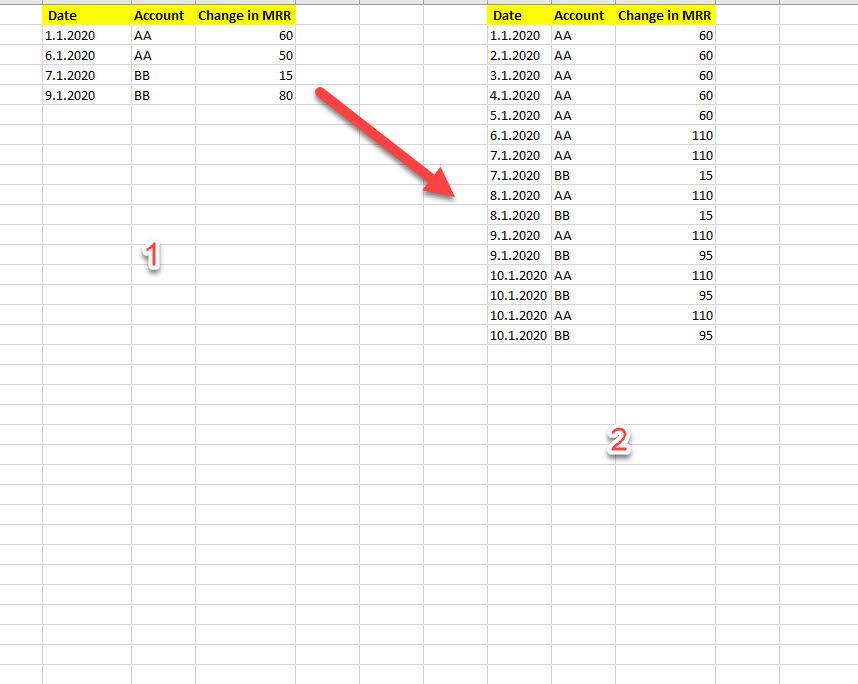
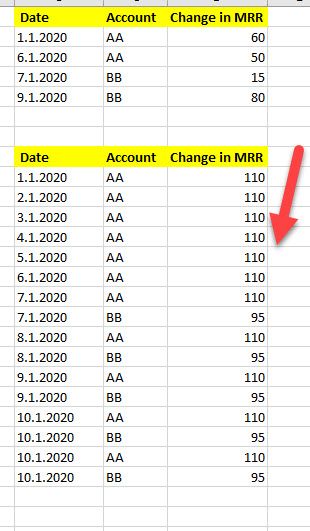
Hi All, I would really appreciate some help on this issue, I have a table with changes on MRR per customers and I need to convert it into a monthly table, can you please advise?( After every change, the sum needs to be updated and continue with the new value).
@DenisStyrt , Try like with a date table
calculate(firstnonblankvalue(Date[Date], Sum(Table[Change in MRR)), filter(date, Date[date] <= max(Date[date])))
or
calculate(firstnonblankvalue(Date[Date], Sum(Table[Change in MRR)), filter(all(date), Date[date] <= max(Date[date])))
Ok, Not working I am getting the totals for each month
I get an error message
Share feedback directly with Fabric product managers, participate in targeted research studies and influence the Fabric roadmap.
Check out the February 2026 Power BI update to learn about new features.
| User | Count |
|---|---|
| 54 | |
| 51 | |
| 39 | |
| 15 | |
| 14 |
| User | Count |
|---|---|
| 93 | |
| 79 | |
| 37 | |
| 27 | |
| 25 |