Join us at FabCon Atlanta from March 16 - 20, 2026, for the ultimate Fabric, Power BI, AI and SQL community-led event. Save $200 with code FABCOMM.
Register now!Get Fabric Certified for FREE during Fabric Data Days. Don't miss your chance! Request now
hi PBI experts,
i have the following question:
I have a contract database (with > 50 colums en > 100.000 rows). Some contracts have changes in within a year:
| Contract year | Date start | Date end | Contract ID | Selling price | Payment method | Payment term |
| 2022 | 1-1-2022 | 1-2-2022 | a001 | 100 | 2 | 14 |
| 2022 | 1-2-2022 | 1-3-2022 | a001 | 105 | 2 | 14 |
| 2022 | 1-3-2022 | 1-4-2022 | a001 | 110 | 2 | 30 |
| 2022 | 1-1-2022 | 1-2-2022 | a002 | 105 | 2 | 30 |
| 2022 | 1-2-2022 | 1-3-2022 | a002 | 110 | 2 | 30 |
| 2022 | 1-1-2022 | 1-2-2022 | a003 | 120 | 1 | 14 |
| 2022 | 1-1-2022 | 1-2-2022 | a004 | 110 | 1 | 14 |
| 2022 | 1-2-2022 | 1-3-2022 | a004 | 110 | 2 | 14 |
I have a dashboard in which I want to show whether there have been changes in the contract during the yearI have a dashboard in which i want to who whether there have been changes in the contract during the year. If i select contract a001, it should show that on 01-02-2022 the selling price has been changed, and that on 01-03-2022 both selling price and payment term has been changed. How i can realize this?
Many thanks in advance,
Regards,
Frank
Solved! Go to Solution.
Hi,
I am not sure how your data model looks like or how your desired outcome visualization looks like, but please check the below picture and the attached pbix file.
I tried to create a sample pbix file like below, and I hope the below can give an idea on how to create and apply the measures to your data model.
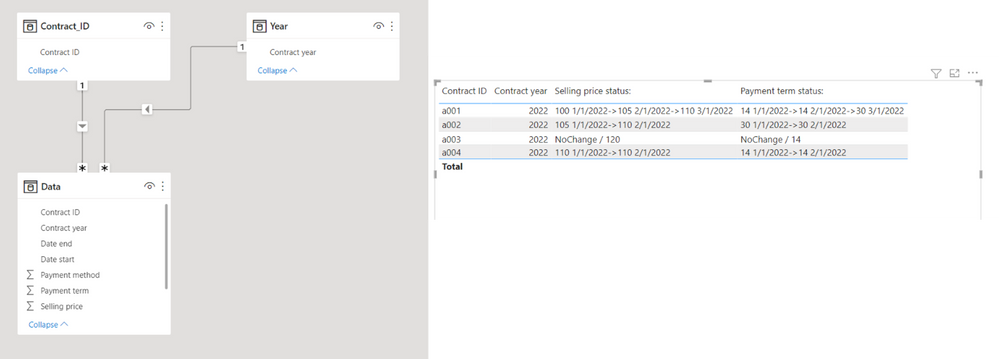
Selling price status: =
VAR currentyear =
MAX ( 'Year'[Contract year] )
VAR sellingpricetable =
SUMMARIZE ( RELATEDTABLE ( Data ), Data[Selling price], Data[Date start] )
VAR countsellingprice =
COUNTROWS ( sellingpricetable )
RETURN
IF (
HASONEVALUE ( Contract_ID[Contract ID] ),
IF (
countsellingprice = 1,
"NoChange / " & MAXX ( sellingpricetable, Data[Selling price] ),
CONCATENATEX (
sellingpricetable,
Data[Selling price] & " " & Data[Date start],
"->"
)
)
)
Payment term status: =
VAR currentyear =
MAX ( 'Year'[Contract year] )
VAR sellingpricetable =
SUMMARIZE ( RELATEDTABLE ( Data ), Data[Payment term], Data[Date start] )
VAR countsellingprice =
COUNTROWS ( sellingpricetable )
RETURN
IF (
HASONEVALUE ( Contract_ID[Contract ID] ),
IF (
countsellingprice = 1,
"NoChange / " & MAXX ( sellingpricetable, Data[Payment term] ),
CONCATENATEX (
sellingpricetable,
Data[Payment term] & " " & Data[Date start],
"->"
)
)
)
Hi,
I am not sure how your data model looks like or how your desired outcome visualization looks like, but please check the below picture and the attached pbix file.
I tried to create a sample pbix file like below, and I hope the below can give an idea on how to create and apply the measures to your data model.
Selling price status: =
VAR currentyear =
MAX ( 'Year'[Contract year] )
VAR sellingpricetable =
SUMMARIZE ( RELATEDTABLE ( Data ), Data[Selling price], Data[Date start] )
VAR countsellingprice =
COUNTROWS ( sellingpricetable )
RETURN
IF (
HASONEVALUE ( Contract_ID[Contract ID] ),
IF (
countsellingprice = 1,
"NoChange / " & MAXX ( sellingpricetable, Data[Selling price] ),
CONCATENATEX (
sellingpricetable,
Data[Selling price] & " " & Data[Date start],
"->"
)
)
)
Payment term status: =
VAR currentyear =
MAX ( 'Year'[Contract year] )
VAR sellingpricetable =
SUMMARIZE ( RELATEDTABLE ( Data ), Data[Payment term], Data[Date start] )
VAR countsellingprice =
COUNTROWS ( sellingpricetable )
RETURN
IF (
HASONEVALUE ( Contract_ID[Contract ID] ),
IF (
countsellingprice = 1,
"NoChange / " & MAXX ( sellingpricetable, Data[Payment term] ),
CONCATENATEX (
sellingpricetable,
Data[Payment term] & " " & Data[Date start],
"->"
)
)
)
Check out the November 2025 Power BI update to learn about new features.
Advance your Data & AI career with 50 days of live learning, contests, hands-on challenges, study groups & certifications and more!