Join us at FabCon Atlanta from March 16 - 20, 2026, for the ultimate Fabric, Power BI, AI and SQL community-led event. Save $200 with code FABCOMM.
Register now!Get Fabric Certified for FREE during Fabric Data Days. Don't miss your chance! Request now
Hi, I have the below table. I am trying to create a measure for the Total number of days in the final Segment. For example - For ticket 1124, Team 1 was the final owning team and they spent 35.51 days in total to provide a solution but only 1.36 days in the last segment. Please help.
| ID | Team | TeamTimeStamp | Handling days | Final Owning Team | Total Days by Final Owning Team | Final Segment (Days) |
| 1124 | Prep Team(Do not consider) | 0 | Team 1 | 0 | ||
| 1124 | Team 1 | 7/2/2021 7:59 | 7.09 | Team 1 | 35.51 | |
| 1124 | Prep Team(Do not consider) | 7/13/2021 10:09 | 0.82 | Team 1 | 0 | |
| 1124 | Team 1 | 7/14/2021 5:52 | 1.18 | Team 1 | 35.51 | |
| 1124 | Prep Team(Do not consider) | 7/15/2021 10:08 | 19.05 | Team 1 | 0 | |
| 1124 | Team 1 | 8/11/2021 11:26 | 10.95 | Team 1 | 35.51 | |
| 1124 | Prep Team(Do not consider) | 8/26/2021 10:16 | 6.7 | Team 1 | 0 | |
| 1124 | Team 1 | 9/6/2021 3:10 | 3.28 | Team 1 | 35.51 | |
| 1124 | Prep Team(Do not consider) | 9/9/2021 9:55 | 7.71 | Team 1 | 0 | |
| 1124 | Team 1 | 9/21/2021 2:58 | 8.56 | Team 1 | 35.51 | |
| 1124 | Prep Team(Do not consider) | 10/1/2021 16:24 | 0.65 | Team 1 | 0 | |
| 1124 | Team 1 | 10/4/2021 8:04 | 3.09 | Team 1 | 35.51 | |
| 1124 | Prep Team(Do not consider) | 10/7/2021 10:10 | 6.65 | Team 1 | 0 | |
| 1124 | Team 1 | 10/18/2021 1:42 | 1.36 | Team 1 | 35.51 | 1.36 |
| 1124 | Prep Team(Do not consider) | 10/19/2021 10:24 | 7.28 | Team 1 | 0 | |
| 1125 | Prep Team(Do not consider) | 0 | Team 2 | 0 | ||
| 1125 | Prep Team(Do not consider) | 5/17/2021 2:01 | 0.61 | Team 2 | 0 | |
| 1125 | Team 2 | 5/17/2021 16:38 | 11.82 | Team 2 | 22.24 | |
| 1125 | Prep Team(Do not consider) | 6/2/2021 12:21 | 2.29 | Team 2 | 0 | |
| 1125 | Prep Team(Do not consider) | 6/6/2021 19:23 | 2.3 | Team 2 | 0 | |
| 1125 | Team 2 | 6/10/2021 2:31 | 10.42 | Team 2 | 22.24 | 10.42 |
| 1125 | Prep Team(Do not consider) | 6/24/2021 12:31 | 24.12 | Team 2 | 0 |
Solved! Go to Solution.
@Chetanab Oh, that's just Lookup Min/Max:
VAR __Last = MAXX(FILTER('Table', [Team] = MAX('Table'[Team]),[Timestamp])
RETURN
MAXX(FILTER('Table',[Team] = MAX('Table'[Team]) && [Timestamp] = __Last),[Handling days])
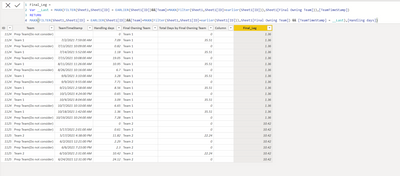
@Greg_Deckler Thank you, I modified the solution you provided a bit because I have multiple IDs and different final owning teams against them,
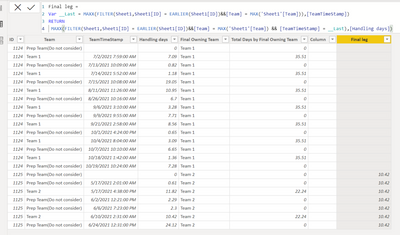
Final leg =
Var __Last = MAXX(FILTER(Sheet1,Sheet1[ID] = EARLIER(Sheet1[ID])&&[Team] = MAX('Sheet1'[Team])),[TeamTimeStamp])
RETURN
MAXX(FILTER(Sheet1,Sheet1[ID] = EARLIER(Sheet1[ID])&&[Team] = MAX('Sheet1'[Team]) && [TeamTimeStamp] = __Last),[Handling days])
I am getting partial results(screenshot above) I am trying to get the DAX to also return 1.36 in the blank rows of Final leg column.
@Chetanab Sorry, what defines a segment?
@Greg_DecklerSegment is the handling days value between 2 time stamps. Final Segment is the last handling days value (value against max date)of the final owning team for a particular ID.
@Chetanab Oh, that's just Lookup Min/Max:
VAR __Last = MAXX(FILTER('Table', [Team] = MAX('Table'[Team]),[Timestamp])
RETURN
MAXX(FILTER('Table',[Team] = MAX('Table'[Team]) && [Timestamp] = __Last),[Handling days])
Check out the November 2025 Power BI update to learn about new features.
Advance your Data & AI career with 50 days of live learning, contests, hands-on challenges, study groups & certifications and more!