Join us at FabCon Atlanta from March 16 - 20, 2026, for the ultimate Fabric, Power BI, AI and SQL community-led event. Save $200 with code FABCOMM.
Register now!The Power BI Data Visualization World Championships is back! Get ahead of the game and start preparing now! Learn more
Hi All,
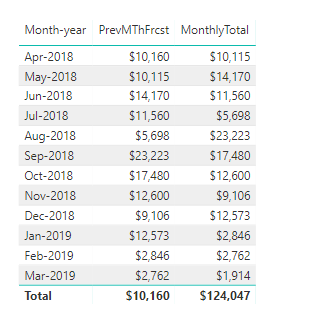
This code summarises the data correctly and places the values in the Previous Month as required but won't display the correct total.
CALCULATE(
SUMX (
SUMMARIZE (
Opportunity,
Opportunity[Currency],
'Probability'[Probability Lower Band Value],
'Currency conversion'[Conversion rate NZ to AUD]
),
VAR TotalAmount =
CALCULATE ( SUM ( Opportunity[Total amount] ) )
VAR ConversionRateFinal =
IF ( Opportunity[Currency] = "AUS$", 1, 'Currency conversion'[Conversion rate NZ to AUD] )
VAR ProbabilityFinal = 'Probability'[Probability Lower Band Value]/ 100
RETURN
TotalAmount * ProbabilityFinal
/ ConversionRateFinal
/ 1000
),PREVIOUSMONTH('Date'[Date]))Which produces the correct result for each previous month that align to the current month as displayed in this table below but the total is not correct. I have read about HASONEVALUE but couldn't see how to apply it in this case.
Appreciate the time.
Solved! Go to Solution.
Check if your "Month-Year" column has one value, then do your current calculation.
If not do total calculation.
So something like...
Measure =
IF (
HASONEVALUE ( 'Date'[Month-year] ),
CALCULATE (
SUMX (
SUMMARIZE (
Opportunity,
Opportunity[Currency],
'Probability'[Probability Lower Band Value],
'Currency conversion'[Conversion rate NZ to AUD]
),
VAR TotalAmount =
CALCULATE ( SUM ( Opportunity[Total amount] ) )
VAR ConversionRateFinal =
IF (
Opportunity[Currency] = "AUS$",
1,
'Currency conversion'[Conversion rate NZ to AUD]
)
VAR ProbabilityFinal = 'Probability'[Probability Lower Band Value] / 100
RETURN
TotalAmount * ProbabilityFinal
/ ConversionRateFinal
/ 1000
),
PREVIOUSMONTH ( 'Date'[Date] )
),
"Your total calculation"
)Replace "Your total calculation" with actual measure/DAX formula.
Check if your "Month-Year" column has one value, then do your current calculation.
If not do total calculation.
So something like...
Measure =
IF (
HASONEVALUE ( 'Date'[Month-year] ),
CALCULATE (
SUMX (
SUMMARIZE (
Opportunity,
Opportunity[Currency],
'Probability'[Probability Lower Band Value],
'Currency conversion'[Conversion rate NZ to AUD]
),
VAR TotalAmount =
CALCULATE ( SUM ( Opportunity[Total amount] ) )
VAR ConversionRateFinal =
IF (
Opportunity[Currency] = "AUS$",
1,
'Currency conversion'[Conversion rate NZ to AUD]
)
VAR ProbabilityFinal = 'Probability'[Probability Lower Band Value] / 100
RETURN
TotalAmount * ProbabilityFinal
/ ConversionRateFinal
/ 1000
),
PREVIOUSMONTH ( 'Date'[Date] )
),
"Your total calculation"
)Replace "Your total calculation" with actual measure/DAX formula.
The Power BI Data Visualization World Championships is back! Get ahead of the game and start preparing now!
| User | Count |
|---|---|
| 39 | |
| 35 | |
| 33 | |
| 32 | |
| 27 |
| User | Count |
|---|---|
| 136 | |
| 96 | |
| 77 | |
| 67 | |
| 65 |