cancel
Showing results for 
Search instead for 
Did you mean: 

The Power BI Data Visualization World Championships is back! Get ahead of the game and start preparing now! Learn more

Reply
rondadonda
New Member

Tooltip to show info of multiple lines on a line graph

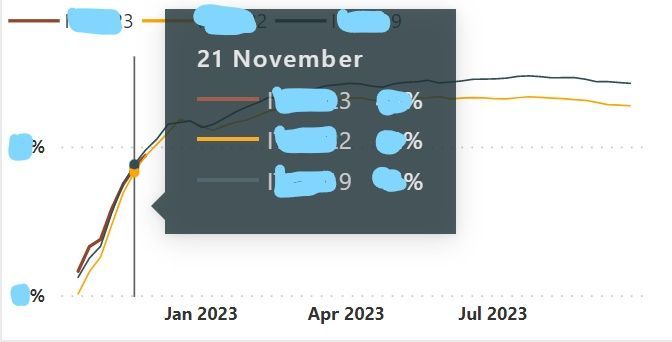
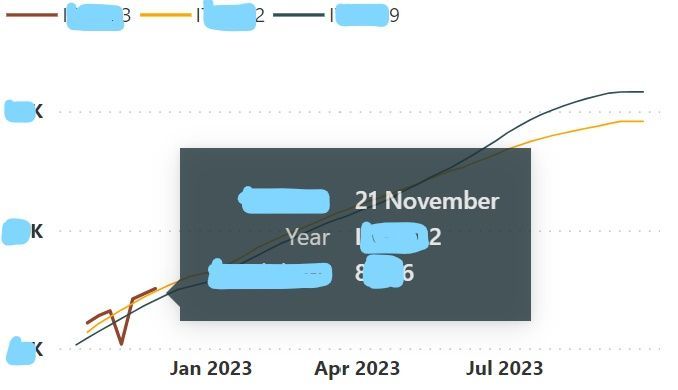
I would like my tooltip to look like the first picture. On some tabs I manage to get it like that (not sure how) but on others I have to hover over the specific point like this (picture 2)tooltip I want on all graphstooltip I want on all graphstooltip I have on some graphs and want to edit it to make sure it shows corresponding values from other linestooltip I have on some graphs and want to edit it to make sure it shows corresponding values from other lines


1 ACCEPTED SOLUTION
v-yueyunzh-msft
Community Support
Community Support

Hi, @rondadonda 

Hello, ToolTip in Power BI Desktop is automatically generated, in the settings do not find the option to set to one line.

For your needs, if you want Tooltip to meet your different needs, I recommend you use the tooltip page.

For how to create tooltip page , you can refer to :
Create report tooltip pages in Power BI - Power BI | Microsoft Learn


Thank you for your time and sharing, and thank you for your support and understanding of PowerBI! 


Best Regards,

Aniya Zhang

If this post helps, then please consider Accept it as the solution to help the other members find it more quickly

View solution in original post

1 REPLY 1
v-yueyunzh-msft
Community Support
Community Support

Hi, @rondadonda 

Hello, ToolTip in Power BI Desktop is automatically generated, in the settings do not find the option to set to one line.

For your needs, if you want Tooltip to meet your different needs, I recommend you use the tooltip page.

For how to create tooltip page , you can refer to :
Create report tooltip pages in Power BI - Power BI | Microsoft Learn


Thank you for your time and sharing, and thank you for your support and understanding of PowerBI! 


Best Regards,

Aniya Zhang

If this post helps, then please consider Accept it as the solution to help the other members find it more quickly

Helpful resources

Announcements
November Power BI Update Carousel

Power BI Monthly Update - November 2025

Check out the November 2025 Power BI update to learn about new features.

Fabric Data Days Carousel

Fabric Data Days

Advance your Data & AI career with 50 days of live learning, contests, hands-on challenges, study groups & certifications and more!

FabCon Atlanta 2026 carousel

FabCon Atlanta 2026

Join us at FabCon Atlanta, March 16-20, for the ultimate Fabric, Power BI, AI and SQL community-led event. Save $200 with code FABCOMM.

Top Solution Authors
Top Kudoed Authors