
Join us at FabCon Atlanta from March 16 - 20, 2026, for the ultimate Fabric, Power BI, AI and SQL community-led event. Save $200 with code FABCOMM.
Register now!The Power BI Data Visualization World Championships is back! Get ahead of the game and start preparing now! Learn more
Hi all, I need help with displaying the count for the respective part in my stacked column chart.
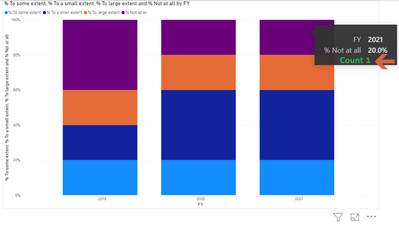
Currently, my formula for 'No. of responses' is COUNT((Table) [column]) but it counts all the entries in the particular table. How do I change my formula such that it only counts for the particular part?
Thanks!
Solved! Go to Solution.
Hi @jacquelineq ,
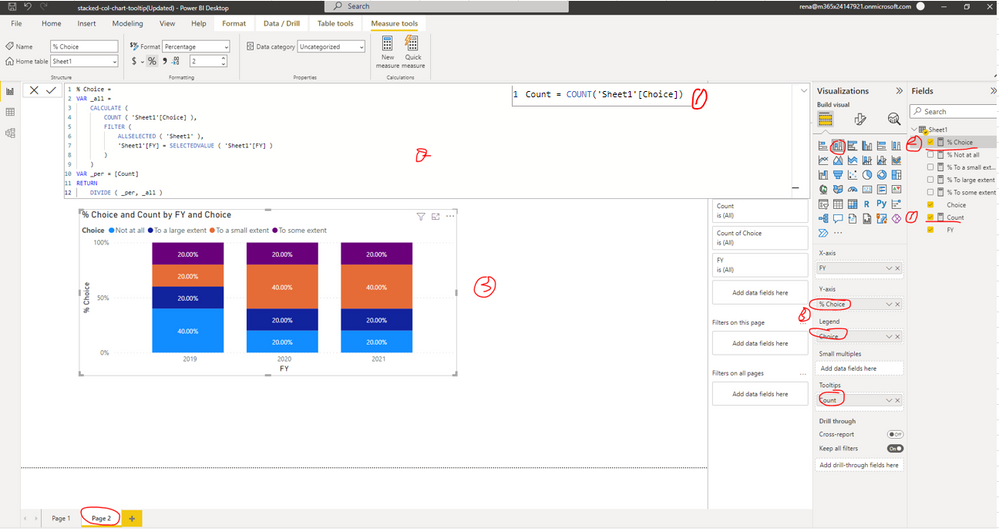
I updated your sample pbix file(see the attachment), please check the details in Page 2...
Count = COUNT('Sheet1'[Choice])% Choice =
VAR _all =
CALCULATE (
COUNT ( 'Sheet1'[Choice] ),
FILTER (
ALLSELECTED ( 'Sheet1' ),
'Sheet1'[FY] = SELECTEDVALUE ( 'Sheet1'[FY] )
)
)
VAR _per = [Count]
RETURN
DIVIDE ( _per, _all )
Best Regards
Hi @jacquelineq ,
How did you set your stacked column chart? Are the field involved in the stacked column chart from the same table? Do you want to get the respective count of response base on different category(the legend field)? Could you please provide some raw data(exclude sensitive data) with Text format and your expected result with backend logic and special examples. It is better if you can share a simplified pbix file. You can refer the following link to upload the file to the community. Thank you.
How to upload PBI in Community
Best Regards
hi @Anonymous , thanks so much for your reply!
I did a simple pbix file here -https://drive.google.com/file/d/1eoeC3gjRo2ocxxjphxBwh2YvZIhyoL4z/view?usp=sharing . Essentially, I want to show the count in the tooltip. How do I do that?
Hi @jacquelineq ,
I updated your sample pbix file(see the attachment), please check the details in Page 2...
Count = COUNT('Sheet1'[Choice])% Choice =
VAR _all =
CALCULATE (
COUNT ( 'Sheet1'[Choice] ),
FILTER (
ALLSELECTED ( 'Sheet1' ),
'Sheet1'[FY] = SELECTEDVALUE ( 'Sheet1'[FY] )
)
)
VAR _per = [Count]
RETURN
DIVIDE ( _per, _all )
Best Regards
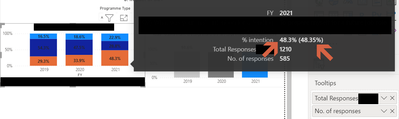
Hi @Anonymous , thank you so much for your help! I have applied your formula on my actual chart and it works! Just have 1 last question which I'm not sure if you can help me with. For the tooltip, I'm not sure why the the % is shown twice (in arrows below).
The Power BI Data Visualization World Championships is back! Get ahead of the game and start preparing now!
Check out the November 2025 Power BI update to learn about new features.
| User | Count |
|---|---|
| 65 | |
| 46 | |
| 43 | |
| 26 | |
| 19 |
| User | Count |
|---|---|
| 198 | |
| 125 | |
| 102 | |
| 69 | |
| 53 |