Jumpstart your career with the Fabric Career Hub
Find everything you need to get certified on Fabric—skills challenges, live sessions, exam prep, role guidance, and a 50 percent discount on exams.
Get started- Power BI forums
- Updates
- News & Announcements
- Get Help with Power BI
- Desktop
- Service
- Report Server
- Power Query
- Mobile Apps
- Developer
- DAX Commands and Tips
- Custom Visuals Development Discussion
- Health and Life Sciences
- Power BI Spanish forums
- Translated Spanish Desktop
- Power Platform Integration - Better Together!
- Power Platform Integrations (Read-only)
- Power Platform and Dynamics 365 Integrations (Read-only)
- Training and Consulting
- Instructor Led Training
- Dashboard in a Day for Women, by Women
- Galleries
- Community Connections & How-To Videos
- COVID-19 Data Stories Gallery
- Themes Gallery
- Data Stories Gallery
- R Script Showcase
- Webinars and Video Gallery
- Quick Measures Gallery
- 2021 MSBizAppsSummit Gallery
- 2020 MSBizAppsSummit Gallery
- 2019 MSBizAppsSummit Gallery
- Events
- Ideas
- Custom Visuals Ideas
- Issues
- Issues
- Events
- Upcoming Events
- Community Blog
- Power BI Community Blog
- Custom Visuals Community Blog
- Community Support
- Community Accounts & Registration
- Using the Community
- Community Feedback
Earn a 50% discount on the DP-600 certification exam by completing the Fabric 30 Days to Learn It challenge.
- Power BI forums
- Forums
- Get Help with Power BI
- Desktop
- To stop automatical accumulated percentage column
- Subscribe to RSS Feed
- Mark Topic as New
- Mark Topic as Read
- Float this Topic for Current User
- Bookmark
- Subscribe
- Printer Friendly Page


- Mark as New
- Bookmark
- Subscribe
- Mute
- Subscribe to RSS Feed
- Permalink
- Report Inappropriate Content
To stop automatical accumulated percentage column
Good day.
Simple data of 2 tables as below, and I want to display them in bars side by side.
I added a slicer using the month. One of the bars (data of percentage) is automatically accumulated (exceeding 100%), when the two percentage columns are of the same setting. It seems the problem lies in the Month in use but I can't figure it out.
Any help, please? Thank you.
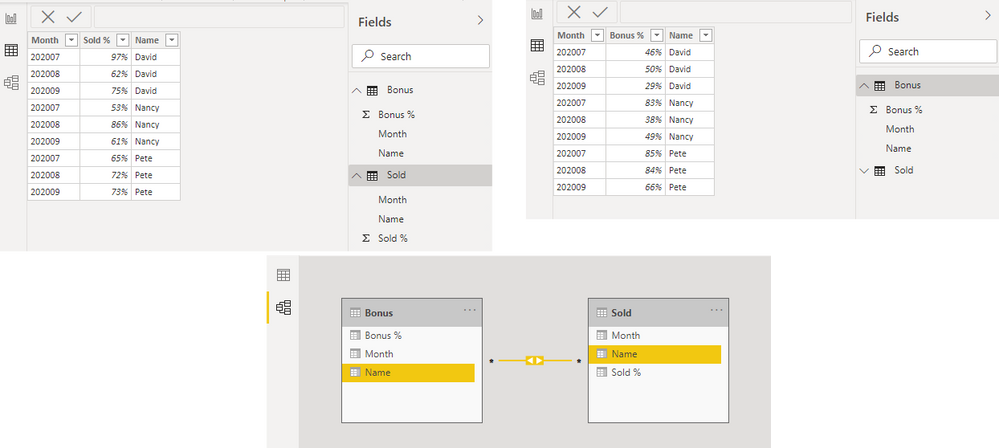
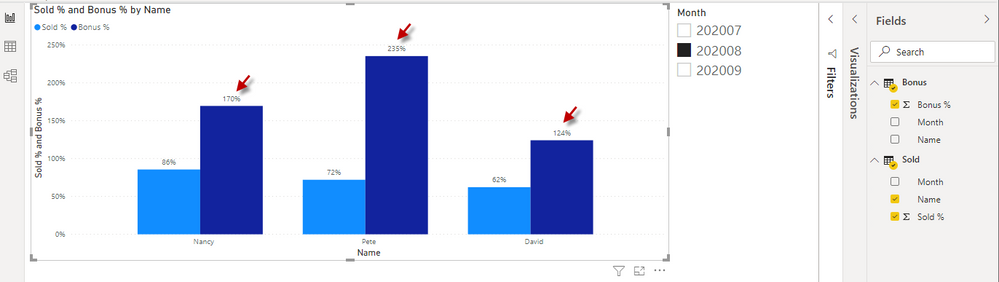
.pbix is here: https://gofile.io/d/3XWybp
Solved! Go to Solution.


- Mark as New
- Bookmark
- Subscribe
- Mute
- Subscribe to RSS Feed
- Permalink
- Report Inappropriate Content
See attached pbix, you just needed to remove the old both side relationship and activate the new relationship.
Please let me know if this solves.
- Mark as New
- Bookmark
- Subscribe
- Mute
- Subscribe to RSS Feed
- Permalink
- Report Inappropriate Content
Hello @JohnnyK
Create at two more tables, using dax you can create automatic and dynamic tables--
Table1 - Get the unique Month from both tables, so this table will have just one column having unique months from both the tables.
Table2 - Get the unique Names from both the tables, so this table will have just one column having unique Names.
Now create relationship Table1 to your both orginal tables based on Months (one to many)
Create relationship Table2 to your both orginal tables based on Names (one to many)
Now in slicer, x asix bring Values/dimentions from these two new tables.
Please let me know if above is making sense, I could not access your file.
- Mark as New
- Bookmark
- Subscribe
- Mute
- Subscribe to RSS Feed
- Permalink
- Report Inappropriate Content
@mhossain, thank you for your help and details in steps. I've followed them, but the result's still the same .
Can you please have a look at the .pbix file? Thank you.
- Mark as New
- Bookmark
- Subscribe
- Mute
- Subscribe to RSS Feed
- Permalink
- Report Inappropriate Content
Unable to open the pbix, showing error, please re-upload and share
- Mark as New
- Bookmark
- Subscribe
- Mute
- Subscribe to RSS Feed
- Permalink
- Report Inappropriate Content
@mhossainthank you for the follow-up. please find the file, https://gofile.io/d/3XWybp
- Mark as New
- Bookmark
- Subscribe
- Mute
- Subscribe to RSS Feed
- Permalink
- Report Inappropriate Content
See attached pbix, you just needed to remove the old both side relationship and activate the new relationship.
Please let me know if this solves.
- Mark as New
- Bookmark
- Subscribe
- Mute
- Subscribe to RSS Feed
- Permalink
- Report Inappropriate Content
@mhossainthanks again for your patience and help! it works! in the bar chart it needs the Names from the new table (not the old table).
wish you a good day!
- Mark as New
- Bookmark
- Subscribe
- Mute
- Subscribe to RSS Feed
- Permalink
- Report Inappropriate Content
Right, both the dimensions will come from the new tables, Glad it worked, have a great time.


- Mark as New
- Bookmark
- Subscribe
- Mute
- Subscribe to RSS Feed
- Permalink
- Report Inappropriate Content
Hi,
Write a measure to take the average of Bonus % and Sold %.
Regards,
Ashish Mathur
http://www.ashishmathur.com
https://www.linkedin.com/in/excelenthusiasts/
- Mark as New
- Bookmark
- Subscribe
- Mute
- Subscribe to RSS Feed
- Permalink
- Report Inappropriate Content
@Ashish_Mathur, thank you. could you please advise the use of the measure (average of Bonus % and Sold %)?
- Mark as New
- Bookmark
- Subscribe
- Mute
- Subscribe to RSS Feed
- Permalink
- Report Inappropriate Content
Hi,
I believe your question has been answered.
Regards,
Ashish Mathur
http://www.ashishmathur.com
https://www.linkedin.com/in/excelenthusiasts/

Helpful resources

New forum boards available in Real-Time Intelligence.
Ask questions in Eventhouse and KQL, Eventstream, and Reflex.

Fabric Monthly Update - May 2024
Check out the May 2024 Fabric update to learn about new features.


| User | Count |
|---|---|
| 94 | |
| 89 | |
| 79 | |
| 77 | |
| 71 |


| User | Count |
|---|---|
| 116 | |
| 107 | |
| 88 | |
| 64 | |
| 63 |


