cancel
Showing results for 
Search instead for 
Did you mean: 

The Power BI Data Visualization World Championships is back! Get ahead of the game and start preparing now! Learn more

Reply
Alexakdr
Regular Visitor

Timeline Slicer and measurement Calculate

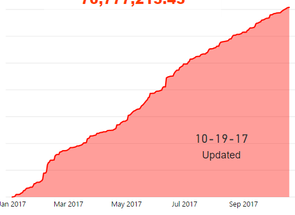
Initialy I have a measurement to calculate our sales

Total = CALCULATE(sum(SalesOrderSummaryGI[Amount]),FILTER(ALL(SalesOrderSummaryGI[Date]),SalesOrderSummaryGI[Date]<=MAX(SalesOrderSummaryGI[Date])))

And it perfectly works like thisslide 1.PNG


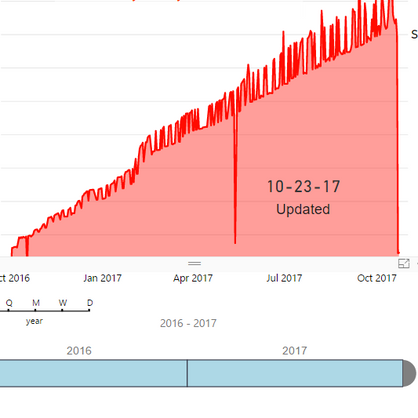
Then I tried to use Timeline visualization and after that picture changed to that


slide 2.PNG


How can I fix it and return to the previous picture?

1 ACCEPTED SOLUTION
v-sihou-msft
Microsoft Employee
Microsoft Employee

@Alexakdr


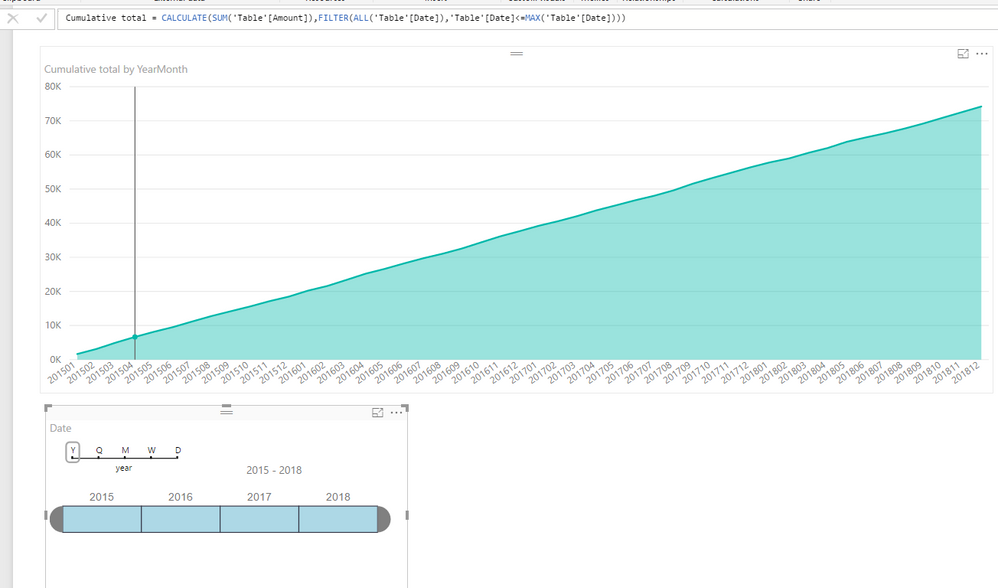
I haven't reproduced your issue. 


4.PNG


Did you apply any filter after you put the TimeLine slicer? Can you share your .pbix?


Regards,

View solution in original post

2 REPLIES 2
v-sihou-msft
Microsoft Employee
Microsoft Employee

@Alexakdr


I haven't reproduced your issue. 


4.PNG


Did you apply any filter after you put the TimeLine slicer? Can you share your .pbix?


Regards,

Yes you are right! I moved filters from the vizualization level to data column and now it works

Thank you!

Helpful resources

Announcements
Power BI DataViz World Championships

Power BI Dataviz World Championships

The Power BI Data Visualization World Championships is back! Get ahead of the game and start preparing now!

November Power BI Update Carousel

Power BI Monthly Update - November 2025

Check out the November 2025 Power BI update to learn about new features.

FabCon Atlanta 2026 carousel

FabCon Atlanta 2026

Join us at FabCon Atlanta, March 16-20, for the ultimate Fabric, Power BI, AI and SQL community-led event. Save $200 with code FABCOMM.