Join us at FabCon Atlanta from March 16 - 20, 2026, for the ultimate Fabric, Power BI, AI and SQL community-led event. Save $200 with code FABCOMM.
Register now!The Power BI Data Visualization World Championships is back! It's time to submit your entry. Live now!
Hi
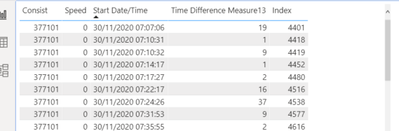
I have used this code to determine the time difference between rows as a messure.
This looks at each row of data.
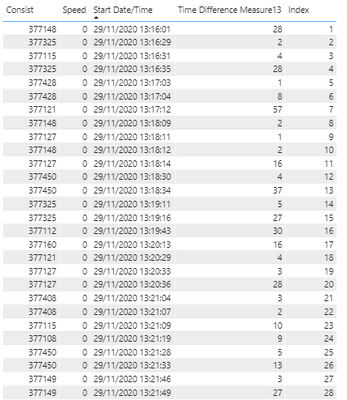
How would i determine the difference when using a slicer? The index is showing what lines the data is on just for me to understand what the messure was doing.
If i select consist using a slicer i would like the messure to determin the time difference.
Any help would be appricated - i have spent hours trying to find a solution.
Solved! Go to Solution.
Hello @RichardT_78 ,
You can update your measurement as below screenshot shown, please find more details in the attachment:
Time Difference =
VAR _nexindex =
CALCULATE (
MIN ( 'FAC'[Index] ),
FILTER (
ALLEXCEPT ( 'FAC', 'FAC'[Consist] ),
'FAC'[Index] > MAX ( 'FAC'[Index] )
)
)
VAR _nexttime =
CALCULATE (
MAX ( 'FAC'[Start Date/Time] ),
FILTER ( ALLEXCEPT ( 'FAC', 'FAC'[Consist] ), 'FAC'[Index] = _nexindex )
)
RETURN
DATEDIFF ( SELECTEDVALUE ( 'FAC'[Start Date/Time] ), _nexttime, SECOND ) + 0
Best regards
Hello,
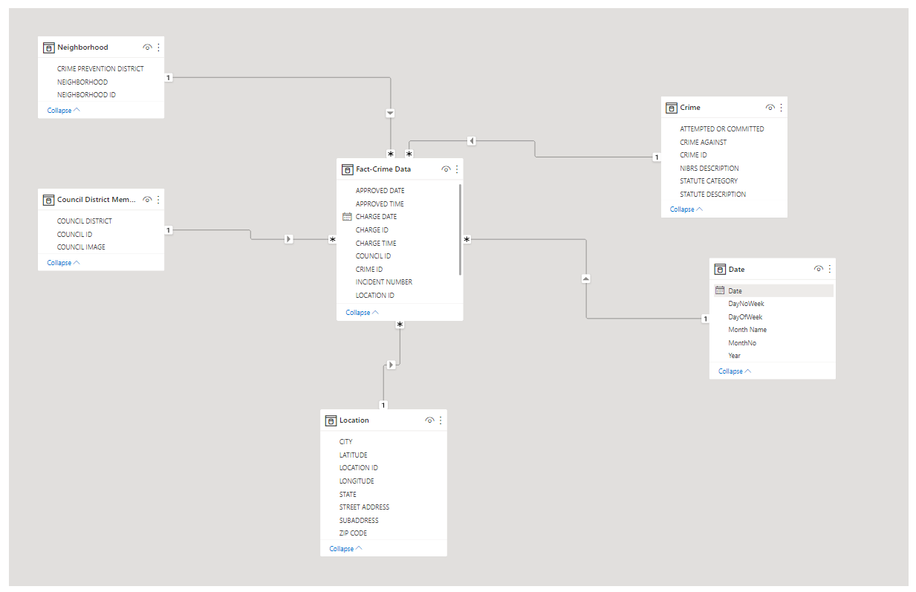
I am using a crime dataset and trying to put it in a star schema. However, when I merge the dimension table with a fact table it causes the fact table to add additional rows. This dataset has three different date columns and three different time columns. I have tried so many different ways and got the same results. Here is a screenshot of the data model. And the file to the original dataset.
https://data.brla.gov/Public-Safety/Baton-Rouge-Crime-Incidents/pbin-pcm7/data
Thank you
| Consist | Start Date/Time |
| 377436 | 01/12/2020 13:08:51 |
| 377436 | 01/12/2020 13:08:50 |
| 377153 | 01/12/2020 13:06:32 |
| 377153 | 01/12/2020 13:06:30 |
| 377408 | 01/12/2020 13:04:51 |
| 377436 | 01/12/2020 13:04:40 |
| 377436 | 01/12/2020 13:04:39 |
| 377140 | 01/12/2020 13:02:14 |
| 377140 | 01/12/2020 13:02:12 |
| 377436 | 01/12/2020 13:01:00 |
| 377436 | 01/12/2020 13:00:59 |
| 377424 | 01/12/2020 12:59:54 |
| 377424 | 01/12/2020 12:59:51 |
| 377447 | 01/12/2020 12:59:40 |
| 377104 | 01/12/2020 12:59:36 |
377436 would be a good test as its spread over the table
So are for example 100 consist codes, which all have a time stamp for each particular event.
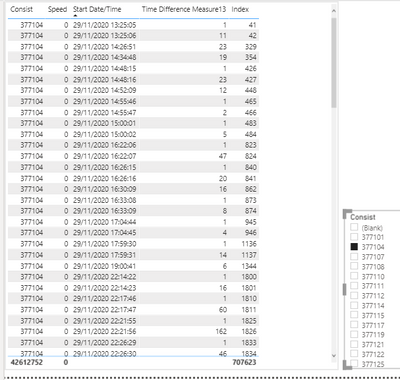
When I use a slicer and select 377104 for example, it displays all events chronologically, but the messure fails.
As you can see the messure works fine when you dont focus on a consist, but when i select a consist its rows are not consecutive.
Hope this helps , much appricated
Hello @RichardT_78 ,
You can update your measurement as below screenshot shown, please find more details in the attachment:
Time Difference =
VAR _nexindex =
CALCULATE (
MIN ( 'FAC'[Index] ),
FILTER (
ALLEXCEPT ( 'FAC', 'FAC'[Consist] ),
'FAC'[Index] > MAX ( 'FAC'[Index] )
)
)
VAR _nexttime =
CALCULATE (
MAX ( 'FAC'[Start Date/Time] ),
FILTER ( ALLEXCEPT ( 'FAC', 'FAC'[Consist] ), 'FAC'[Index] = _nexindex )
)
RETURN
DATEDIFF ( SELECTEDVALUE ( 'FAC'[Start Date/Time] ), _nexttime, SECOND ) + 0
Best regards
@RichardT_78 ,The information you have provided is not making the problem clear to me. Can you please explain with an example.
Appreciate your Kudos.
Can you share sample data and sample output in table format? Or a sample pbix after removing sensitive data.
| User | Count |
|---|---|
| 51 | |
| 38 | |
| 33 | |
| 22 | |
| 19 |
| User | Count |
|---|---|
| 136 | |
| 101 | |
| 58 | |
| 36 | |
| 35 |