Join us at FabCon Atlanta from March 16 - 20, 2026, for the ultimate Fabric, Power BI, AI and SQL community-led event. Save $200 with code FABCOMM.
Register now!View all the Fabric Data Days sessions on demand. View schedule
Hello,
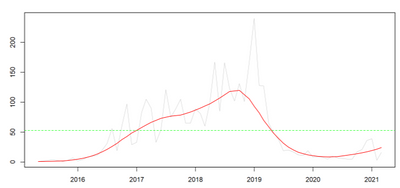
I am experiencing with "Time series decomposition chart" There is a dotted green line if I switch to Plot Type = "trend". What does it represent? An average? A median? The standard deviation?
Alos, what means "Degree" in the Algorithm Parameters section?
Regards.
Solved! Go to Solution.
HI @Anonymous,
I think it maybe a manually added measure line or analyse panel constant line and used as 'baseline' for visual analysis.
Use the Analytics pane in Power BI Desktop - Power BI | Microsoft Docs
Regards,
Xiaoxin Sheng
Thank you for providing additional information, very useful.
Can you also please let me know what is the dotted horizontal green line in chart below? There is no information about it in the visual, it just shows there and cannot be removed, customized, etc:
Regards.
HI @Anonymous,
I think it maybe a manually added measure line or analyse panel constant line and used as 'baseline' for visual analysis.
Use the Analytics pane in Power BI Desktop - Power BI | Microsoft Docs
Regards,
Xiaoxin Sheng
Hi @Anonymous,
It should work as same as its name, the trend line will analyze your records and show the graph trend based on the current category group and value field aggregate mode.
From power bi forecast features, you can also take a look at the following blog that mention how to use Dax functions to achieve them:
How To Create A Forward Forecast In Power BI: Advanced Forecasting Techniques
Regards,
Xiaoxin Sheng
Check out the November 2025 Power BI update to learn about new features.
Advance your Data & AI career with 50 days of live learning, contests, hands-on challenges, study groups & certifications and more!