cancel
Showing results for 
Search instead for 
Did you mean: 

Get Fabric Certified for FREE during Fabric Data Days. Don't miss your chance! Request now

Reply
Jyo27
Helper II
Helper II

Time range

Hi ,

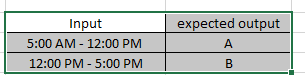
How to calculate if else statement for  time range ? want to create custom column in power query.


Jyo27_0-1671550295472.png

Appreciate your help.

1 ACCEPTED SOLUTION
Anonymous
Not applicable

Hi @Jyo27 ,


Please try:


= Table.AddColumn(
Previousstepsname, 
"Custom", 
each if [Time] >= #time(5, 0, 0) and [Time] < #time(12, 0, 0) then "A" 
else if [Time] >= #time(12, 0, 0) and [Time] <= #time(17, 0, 0) then "B" 
else null
)


Best Regards,
Gao

Community Support Team


If there is any post helps, then please consider Accept it as the solution  to help the other members find it more quickly. If I misunderstand your needs or you still have problems on it, please feel free to let us know. Thanks a lot!

How to get your questions answered quickly --  How to provide sample data in the Power BI Forum

View solution in original post

3 REPLIES 3
Anonymous
Not applicable

Hi @Jyo27 ,


Please try:


= Table.AddColumn(
Previousstepsname, 
"Custom", 
each if [Time] >= #time(5, 0, 0) and [Time] < #time(12, 0, 0) then "A" 
else if [Time] >= #time(12, 0, 0) and [Time] <= #time(17, 0, 0) then "B" 
else null
)


Best Regards,
Gao

Community Support Team


If there is any post helps, then please consider Accept it as the solution  to help the other members find it more quickly. If I misunderstand your needs or you still have problems on it, please feel free to let us know. Thanks a lot!

How to get your questions answered quickly --  How to provide sample data in the Power BI Forum

nick_potts
New Member

You could categorize or index each time range then make a calculated column with a switch statement on that index. Or do what @Shaurya recommended if there are only a few cases to consider

Shaurya
Memorable Member
Memorable Member

Hi @Jyo27,


Instead of custom formula in Power Query, just create a conditional column in DAX. It's much easier.


Column = IF(HOUR('Table'[Date])>=5&&HOUR('Table'[Date])<=12,"A",IF(HOUR('Table'[Date])>12&&HOUR('Table'[Date])<=17,"B",""))


Works for you? Mark this post as a solution if it does!
Check out this blog of mine: How to Export Telemetry Data from Azure IoT Central into Power BI

Helpful resources

Announcements
November Power BI Update Carousel

Power BI Monthly Update - November 2025

Check out the November 2025 Power BI update to learn about new features.

Fabric Data Days Carousel

Fabric Data Days

Advance your Data & AI career with 50 days of live learning, contests, hands-on challenges, study groups & certifications and more!

FabCon Atlanta 2026 carousel

FabCon Atlanta 2026

Join us at FabCon Atlanta, March 16-20, for the ultimate Fabric, Power BI, AI and SQL community-led event. Save $200 with code FABCOMM.

Top Solution Authors
Top Kudoed Authors