Forum Discussion

Time comparison multiple years
Hi Ciria,
Thanks for your reply, weekly I see the Curbal DAX-Friday-videos, Ruth does a good job. :-)
In the meantime I’ve made the DAX-formulas for New and Steady customers:
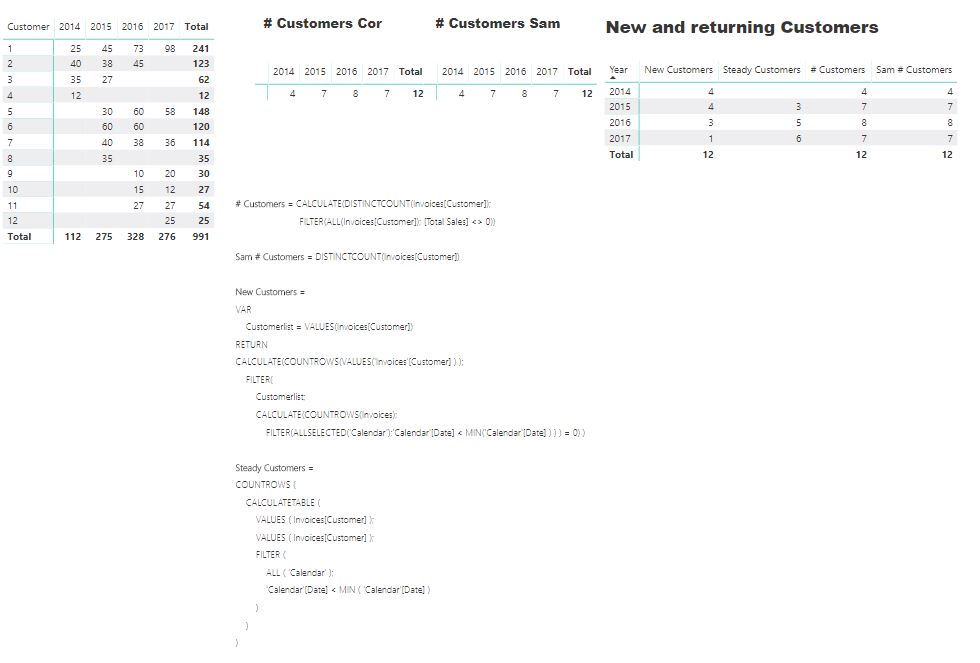
Can you help me with the formula for Lost customers? Now I have the numbers for New and Steady customers, how can I connect these numbers with the amount of Sales?
Thanks in advance,
Cor

Hi Anonymous
I'm afraid of without having the model I cannot help you more, additionally your DAX looks pretty advanced, so I am not sure if I will be able to help you any further....
About your question, maybe this video helps you to clasify your customers....
https://www.youtube.com/watch?v=Nboy_u8Iv74&index=2&list=LLECfzwATlNAWnYdkkGLenGw
Keep me posted if it works!
- Anonymous8 years agoNot applicable
Hi Ciria,
Thanks for your reply!
Sam McKay makes wonderful videos and the video you mentioned is also an excellent video by Sam but the video doesn't help me to answer my questions. I'm still looking for a solution to connect the number of lost-steady and new customers to the Sales-amount and compare these figures with the figure of the previous year.
Is there someone who can help me?
Thanks in advance,
With kind regards,
Cor
- Ciria8 years agoAdvocate III
Hi Anonymous
What about the use of LASTNONBLANK??
This function may return the last date with sales for every customer. I guess adding a IF function you could classify every customer.
I guess a customer with no sales on the present year, may be classifed as "lost customer"?
Regards,