FabCon is coming to Atlanta
Join us at FabCon Atlanta from March 16 - 20, 2026, for the ultimate Fabric, Power BI, AI and SQL community-led event. Save $200 with code FABCOMM.
Register now!- Power BI forums
- Get Help with Power BI
- Desktop
- Service
- Report Server
- Power Query
- Mobile Apps
- Developer
- DAX Commands and Tips
- Custom Visuals Development Discussion
- Health and Life Sciences
- Power BI Spanish forums
- Translated Spanish Desktop
- Training and Consulting
- Instructor Led Training
- Dashboard in a Day for Women, by Women
- Galleries
- Data Stories Gallery
- Themes Gallery
- Contests Gallery
- QuickViz Gallery
- Quick Measures Gallery
- Visual Calculations Gallery
- Notebook Gallery
- Translytical Task Flow Gallery
- TMDL Gallery
- R Script Showcase
- Webinars and Video Gallery
- Ideas
- Custom Visuals Ideas (read-only)
- Issues
- Issues
- Events
- Upcoming Events
The Power BI Data Visualization World Championships is back! Get ahead of the game and start preparing now! Learn more
- Power BI forums
- Forums
- Get Help with Power BI
- Desktop
- Time calculations - Hours per month over different...
- Subscribe to RSS Feed
- Mark Topic as New
- Mark Topic as Read
- Float this Topic for Current User
- Bookmark
- Subscribe
- Printer Friendly Page

- Mark as New
- Bookmark
- Subscribe
- Mute
- Subscribe to RSS Feed
- Permalink
- Report Inappropriate Content
Time calculations - Hours per month over different periods
I have an interesting oen that I don't know how to solve.
The data looks something like this:
ID Revision Start Date & Time End Date & Time
1 1 2016/02/03 14:26 2016/02/06 13:58
1 2 2016/02/06 13:58 2016/08/03 9:06
2 1 2016/02/11 15:21 2016/02/11 16:55
2 2 2016/02/11 16:55 2016/02/12 8:55
2 3 2016/02/12 8:55 2016/06/29 15:10
2 4 2016/06/29 15:10 2016/07/05 9:30
2 5 2016/07/05 9:30 2017/01/03 15:00
The table contains around 150k lines.
The request is :
- Report total hours that elapsed per ID or ID and Revision in hours (actually working hours but that is not the problem right now)
- Break down those hours per month, even if the start and end date crossed many months, it needs to report the maximum for those months.
So initial output I would require to get this working is just Month/Year - total hours. From there I should break it down into per ID etc.
I'm not sure how to implement the monthly calculations? Can anybody help?
Solved! Go to Solution.


- Mark as New
- Bookmark
- Subscribe
- Mute
- Subscribe to RSS Feed
- Permalink
- Report Inappropriate Content
@qball wrote:
I have an interesting oen that I don't know how to solve.
The data looks something like this:
ID Revision Start Date & Time End Date & Time
1 1 2016/02/03 14:26 2016/02/06 13:58
1 2 2016/02/06 13:58 2016/08/03 9:06
2 1 2016/02/11 15:21 2016/02/11 16:55
2 2 2016/02/11 16:55 2016/02/12 8:55
2 3 2016/02/12 8:55 2016/06/29 15:10
2 4 2016/06/29 15:10 2016/07/05 9:30
2 5 2016/07/05 9:30 2017/01/03 15:00
The table contains around 150k lines.
The request is :
- Report total hours that elapsed per ID or ID and Revision in hours (actually working hours but that is not the problem right now)
- Break down those hours per month, even if the start and end date crossed many months, it needs to report the maximum for those months.
So initial output I would require to get this working is just Month/Year - total hours. From there I should break it down into per ID etc.
I'm not sure how to implement the monthly calculations? Can anybody help?
To achieve the goal, I'll create a calendar table as below
calendar =
ADDCOLUMNS (
    FILTER ( CALENDAR ( "2016-01-01", "2017-12-31" ), DAY ( [Date] ) = 1 ),
    "MonthEnd", EOMONTH ( [Date], 0 )
)
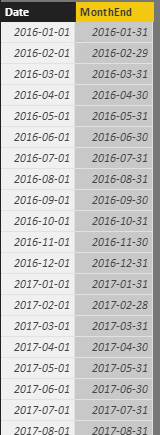
Then create a calculated table as below, to expand the dates window to multiple rows for each month.
calculated Table =
FILTER (
    CROSSJOIN ( yourTable, 'calendar' ),
    OR (
        OR (
            yourTable[Start Date  & Time] >= 'calendar'[Date]
                && yourTable[Start Date  & Time] <= 'calendar'[MonthEnd],
            'calendar'[MonthEnd] >= yourTable[Start Date  & Time]
                && 'calendar'[MonthEnd] <= yourTable[End Date & Time]
        ),
        ( yourTable[End Date & Time] ) >= 'calendar'[Date]
            && yourTable[End Date & Time] <= 'calendar'[MonthEnd]
    )
)

Then create a calculated column as
elapsed hours =
SWITCH (
    TRUE (),
    'calculated Table'[Start Date  & Time] >= 'calculated Table'[Date]
        && 'calculated Table'[End Date & Time] <= 'calculated Table'[MonthEnd], DATEDIFF (
        'calculated Table'[Start Date  & Time],
        'calculated Table'[End Date & Time],
        HOUR
    ),
    'calculated Table'[Start Date  & Time] >= 'calculated Table'[Date]
        && 'calculated Table'[End Date & Time] >= 'calculated Table'[MonthEnd], DATEDIFF (
        'calculated Table'[Start Date  & Time],
        'calculated Table'[MonthEnd],
        HOUR
    ),
    'calculated Table'[Date] > 'calculated Table'[Start Date  & Time]
        && 'calculated Table'[MonthEnd] < 'calculated Table'[End Date & Time], DATEDIFF ( 'calculated Table'[Date], 'calculated Table'[MonthEnd], HOUR ),
    DATEDIFF ( 'calculated Table'[Date], 'calculated Table'[End Date & Time], HOUR )
)
So finally

See more details in the attached pbix file.
- Mark as New
- Bookmark
- Subscribe
- Mute
- Subscribe to RSS Feed
- Permalink
- Report Inappropriate Content
Eric - you are a legend!
Thank you so much - all working now. Also got it to work by calculating the working hours (minus weekends and holidays).
- Mark as New
- Bookmark
- Subscribe
- Mute
- Subscribe to RSS Feed
- Permalink
- Report Inappropriate Content
Glad to help. 🙂
- Mark as New
- Bookmark
- Subscribe
- Mute
- Subscribe to RSS Feed
- Permalink
- Report Inappropriate Content
@qball wrote:
I have an interesting oen that I don't know how to solve.
The data looks something like this:
ID Revision Start Date & Time End Date & Time
1 1 2016/02/03 14:26 2016/02/06 13:58
1 2 2016/02/06 13:58 2016/08/03 9:06
2 1 2016/02/11 15:21 2016/02/11 16:55
2 2 2016/02/11 16:55 2016/02/12 8:55
2 3 2016/02/12 8:55 2016/06/29 15:10
2 4 2016/06/29 15:10 2016/07/05 9:30
2 5 2016/07/05 9:30 2017/01/03 15:00
The table contains around 150k lines.
The request is :
- Report total hours that elapsed per ID or ID and Revision in hours (actually working hours but that is not the problem right now)
- Break down those hours per month, even if the start and end date crossed many months, it needs to report the maximum for those months.
So initial output I would require to get this working is just Month/Year - total hours. From there I should break it down into per ID etc.
I'm not sure how to implement the monthly calculations? Can anybody help?
To achieve the goal, I'll create a calendar table as below
calendar =
ADDCOLUMNS (
    FILTER ( CALENDAR ( "2016-01-01", "2017-12-31" ), DAY ( [Date] ) = 1 ),
    "MonthEnd", EOMONTH ( [Date], 0 )
)
Then create a calculated table as below, to expand the dates window to multiple rows for each month.
calculated Table =
FILTER (
    CROSSJOIN ( yourTable, 'calendar' ),
    OR (
        OR (
            yourTable[Start Date  & Time] >= 'calendar'[Date]
                && yourTable[Start Date  & Time] <= 'calendar'[MonthEnd],
            'calendar'[MonthEnd] >= yourTable[Start Date  & Time]
                && 'calendar'[MonthEnd] <= yourTable[End Date & Time]
        ),
        ( yourTable[End Date & Time] ) >= 'calendar'[Date]
            && yourTable[End Date & Time] <= 'calendar'[MonthEnd]
    )
)
Then create a calculated column as
elapsed hours =
SWITCH (
    TRUE (),
    'calculated Table'[Start Date  & Time] >= 'calculated Table'[Date]
        && 'calculated Table'[End Date & Time] <= 'calculated Table'[MonthEnd], DATEDIFF (
        'calculated Table'[Start Date  & Time],
        'calculated Table'[End Date & Time],
        HOUR
    ),
    'calculated Table'[Start Date  & Time] >= 'calculated Table'[Date]
        && 'calculated Table'[End Date & Time] >= 'calculated Table'[MonthEnd], DATEDIFF (
        'calculated Table'[Start Date  & Time],
        'calculated Table'[MonthEnd],
        HOUR
    ),
    'calculated Table'[Date] > 'calculated Table'[Start Date  & Time]
        && 'calculated Table'[MonthEnd] < 'calculated Table'[End Date & Time], DATEDIFF ( 'calculated Table'[Date], 'calculated Table'[MonthEnd], HOUR ),
    DATEDIFF ( 'calculated Table'[Date], 'calculated Table'[End Date & Time], HOUR )
)
So finally
See more details in the attached pbix file.
- Mark as New
- Bookmark
- Subscribe
- Mute
- Subscribe to RSS Feed
- Permalink
- Report Inappropriate Content
Thank you Eric - will do it right now and let you know the outcome.

Helpful resources

Power BI Dataviz World Championships
The Power BI Data Visualization World Championships is back! Get ahead of the game and start preparing now!

Power BI Monthly Update - December 2025
Check out the December 2025 Power BI Holiday Recap!

FabCon Atlanta 2026
Join us at FabCon Atlanta, March 16-20, for the ultimate Fabric, Power BI, AI and SQL community-led event. Save $200 with code FABCOMM.

| User | Count |
|---|---|
| 41 | |
| 38 | |
| 36 | |
| 31 | |
| 28 |


| User | Count |
|---|---|
| 129 | |
| 88 | |
| 79 | |
| 68 | |
| 63 |


