cancel
Showing results for 
Search instead for 
Did you mean: 

The Power BI Data Visualization World Championships is back! Get ahead of the game and start preparing now! Learn more

Reply
Anonymous
Not applicable

Time Period

Hi Team,


In power bi i need one line and stacked column chart like it should show the previous month data if the date cross 12th of every month or before 12th it should should previous two months data for example current month is april and date is 15th so it should show me last six month data i.e. Mar, Feb, Jan, Dec, Nov, Oct and if it doesn't cross 12th then it should show the months i.e. - Feb, Jan, Dec, Nov, Oct, Sept. I have written a dax query which is something like this but i am getting an error that 

'Measure'[PreviousMonths]: A table of multiple values was supplied where a single value was expected. 


Dax Query - 

PreviousMonths =
VAR CurrentDate = TODAY()
VAR CurrentMonth = MONTH(CurrentDate)
VAR CurrentDay = DAY(CurrentDate)

RETURN
IF(
    CurrentDay > 12,
    CALCULATETABLE(
        VALUES('Calendar'[Month]),
        FILTER(
            'Calendar',
            'Calendar'[Heriearchy] <= EOMONTH(CurrentDate, -1) && 'Calendar'[Heriearchy] > EOMONTH(CurrentDate, -7)
        )
    ),
    CALCULATETABLE(
        VALUES('Calendar'[Month]),
        FILTER(
            'Calendar',
            'Calendar'[Heriearchy] <= EOMONTH(CurrentDate, -2) && 'Calendar'[Heriearchy] > EOMONTH(CurrentDate, -8)
        )
    )
)
Calendar[Heriearchy] - Contains Date, 'Calendar[Month] - contains Month number. 
 
Please let me know what i need to change in this query. It's urgent please help.
1 ACCEPTED SOLUTION
Anonymous
Not applicable

Hello Everyone!!
Thanks for your responses and your time, really appreciate, but i have solved the issue by my own by using the below mention DAX query. But anyways, really thanks for your support. 

SelectedMonths =
VAR CurrentDate = TODAY()
VAR CurrentDay = DAY(CurrentDate)
VAR StartDate =
    IF(
        CurrentDay > 12,
        EOMONTH(CurrentDate, -6),
        EOMONTH(CurrentDate, -5)
    )
VAR EndDate = EOMONTH(CurrentDate, -1)
VAR EndDate_1 = EOMONTH(CurrentDate, -2)
RETURN
IF(CurrentDay>12,
 (CALCULATE(
        SUMX('Measure',[Orders (MUSD)]),
        'Calendar'[Heriearchy] >= StartDate && 'Calendar'[Heriearchy] <= EndDate)),
        CALCULATE(
        SUMX('Measure',[Orders (MUSD)]),
        'Calendar'[Heriearchy] >= StartDate && 'Calendar'[Heriearchy] <= EndDate_1))
 
Once again thanks for your support.

View solution in original post

3 REPLIES 3
Anonymous
Not applicable

Hello Everyone!!
Thanks for your responses and your time, really appreciate, but i have solved the issue by my own by using the below mention DAX query. But anyways, really thanks for your support. 

SelectedMonths =
VAR CurrentDate = TODAY()
VAR CurrentDay = DAY(CurrentDate)
VAR StartDate =
    IF(
        CurrentDay > 12,
        EOMONTH(CurrentDate, -6),
        EOMONTH(CurrentDate, -5)
    )
VAR EndDate = EOMONTH(CurrentDate, -1)
VAR EndDate_1 = EOMONTH(CurrentDate, -2)
RETURN
IF(CurrentDay>12,
 (CALCULATE(
        SUMX('Measure',[Orders (MUSD)]),
        'Calendar'[Heriearchy] >= StartDate && 'Calendar'[Heriearchy] <= EndDate)),
        CALCULATE(
        SUMX('Measure',[Orders (MUSD)]),
        'Calendar'[Heriearchy] >= StartDate && 'Calendar'[Heriearchy] <= EndDate_1))
 
Once again thanks for your support.
Anonymous
Not applicable

Hi @Anonymous ,

First of all, many thanks to @ChiragGarg2512  for your very quick and effective replies.

Based on my testing, please try the following methods:

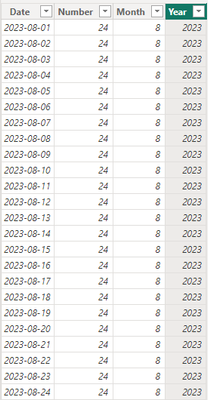
1.Create the simple table.

vjiewumsft_0-1713336713789.png

2.Create the new measure to filter month.


PreviousMonths = 
VAR CurrentDate = TODAY()
VAR CurrentMonth = MONTH(CurrentDate)
VAR CurrentDay = DAY(CurrentDate)
VAR curyear = YEAR(CurrentDate)

RETURN
IF(
    CurrentDay > 12,
    CALCULATE(
        SUMX('Table', 'Table'[Number]),
        FILTER (
            ALLEXCEPT('Table', 'Table'[Date]), 
            ('Table'[Year] = curyear
                && 'Table'[Month] < CurrentMonth) || ('Table'[Year] = curyear - 1 && ('Table'[Month] > CurrentMonth + 5 && 'Table'[Month] <= 12))
        )
    ),
    CALCULATE(
        SUMX('Table', 'Table'[Number]),
        FILTER (
            ALLEXCEPT('Table', 'Table'[Date]), 
            ('Table'[Year] = curyear
                && 'Table'[Month] < CurrentMonth - 1) || ('Table'[Year] = curyear - 1 && ('Table'[Month] > CurrentMonth + 4 && 'Table'[Month] <= 12))
        )
))


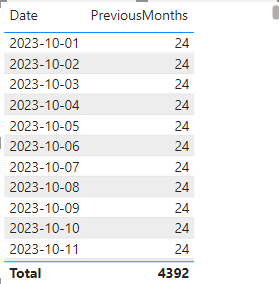
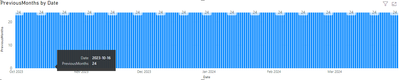
3.Drag the measure into the table visual and column chart. The result is shown below.

vjiewumsft_1-1713337462152.png

vjiewumsft_2-1713337505792.png


Best Regards,

Wisdom Wu

If this post helps, then please consider Accept it as the solution to help the other members find it more quickly.

ChiragGarg2512
Solution Sage
Solution Sage

The error might be because of Calculatetable, try Calculate instead.

Helpful resources

Announcements
Power BI DataViz World Championships

Power BI Dataviz World Championships

The Power BI Data Visualization World Championships is back! Get ahead of the game and start preparing now!

December 2025 Power BI Update Carousel

Power BI Monthly Update - December 2025

Check out the December 2025 Power BI Holiday Recap!

FabCon Atlanta 2026 carousel

FabCon Atlanta 2026

Join us at FabCon Atlanta, March 16-20, for the ultimate Fabric, Power BI, AI and SQL community-led event. Save $200 with code FABCOMM.

Top Solution Authors