Get Fabric or SQL Certified for Free.
Get certified for free when you join Fabric Data Days 2026 and dive into Fabric, Power BI, SQL, AI, and other essential data skills.
Join now- Power BI forums
- Get Help with Power BI
- Desktop
- Service
- Report Server
- Power Query
- Mobile Apps
- Developer
- DAX Commands and Tips
- Custom Visuals Development Discussion
- Health and Life Sciences
- Power BI Spanish forums
- Translated Spanish Desktop
- Training and Consulting
- Instructor Led Training
- Dashboard in a Day for Women, by Women
- Galleries
- Data Stories Gallery
- Themes Gallery
- Contests Gallery
- QuickViz Gallery
- Quick Measures Gallery
- Visual Calculations Gallery
- Fabric Apps Gallery
- Notebook Gallery
- Translytical Task Flow Gallery
- TMDL Gallery
- R Script Showcase
- Webinars and Video Gallery
- Ideas
- Custom Visuals Ideas (read-only)
- Issues
- Issues
- Events
- Upcoming Events
July 28 - August 9 | Final Round of the Power BI Dataviz World Championships. This is your chance. Learn more
- Power BI forums
- Forums
- Get Help with Power BI
- Desktop
- Time Intelligence Functions
- Subscribe to RSS Feed
- Mark Topic as New
- Mark Topic as Read
- Float this Topic for Current User
- Bookmark
- Subscribe
- Printer Friendly Page

- Mark as New
- Bookmark
- Subscribe
- Mute
- Subscribe to RSS Feed
- Permalink
- Report Inappropriate Content
Time Intelligence Functions
Hi Guru's,
Hope you are doing good. I need your help in figuring out the formula for couple of new metrics. I am new to Power BI and this is my 3rd day playing with the tool. I have created "Current Year YTD Sales" and "Prior Year YTD Sales" by looking at few blogs and discussion forum. Now, the other requirement is to create "Prior Year Next Month Sales" which is Aug 2019 and "Prior Year Next 3 Month Sales" which is a total sales of Aug 2019, Sep 2019 and Oct 2019. Could you please help me.
Thanks, Sandeep


- Mark as New
- Bookmark
- Subscribe
- Mute
- Subscribe to RSS Feed
- Permalink
- Report Inappropriate Content
Hi, @Anonymous
Based on your description, I created data to reproduce your scenario. The pbix file is attached in the end.
Table:
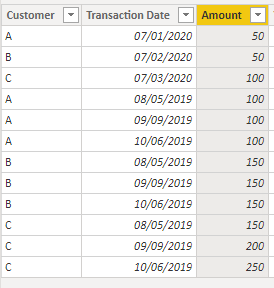
Calendar(a calculated table):
Calendar = CALENDAR(DATE(2018,1,1),DATE(2020,12,31))
There is no relationship between two tables. You may create calculated columns and meausres as below.
Calculated column:
CalendarYearMonth = YEAR('Calendar'[Date])*100+MONTH('Calendar'[Date])

YearMonth = YEAR('Table'[Transaction Date])*100+MONTH('Table'[Transaction Date])

Measure:
Current year Sales =
var tab =
SUMMARIZE(
    'Table',
    'Table'[Customer],
    "Current Month Sales",
    CALCULATE(
        SUM('Table'[Amount]),
        FILTER(
            ALL('Table'),
            'Table'[Customer]=EARLIER('Table'[Customer])&&
            YEAR('Table'[Transaction Date])=YEAR(TODAY())&&
            MONTH('Table'[Transaction Date])=MONTH(TODAY())
        )
    )
)
return
SUMX(
    tab,
    [Current Month Sales]
)

Prior Year Next 1 Month sales =
var tab =
SUMMARIZE(
    'Table',
    'Table'[Customer],
    "Prior Year Next 1 month sales",
    var _customer = [Customer]
    return
    CALCULATE(
        SUM('Table'[Amount]),
        FILTER(
            ALL('Table'),
            'Table'[Customer] = _customer&&
            'Table'[YearMonth] =
            CALCULATE(
                MIN('Calendar'[CalendarYearMonth]),
                FILTER(
                    ALL('Calendar'),
                    'Calendar'[CalendarYearMonth]>(YEAR(TODAY())-1)*100+MONTH(TODAY())
                )
            )
        )
    )
)
return
SUMX(
    tab,
    [Prior Year Next 1 month sales]
)

Prior Year Next 3 Month sales =
var tab =
SUMMARIZE(
    'Table',
    'Table'[Customer],
    "Prior Year Next 3 month sales",
    var _customer = [Customer]
    return
    CALCULATE(
        SUM('Table'[Amount]),
        FILTER(
            ALL('Table'),
            'Table'[Customer] = _customer&&
            'Table'[YearMonth] in
            TOPN(
                3,
                FILTER(
                    ALL('Calendar'[CalendarYearMonth]),
                    'Calendar'[CalendarYearMonth]>(YEAR(TODAY())-1)*100+MONTH(TODAY())
                ),
                [CalendarYearMonth],ASC
            )
        )
    )
)
return
SUMX(
    tab,
    [Prior Year Next 3 month sales]
)
Result:
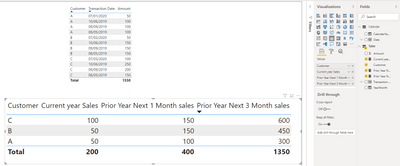
Best Regards
Allan
If this post helps, then please consider Accept it as the solution to help the other members find it more quickly.
- Mark as New
- Bookmark
- Subscribe
- Mute
- Subscribe to RSS Feed
- Permalink
- Report Inappropriate Content
@v-alq-msft . Thanks for your message.
Not able to open the file that you sent. Please see the attached screenshot. I have installed multiple times but no luck.
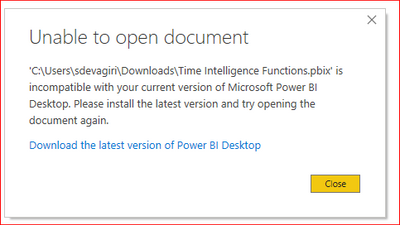
Thanks,
Sandeep
- Mark as New
- Bookmark
- Subscribe
- Mute
- Subscribe to RSS Feed
- Permalink
- Report Inappropriate Content
- Mark as New
- Bookmark
- Subscribe
- Mute
- Subscribe to RSS Feed
- Permalink
- Report Inappropriate Content
Thanks for your help on this.
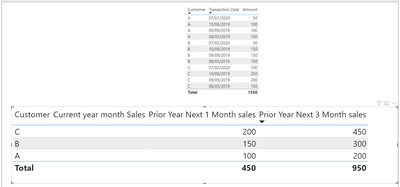
But the report is still showing null values in my PBI report.
Our data looks like below.
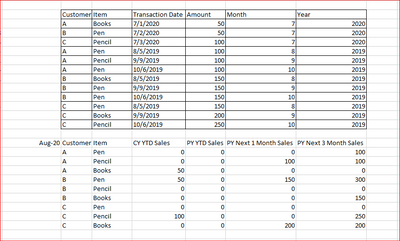
Your help and support is greatly appreciated.
Thanks,
Sandeep
- Mark as New
- Bookmark
- Subscribe
- Mute
- Subscribe to RSS Feed
- Permalink
- Report Inappropriate Content
Hi, @Anonymous
Power BI Desktop is updated and released on a monthly basis, incorporating customer feedback and new features. Only the most recent version of Power BI Desktop is supported; customers who contact support for Power BI Desktop will be asked to upgrade to the most recent version. You can get the most recent version of Power BI Desktop from the Windows Store.
Best Regards
Allan


- Mark as New
- Bookmark
- Subscribe
- Mute
- Subscribe to RSS Feed
- Permalink
- Report Inappropriate Content
@Anonymous , with time intelligence and date table
YTD Sales = CALCULATE(SUM(Sales[Sales Amount]),DATESYTD('Date'[Date],"12/31"))
Last YTD Sales = CALCULATE(SUM(Sales[Sales Amount]),DATESYTD(dateadd('Date'[Date],-1,Year),"12/31"))
MTD Sales = CALCULATE(SUM(Sales[Sales Amount]),DATESMTD('Date'[Date]))
last MTD Sales = CALCULATE(SUM(Sales[Sales Amount]),DATESMTD(dateadd('Date'[Date],-1,MONTH)))
last year MTD Sales = CALCULATE(SUM(Sales[Sales Amount]),DATESMTD(dateadd('Date'[Date],-12,MONTH)))
last year MTD Sales next month = CALCULATE(SUM(Sales[Sales Amount]),DATESMTD(dateadd('Date'[Date],-11,MONTH)))
last year MTD Sales next to next month = CALCULATE(SUM(Sales[Sales Amount]),DATESMTD(dateadd('Date'[Date],-10,MONTH)))
same way you can use rolling
Rolling 3 till last 12 month = CALCULATE(sum(Sales[Sales Amount]),DATESINPERIOD('Date'[Date],ENDOFMONTH(dateadd(Sales[Sales Date],-9,month)),-3,MONTH))
Rolling 3 till last month = CALCULATE(sum(Sales[Sales Amount]),DATESINPERIOD('Date'[Date],ENDOFMONTH(dateadd(Sales[Sales Date],-1,month)),-3,MONTH))
Rolling 3 till last 2 month = CALCULATE(sum(Sales[Sales Amount]),DATESINPERIOD('Date'[Date],ENDOFMONTH(dateadd(Sales[Sales Date],-2,month)),-3,MONTH))
Rolling 3 till last 1 month = CALCULATE(sum(Sales[Sales Amount]),DATESINPERIOD('Date'[Date],ENDOFMONTH(dateadd(Sales[Sales Date],-1,month)),-3,MONTH))
Rolling 3 till last 3 month = CALCULATE(sum(Sales[Sales Amount]),DATESINPERIOD('Date'[Date],ENDOFMONTH(dateadd(Sales[Sales Date],-3,month)),-3,MONTH))
To get the best of the time intelligence function. Make sure you have a date calendar and it has been marked as the date in model view. Also, join it with the date column of your fact/s. Refer :
https://radacad.com/creating-calendar-table-in-power-bi-using-dax-functions
https://www.archerpoint.com/blog/Posts/creating-date-table-power-bi
https://www.sqlbi.com/articles/creating-a-simple-date-table-in-dax/
See if my webinar on Time Intelligence can help: https://community.powerbi.com/t5/Webinars-and-Video-Gallery/PowerBI-Time-Intelligence-Calendar-WTD-Y...
Power BI — YTD Questions — Time Intelligence 1–5
https://medium.com/@amitchandak.1978/power-bi-ytd-questions-time-intelligence-1-5-e3174b39f38a
Power BI — QTD Questions — Time Intelligence 2–5
https://medium.com/@amitchandak.1978/power-bi-qtd-questions-time-intelligence-2-5-d842063da839
Power BI — MTD Questions — Time Intelligence 3–5
https://medium.com/@amitchandak.1978/power-bi-mtd-questions-time-intelligence-3-5-64b0b4a4090e
Appreciate your Kudos.

- Mark as New
- Bookmark
- Subscribe
- Mute
- Subscribe to RSS Feed
- Permalink
- Report Inappropriate Content
HI @Anonymous ,
Can you share some sample data please?
https://community.powerbi.com/t5/Community-Blog/How-to-Get-Your-Question-Answered-Quickly/ba-p/38490
Thanks,
Pragati
- Mark as New
- Bookmark
- Subscribe
- Mute
- Subscribe to RSS Feed
- Permalink
- Report Inappropriate Content
Hi Pragathi,
Thanks for your reply.
our issue is similar to the below post.
I have followed this post https://community.powerbi.com/t5/Desktop/Current-Month-Previous-Month-and-Before-Previous-Month/td-p... and ended up creating the Measures but column is showing blank data.
Thanks,
Sandeep
- Mark as New
- Bookmark
- Subscribe
- Mute
- Subscribe to RSS Feed
- Permalink
- Report Inappropriate Content
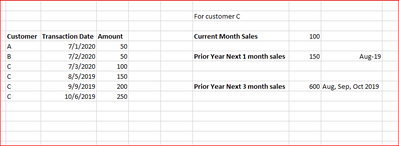
Helpful resources

FabCon & SQLCon – Barcelona 2026
Join us in Barcelona for FabCon and SQLCon, the Fabric, Power BI, SQL, and AI community event. Save €200 with code FABCMTY200.

Fabric Community Sticker Challenge - Barcelona 2026
If you love stickers, then you will definitely want to check out our community sticker challenge, Barcelona edition!

Power BI Monthly Update - July 2026
Check out the July 2026 Power BI update to learn about new features.

Power BI DataViz World Championships - June 2026
A new Power BI DataViz World Championship is coming this June! Don't miss out on submitting your entry.

| User | Count |
|---|---|
| 30 | |
| 28 | |
| 23 | |
| 21 | |
| 19 |


| User | Count |
|---|---|
| 44 | |
| 31 | |
| 18 | |
| 18 | |
| 16 |


