cancel
Showing results for 
Search instead for 
Did you mean: 

Did you hear? There's a new SQL AI Developer certification (DP-800). Start preparing now and be one of the first to get certified. Register now

Reply
Anonymous
Not applicable

Time Intelligence - Auto date/time error (ShowAsVariationOnly, LocalDateTable)

Sequence of events...


1. I tried to delete a erreneous relationship between two tables, but was unsuccesful.

2. I figured it has something to do with Auto date/time option in Time Intelligence. So disabled it.

3. I was able to delete the relationship.

4. But all my date/time columns displayed as error.

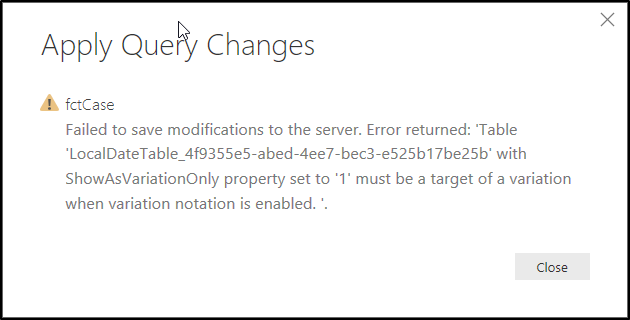
5. Tried to enable Auto date/time option again, but getting the error as below.

6. Now my report is now completely broken. PLEASE HELP!


Auto date/time error

3 REPLIES 3
v-caliao-msft
Microsoft Employee
Microsoft Employee

Hi @Anonymous,


Could you please provide us more information about your report, so that we can make further analysis.


Regards,

Charlie Liao

Anonymous
Not applicable

Hi Charlie


I'm currently expeienceing the same error. It happened when I made extensive changes to date fields in Power Query and then attempted a refresh.


Model summary:

Big model model with 49 autogenerated hidden dimDates. I can't see anything funky about this particular date table.  According to  $SYSTEM.TMSCHEMA_TABLES, all of the date tables appear identical in structure.  Deleteing the table prevents the bug (obviously) and allows me to refresh.


Solution to anyone reading this:

  1. Make a backup of your Power BI file
  2. Navigate to Options -> Data Load -> Untick "Auto Date/Time".
  3. Refresh all data
  4. Navigate to Options -> Data Load -> tick "Auto Date/Time".
  5. Refresh all data

Error output:

2017-02-24 11_01_15-.png


Thanks,

Simon

Anonymous
Not applicable

@v-caliao-msft - let me know what information you need.


By the way, the issue fixed it self when I had to recover the pbix file after a computer restart! Thanks for that feature! 🙂

Helpful resources

Announcements
April Power BI Update Carousel

Power BI Monthly Update - April 2026

Check out the April 2026 Power BI update to learn about new features.

Fabric SQL PBI Data Days

Data Days 2026 coming soon!

Sign up to receive a private message when registration opens and key events begin.

New to Fabric survey Carousel

New to Fabric Survey

If you have recently started exploring Fabric, we'd love to hear how it's going. Your feedback can help with product improvements.

Power BI DataViz World Championships carousel

Power BI DataViz World Championships - June 2026

A new Power BI DataViz World Championship is coming this June! Don't miss out on submitting your entry.