Fabric Data Days starts November 4th!
Advance your Data & AI career with 50 days of live learning, dataviz contests, hands-on challenges, study groups & certifications and more!
Get registered- Power BI forums
- Get Help with Power BI
- Desktop
- Service
- Report Server
- Power Query
- Mobile Apps
- Developer
- DAX Commands and Tips
- Custom Visuals Development Discussion
- Health and Life Sciences
- Power BI Spanish forums
- Translated Spanish Desktop
- Training and Consulting
- Instructor Led Training
- Dashboard in a Day for Women, by Women
- Galleries
- Data Stories Gallery
- Themes Gallery
- Contests Gallery
- QuickViz Gallery
- Quick Measures Gallery
- Visual Calculations Gallery
- Notebook Gallery
- Translytical Task Flow Gallery
- TMDL Gallery
- R Script Showcase
- Webinars and Video Gallery
- Ideas
- Custom Visuals Ideas (read-only)
- Issues
- Issues
- Events
- Upcoming Events
Get Fabric Certified for FREE during Fabric Data Days. Don't miss your chance! Request now
- Power BI forums
- Forums
- Get Help with Power BI
- Desktop
- Re: Time/Date Problem when publishing to Power BI ...
- Subscribe to RSS Feed
- Mark Topic as New
- Mark Topic as Read
- Float this Topic for Current User
- Bookmark
- Subscribe
- Printer Friendly Page


- Mark as New
- Bookmark
- Subscribe
- Mute
- Subscribe to RSS Feed
- Permalink
- Report Inappropriate Content
Time/Date Problem when publishing to Power BI Service
Hi,
I've got a problem with my Date/Time when publishing to PBI Service
This dataset I've got is used to show the completions in the business. I have a Completion Date and I converted it from Date/Time to a Date column. The reason I convert it is because it makes it possible to create a relationship between the Completion Date and the Date from the Date table

The image on the left is the date when converted, and the image on the right is what it looks like not converted. The 2 values at the bottom are what I'm struggling with. All of the date on the left are correct and I'm happy with, the dates on the right are where I think the issue is. As you can see, it's showing the bottom two as being in August rather than September
I think this is happening in the Power BI Service, as them two records aren't showing up in September like the column says, but it shows them in August
Has anyone experienced this? I need any help
Cheers,
Mike
- Mark as New
- Bookmark
- Subscribe
- Mute
- Subscribe to RSS Feed
- Permalink
- Report Inappropriate Content
Right, I've cracked it with a help from you two!
You both helped in identifying the issue in terms of the times changing when publishing, so I did research on how to change the time
I used this article: https://natechamberlain.com/2019/08/02/add-or-subtract-hours-from-date-time-values-in-power-bi-using...
=[Completion Date] + #duration(0, 1, 0, 0)
I used that formula in the Custom Column section in the Query Editor. I felt that the difference in time wasn't significant so I just change the time so instead of 11pm, it showed 10pm and that gave me the desired result.
The hard thing to understand was that the Desktop version is always going to be wrong because time time/dates change but when I publish it to the service is when the figures become identical to Dynamics 365


- Mark as New
- Bookmark
- Subscribe
- Mute
- Subscribe to RSS Feed
- Permalink
- Report Inappropriate Content
hi @michael_knight - Glad you got this worked out; I also enquired and there are some reports we have built for one of our customers which is using data from Dynamics 365 but we are not seeing this issue.
I think you should still open a ticket with Microsoft to look into this. 🙂
Also curious to know - did you try the calculated column approach - did that work as expected?
Proud to be a Super User!
- Mark as New
- Bookmark
- Subscribe
- Mute
- Subscribe to RSS Feed
- Permalink
- Report Inappropriate Content
Well this is the really the only time I've seen this issue. Most of the date data we use in Dynamics 365 has Time and Date, but for this instance it's only a date so maybe that's where the issue lies. I'll contact Microsoft anyway and see if it's an issue
I didn't get to trying the calculated column appoach, that was going to be the 2nd thing I tried today but thank god the first thing worked!
Thank for very much for your help, it was much appreicated!
- Mark as New
- Bookmark
- Subscribe
- Mute
- Subscribe to RSS Feed
- Permalink
- Report Inappropriate Content
@michael_knight - Great! happy to help!
Proud to be a Super User!


- Mark as New
- Bookmark
- Subscribe
- Mute
- Subscribe to RSS Feed
- Permalink
- Report Inappropriate Content
A few questions:
Do these same inconsistencies show up in the Power BI Desktop file (prior to publishing to the service) - or only after connecting to the dataset after it has been published?
What means (formula, etc) did you use to strip away the time and keep the date?
If you have access to the Power BI Desktop file where the conversion was done - this is where I would start - specifically at the step where the time was removed and date was kept.
- Mark as New
- Bookmark
- Subscribe
- Mute
- Subscribe to RSS Feed
- Permalink
- Report Inappropriate Content
Hi @swise001
The screenshot I posted is from Power BI Desktop, and it works fine in that and I'm very happy with the numbers. Once I upload it to the Power BI service, it -1 day for every single record
I don't use a formula, I change the datatype with the drop down option in Desktop
I use the USERELATIONSHIP function in order to connect the completion date to the date table
- Mark as New
- Bookmark
- Subscribe
- Mute
- Subscribe to RSS Feed
- Permalink
- Report Inappropriate Content
Is this repeatable with all dates?
For example - if you create a second table containing dates - and publish it to the service - does the same -1 occur?
This would be my next steps - try to isolate if the issue is only related to that single column's date structure - or if it is reproducible with other dates.
Is there anyway for you to share a snippet of the Power BI desktop file with that date column in place?
- Mark as New
- Bookmark
- Subscribe
- Mute
- Subscribe to RSS Feed
- Permalink
- Report Inappropriate Content
hi @michael_knight, can you confirm if you are using PRO license or a Premium license?
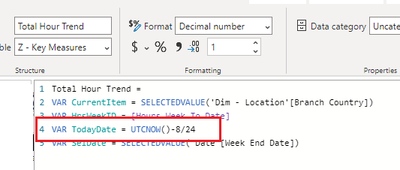
Also are you using any TODAY() or NOW() in DAX?
I have experienced that these above functions will return the Power BI service server time when used - and this causes issues in reports. I had to implement some logic to calculate back to US timezone to ensure my report logic works as expected.
Please mark the post as a solution and provide a 👍 if my comment helped with solving your issue. Thanks!
Proud to be a Super User!
- Mark as New
- Bookmark
- Subscribe
- Mute
- Subscribe to RSS Feed
- Permalink
- Report Inappropriate Content
- Mark as New
- Bookmark
- Subscribe
- Mute
- Subscribe to RSS Feed
- Permalink
- Report Inappropriate Content
hi @michael_knight - I have used that formula in a while I was creating a DAX measures for one my report KPIs.
Please mark the post as a solution and provide a 👍 if my comment helped with solving your issue. Thanks!
Proud to be a Super User!
- Mark as New
- Bookmark
- Subscribe
- Mute
- Subscribe to RSS Feed
- Permalink
- Report Inappropriate Content
Can you post a PBIX file with it included? I'm interested to see how it works @Sumanth_23
I tried creating another column which +1 days and that worked until it hit December when it stopped -1 to all of my dates. Really puzzling
- Mark as New
- Bookmark
- Subscribe
- Mute
- Subscribe to RSS Feed
- Permalink
- Report Inappropriate Content
hi @michael_knight - thee report has some customer data - I shall mock up something and share it with you shortly. Thanks!
Proud to be a Super User!
- Mark as New
- Bookmark
- Subscribe
- Mute
- Subscribe to RSS Feed
- Permalink
- Report Inappropriate Content
Are you creating your date columns using DAX or are you pulling those values directly from a datasource?
Power BI Desktop will always refer to your local datetime when you use formulas like NOW() because it has reference to your local time. However, when you publish to the service - these formulas shift to UTC time - and must be corrected by adding or subtracting time (as @Sumanth_23 showed).
You can easily test this by publishing a Power BI desktop file to the cloud with variations of the Now() and UTCNow() formulas.
Here are the formulas in the Power BI Desktop file - but as a measure and as calculated columns on a table.
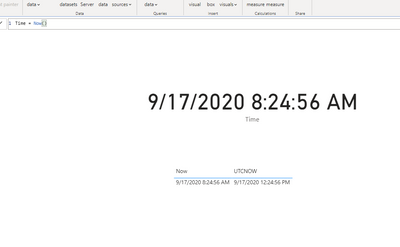
When its published to the service - the DAX measure changes to UTC immediately - but the calculated columns remain the same as they appeared in PBI Desktop (since they are imported values).

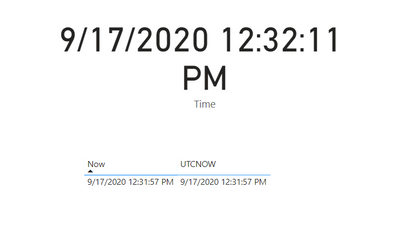
However - as soon as the model is refreshed in the service - everything now adjusts to UTC (including the calculated columns)
- Mark as New
- Bookmark
- Subscribe
- Mute
- Subscribe to RSS Feed
- Permalink
- Report Inappropriate Content
Hi @swise001 and @Sumanth_23 ,
I import the data from Dynamics 365 and include the date table that I use for all my reports. I change the Data types with the dates in from Date/Time/Timezone to Date. The reason for this is because the Data Types for the date in the Data table and the Date table need to be the same if I want to create a relationship between the two
After I've done that, I create the formula, and Include the USERELATIONSHIP function in order for the Dates in the Data table to use the Dates in the Date Table in a visual
I just made a sample dataset of what I'm working with, with a link to what it looks like published. I also duplicated the Date columns I'm working with so you can see what it looks like before and after I make the changes. As you can see the figures are different in both the PBIX file and the Published version. The figured in the PBIX file are what I want.
https://www.dropbox.com/s/7h70duzrrnb2ksf/comp%20test.pbix?dl=0
Cheers,
Mike
- Mark as New
- Bookmark
- Subscribe
- Mute
- Subscribe to RSS Feed
- Permalink
- Report Inappropriate Content
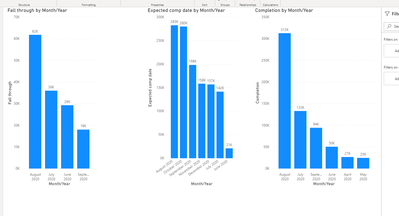
When I publish your PBIX file to my PBI instance - the numbers in the desktop version and the number in the service - are the same:
Desktop
Service
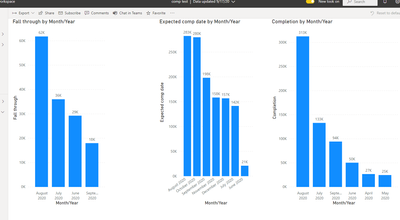
I can't duplicate the changes that take place in your shared version of the published report.
Are you saying that when you go through this exact same process - and publish this report - the values showing in the service are changing?
Could this be related to regional settings in the file - and how that is handled as it moves into the Cloud. I don't have a direct answer - but wanted to share my findings.
- Mark as New
- Bookmark
- Subscribe
- Mute
- Subscribe to RSS Feed
- Permalink
- Report Inappropriate Content
I think the issue there is that the data isn't being refreshed. I publish the data, then it refreshes and then the dates change
I've checked the region settings on the Desktop version and it's in set to UK. I can only see the option to change the region in the schedule refresh section, and I set that to UK too
- Mark as New
- Bookmark
- Subscribe
- Mute
- Subscribe to RSS Feed
- Permalink
- Report Inappropriate Content
Since the file is still connected to your Dynamic 365 - I can't refresh it or update the queries.
Back to your original question - when you copied the date/time columns in your query - you said that in that moment - the columns changed to a different date?
In the sample you shared - those dates are already different - even before the file is published. I can't really change that - but this is where I want to zero in on.
These dates should be the same - especially in Power BI Desktop.
Unfortunately - I can't toggle with your original query because of the Dynamic connection - and when I make a copy of it - I am not able to 'replicate' this date change - that happens.

- Mark as New
- Bookmark
- Subscribe
- Mute
- Subscribe to RSS Feed
- Permalink
- Report Inappropriate Content
Yeah, that's annoying that you're unable to connect
Incorrect. I have a date column for Completion, Expected Completion and Fall Through. All three of them have the Date/Time/Timezone. I copied it in the rawest format for comparison purposes to help yourself and others.
Normally I change the data type from Date/Time/Timezone to just a date Date Type, which is what I did so I can present the problem
I noticed that about the dates being different, I found it odd. Is there any automatic function within PBI that rounds dates?
- Mark as New
- Bookmark
- Subscribe
- Mute
- Subscribe to RSS Feed
- Permalink
- Report Inappropriate Content
Yeah I believe that Date/Time/TimeZone data type is where the issue is being introduced.
I think you'll need to switch those columns to your current timezone using
https://docs.microsoft.com/en-us/powerquery-m/datetimezone-switchzone
Found this article about it as well.
https://www.poweredsolutions.co/2019/10/21/handling-different-time-zones-in-power-bi-power-query/
Since the times are 11:00PM (23:00) - if the service kicks the timezone part of the columns 1 hour forward - it will change the day. I believe that's what is happening.
Try using the timezone switch formula in power query as part of your column copy step. That may what is needed.
- Mark as New
- Bookmark
- Subscribe
- Mute
- Subscribe to RSS Feed
- Permalink
- Report Inappropriate Content
hi @michael_knight - Also may be you can try to move the formatting of the date into calculated columns in the Power BI data model. You would need to test it with the refresh and see the behavior but this seems to calculate as expected as seen in the below screen shot.
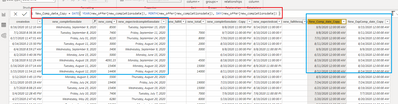
Else the option mentioned by @swise001 would be the best way forward.
Proud to be a Super User!

Helpful resources

Fabric Data Days
Advance your Data & AI career with 50 days of live learning, contests, hands-on challenges, study groups & certifications and more!

Power BI Monthly Update - October 2025
Check out the October 2025 Power BI update to learn about new features.

FabCon Atlanta 2026
Join us at FabCon Atlanta, March 16-20, for the ultimate Fabric, Power BI, AI and SQL community-led event. Save $200 with code FABCOMM.


