cancel
Showing results for 
Search instead for 
Did you mean: 

Get Fabric Certified for FREE during Fabric Data Days. Don't miss your chance! Request now

Reply
Anonymous
Not applicable

Template with graphs and Power Query that i can use for a new file every month

Hello Power BI enthusiasts, 


I am very new to PowerBI, I have just been assigned a task:


Every month we get a new dataset as a .txt file, which is put in a folder. 

The file name changes each month: 

(Example)

TCategory_01_2022_PROD.txt 

to

TCategory_02_2022_PROD.txt

(Example finished)

This .txt file then has to be made into a report in PowerBI. Currently this is done manually where we create a new PowerBI report, make all the graphs and input the Power Queries manually. 

I can't by the thread seem to figure out how i can make a template that includes both all my graphs and the Power Query.

If possible, can someone make a step-by-step solution to this problem.

As mentioned Power BI is very new to me so i only know the very basics.

I could see that there is a post called "How to create a template with a different data source every time?", but sadly I couldn't figure out how to do it through that thread.


Best regards,

Mads

1 ACCEPTED SOLUTION
v-easonf-msft
Community Support
Community Support

Hi, @Anonymous 
Pleae try follow steps to create data source parameters.

1. Connect to your .txt file 

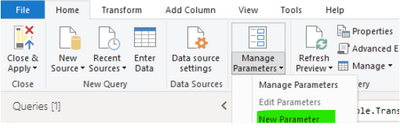
2. Go to 'Tansform Data' and new a parameter in 'Manage parameters

veasonfmsft_3-1653299565226.png

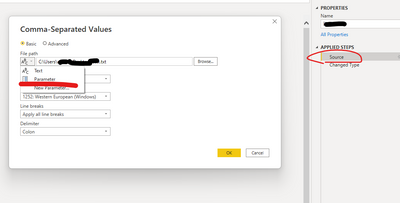
3. Then you can use new parameter to replace your original datasource URL in the first step of 'Applied Steps'.

veasonfmsft_2-1653299462400.png

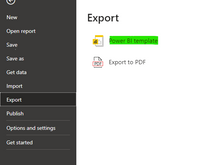
4.Close&Apply and you can export PowerBI template

veasonfmsft_4-1653299746039.png

For more details, please refer to this tutorial.

Easily add query parameters to your source paths in Power Query 


Best Regards,
Community Support Team _ Eason

View solution in original post

2 REPLIES 2
v-easonf-msft
Community Support
Community Support

Hi, @Anonymous 
Pleae try follow steps to create data source parameters.

1. Connect to your .txt file 

2. Go to 'Tansform Data' and new a parameter in 'Manage parameters

veasonfmsft_3-1653299565226.png

3. Then you can use new parameter to replace your original datasource URL in the first step of 'Applied Steps'.

veasonfmsft_2-1653299462400.png

4.Close&Apply and you can export PowerBI template

veasonfmsft_4-1653299746039.png

For more details, please refer to this tutorial.

Easily add query parameters to your source paths in Power Query 


Best Regards,
Community Support Team _ Eason

Anonymous
Not applicable

Thank you so much 🙂 Works perfectly 

Helpful resources

Announcements
November Power BI Update Carousel

Power BI Monthly Update - November 2025

Check out the November 2025 Power BI update to learn about new features.

Fabric Data Days Carousel

Fabric Data Days

Advance your Data & AI career with 50 days of live learning, contests, hands-on challenges, study groups & certifications and more!

FabCon Atlanta 2026 carousel

FabCon Atlanta 2026

Join us at FabCon Atlanta, March 16-20, for the ultimate Fabric, Power BI, AI and SQL community-led event. Save $200 with code FABCOMM.

Top Solution Authors
Top Kudoed Authors