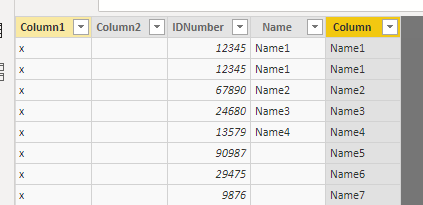
Hello, I've been trying to wrap my head around a problem I have been having for the past few hours. Right now I have two tables. Both tables have an ID Number and an associated name. However, Table1, which is being pulled from a database, has a number of rows in which there is an ID Number but no associated Name. As Table1 is being pulled from a database it has multiple instances of the IDNumber and Name happening as it is keeping track of the instances hapening on the system.
Table2, being pulled from an excel sheet, has distinct rows in which the blank Names from Table1 do have their corresponding IDNumbers.
I am trying to figure out if there is a way to "insert" the Names from Table2 into the Name column on Table1 if the IDNumber in both tables are a match.
Thinking about it from a PseduoCode pespective this is what my thought process is. I did try to get this to work in DAX but couldn;t figure that out properly.
IF (Table1[IDNumber] == Table2[IDNumber] && Table[Name] ISBlank)
{
Table2[Name] = Table1[Name]
}
Any help or direction would be greatly appreciated. Thanks.
I will not be able to share the PBIX file or provide screenshots of the actual data for privacy reasons
Table1
Column1 | Column2 | IDNumber | Name | Column3 |
| | 12345 | Name1 | |
| | 12345 | Name1 | |
| | 67890 | Name2 | |
| | 24680 | Name3 | |
| | 13579 | Name4 | |
| | 90987 | | |
| | 29475 | | |
| | 09876 | | |
Table2
Column1 | Column2 | IDNumber | Name |
| | 90987 | Name5 |
| | 29475 | Name6 |
| | 09876 | Name7 |