cancel
Showing results for 
Search instead for 
Did you mean: 

Learn from the best! Meet the four finalists headed to the FINALS of the Power BI Dataviz World Championships! Register now

Reply
Dellis81
Post Prodigy
Post Prodigy

Tabular Editor

Hello - I have slowly been trying to learn and better utilize Tabular Editor.  I see so much potential 🙂

As I have been trying to clean and reorganize my data models - wanting to shift measures from one table to another.   I have been able to make that work within Tabular Editor - kinda.   First, seems I can only move one block at a time, must save, exit, and then start again.  I get the little circle with crossX's if I try to do more than one block at a time.


Now I am finding - the visual measure well - has invalid measures, of which are those that I have moved.   I suspect the first few measures I moved had no issues inside the visual well - but don't know that for certain.


Am I missing something in how I am doing this.   Anybody else experience this -and have a thought on what I may be doing wrong.


I have also created display folders for a slug of measures - those seem to be fine.


thanks!

1 ACCEPTED SOLUTION
v-deddai1-msft
Community Support
Community Support

Hi @Dellis81 ,


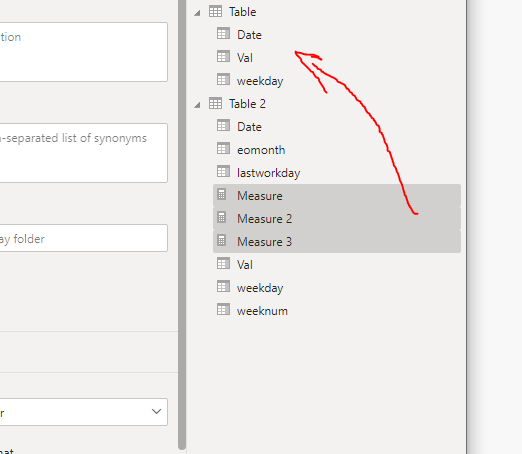
It seems that you want to move multiple measures to another table at a time.  You can switch to “Model View  and  drag measure in the “Fields Pane” from the current table to the desired table.


With this dragging technique, you can select multiple measures at the same time by pressing down the Ctrl Key. Then drag once to the desired table


Capture1.PNG


If this post helps, then please consider Accept it as the solution to help the other members find it more quickly.


Best Regards,

Dedmon Dai

View solution in original post

2 REPLIES 2
v-deddai1-msft
Community Support
Community Support

Hi @Dellis81 ,


It seems that you want to move multiple measures to another table at a time.  You can switch to “Model View  and  drag measure in the “Fields Pane” from the current table to the desired table.


With this dragging technique, you can select multiple measures at the same time by pressing down the Ctrl Key. Then drag once to the desired table


Capture1.PNG


If this post helps, then please consider Accept it as the solution to help the other members find it more quickly.


Best Regards,

Dedmon Dai

Thank you for your response - took me awhile to understand the model aspect, but once I found it - perfect.


But back to tabular editor - I think there is an issue when a measure that is used in a visual is moved to another table - the moved measure results in an invalid field back in the visual data well.


One other thing - I am getting alot of forum responses back in a translated spanish.  Is there a way to lock in my forum language as english.


Thank you!

Helpful resources

Announcements
Join our Fabric User Panel

Join our Fabric User Panel

Share feedback directly with Fabric product managers, participate in targeted research studies and influence the Fabric roadmap.

February Power BI Update Carousel

Power BI Monthly Update - February 2026

Check out the February 2026 Power BI update to learn about new features.

FabCon Atlanta 2026 carousel

FabCon Atlanta 2026

Join us at FabCon Atlanta, March 16-20, for the ultimate Fabric, Power BI, AI and SQL community-led event. Save $200 with code FABCOMM.