cancel
Showing results for 
Search instead for 
Did you mean: 

Data Days is here! Join us now for 60+ days of learning, challenges, and connection. Learn more

Reply
nicktayl
Helper I
Helper I

TableSorter Custom Power BI Visual - Color

Hi,


Why isn't there a setting under formatting to change the color of the bars? I can't use this visual if it doesn't fit my company's color theme. Do I have to edit the code of the custom visual myself to harcode the color?


Thanks,

Nick

1 ACCEPTED SOLUTION
MFelix
Super User
Super User

Hi @nicktayl,


I don't know if you are using all of the capabilities of the TableSorter but with the PBI version of June the Table preview added an option to add bars to the values in the columns so you can simulate the Table sorter visual see below what I have done.


In order to make it as interactive as the table sorter I have made a Slicer to change the Ranking based on the column I choose in the slicer that in an automated way reorders my table see image below and reference to this site. Any question please tell me.


In the image you can see the visuals are similar but I have selected the colours and also the max/min amount where my bars would star/end making them as close to the real data as possible (margin% is set to 100%) I wanted for each column the table is the same for you to see the ranking working.
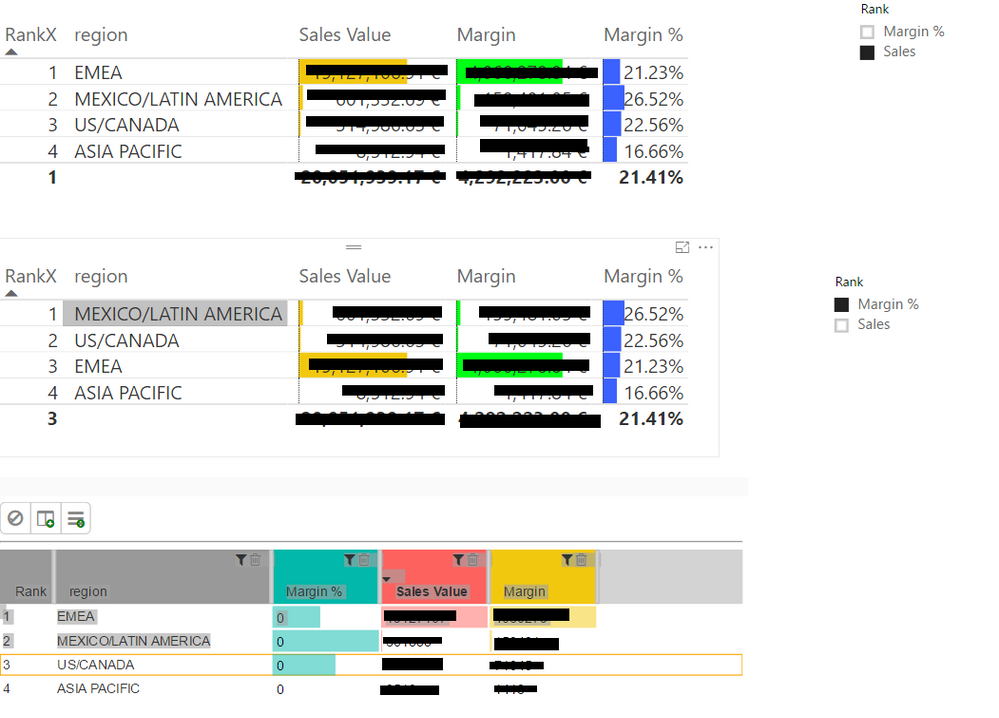
 

TableSorter.png


Regards,

MFelix

Regards,

MFelix


Regards

Miguel Félix


Did I answer your question? Mark my post as a solution!

Proud to be a Super User!

Check out my blog: Power BI em Português



View solution in original post

2 REPLIES 2
MFelix
Super User
Super User

Hi @nicktayl,


I don't know if you are using all of the capabilities of the TableSorter but with the PBI version of June the Table preview added an option to add bars to the values in the columns so you can simulate the Table sorter visual see below what I have done.


In order to make it as interactive as the table sorter I have made a Slicer to change the Ranking based on the column I choose in the slicer that in an automated way reorders my table see image below and reference to this site. Any question please tell me.


In the image you can see the visuals are similar but I have selected the colours and also the max/min amount where my bars would star/end making them as close to the real data as possible (margin% is set to 100%) I wanted for each column the table is the same for you to see the ranking working.


TableSorter.png


Regards,

MFelix

Regards,

MFelix


Regards

Miguel Félix


Did I answer your question? Mark my post as a solution!

Proud to be a Super User!

Check out my blog: Power BI em Português


Anonymous
Not applicable

I think he is asking to change color of bars in table sorter 

I am facing the same issue i want my Dashboard to look in 2 or 3 color max

Helpful resources

Announcements
Fabric Data Days is here Carousel

Fabric Data Days 2026

Don't miss out on Data Days, June 15 through August 7. Learn Fabric, Power BI, SQL, AI and more.

May Power BI Update Carousel

Power BI Monthly Update - May 2026

Check out the May 2026 Power BI update to learn about new features.

Power BI DataViz World Championships carousel

Power BI DataViz World Championships - June 2026

A new Power BI DataViz World Championship is coming this June! Don't miss out on submitting your entry.